Main Content

Guidance Model

Reduced-order model for UAV

  • UAV Guidance Model block

Libraries:
UAV Toolbox / Algorithms

Description

The Guidance Model block simulates a UAV by using a reduced-order fixed-wing [1] or multirotor [2] kinematic model and autopilot controller.

Examples

expand all

Open the reducedOrderUAVModel.slx Simulink® model. The model uses the Guidance Model block to simulate a UAV with a reduced order fixed-wing kinematic models, and a UAV Animation block to visualize the result.

open_system("reducedOrderUAVModel")
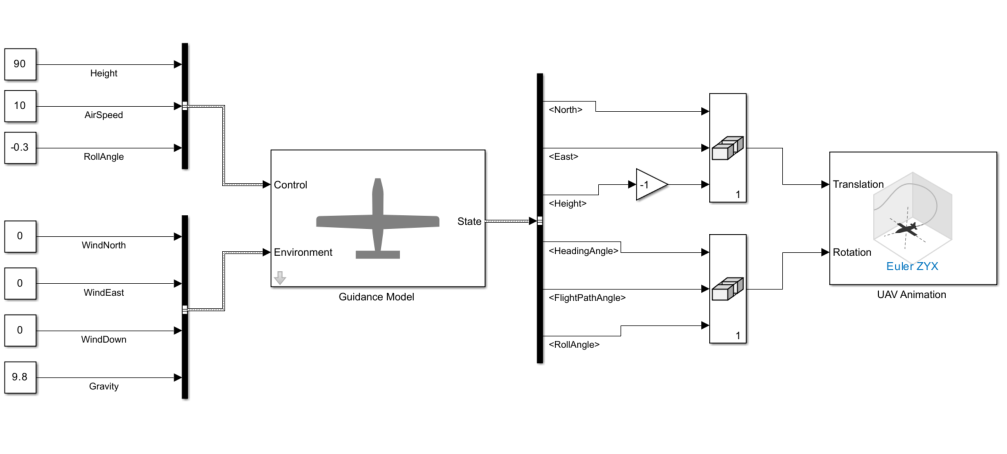
reducedOrderUAVModel Simulink model

Initial Condition of UAV

This model simulates the flight of a UAV with an initial height of 80 meters. The initial condition is specified in the Initial State parameter of the Guidance Model block.
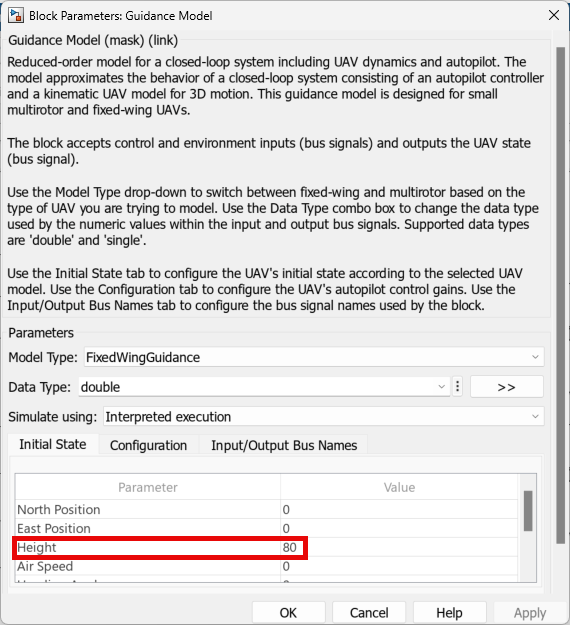
Guidance Model block mask with the initial height parameters highlighted

Configuration of UAV

The UAV is configured with a proportional gain of the height controller of 1, and a proportional gain of the flight path angle controller of 1. This configuration is specified in the Configuration parameter of the Guidance Model block.
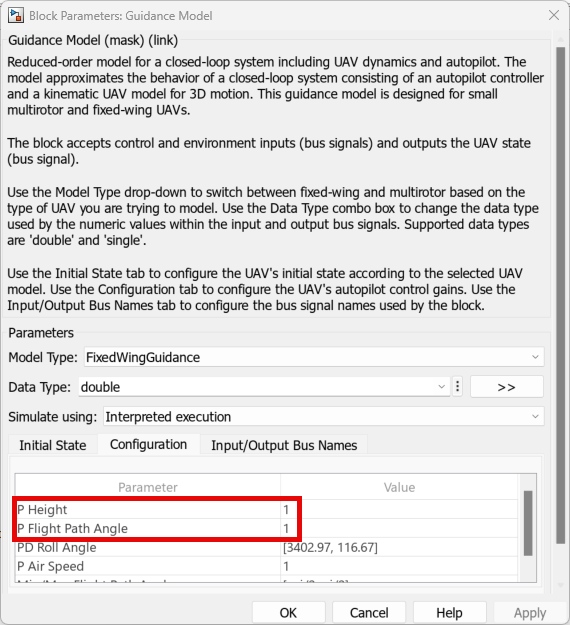
Guidance Model block mask with the P Height and P Flight Path Angle parameters highlighted.

Control Input

This model uses the Bus Creator block to create the control input bus. The bus name is specified in accordance with the Control Bus Name parameter of the Guidance Model block.
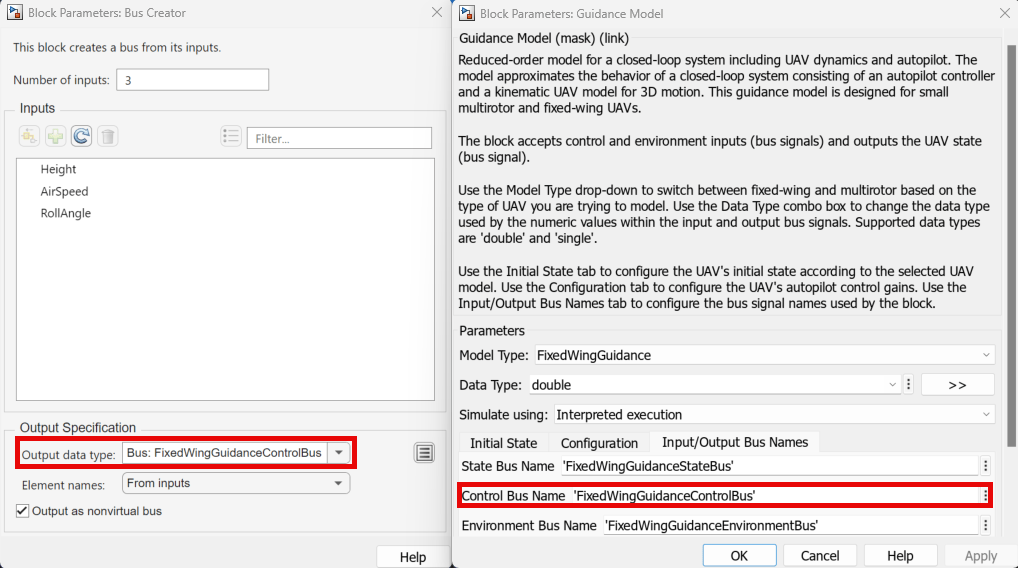
Bus Creator and Guidance Model block masks, with the Output data type and Control Bus Name parameters highlighted, respectively.

The bus contains these elements:

  • Height — Sets the UAV to have a height of 90 meters.

  • AirSpeed — Sets the UAV to have an air speed of 10 m/s.

  • RollAngle — Sets the UAV to have a roll angle of -0.3 radians.
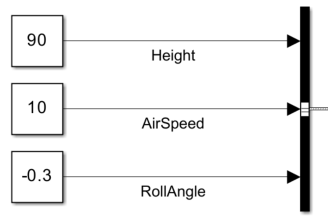
Control input bus, with Height, AirSpeed, and RollAngle inputs.

Environment Input

This model uses the Bus Creator block to create the environment input bus. The bus name is specified in accordance with the Environment Bus Name parameter of the Guidance Model block.
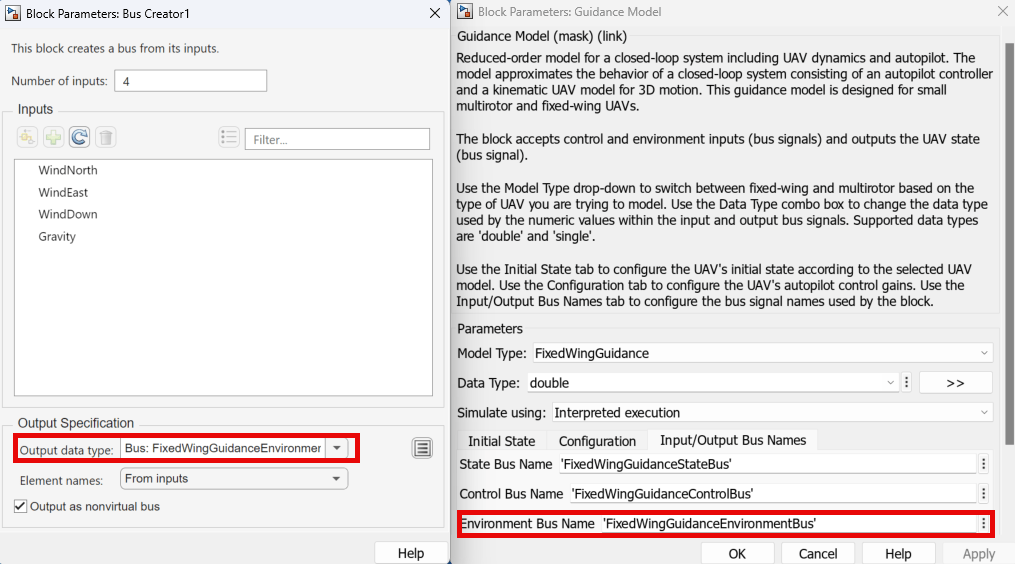
Bus Creator and Guidance Model block masks, with the Output data type and Environment Bus Name parameters highlighted, respectively.

The bus contains the following elements:

  • WindNorth — Sets the UAV to have north wind velocity of 0 m/s.

  • WindEast — Sets the UAV to have east wind velocity of 0 m/s.

  • WindDown — Sets the UAV to have down wind velocity of 0 m/s.

  • Gravity — Sets the UAV to have a gravitational acceleration of 9.8 m/s2.
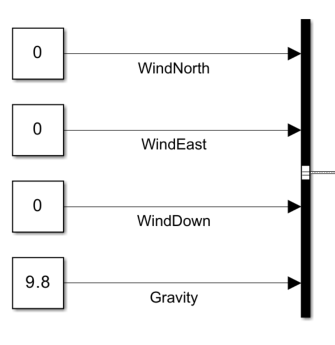
Environment input bus, with WindNorth, WindEast, WindDown, and Gravity inputs.

Visualizing State Output

Before visualizing the state output, the model performs these operations on the elements of the bus output by the Guidance Model block.

  • Multiplies the <Height> signal by a gain of –1 to match the z-axis direction of the UAV Animation block. The model then combine the height signal with <North> and <East> signals into a matrix. The model connects the matrix to the Translation port of the UAV Animation block.

  • Combines the <HeadingAngle>, <FlightPathAngle>, and <RollAngle> signals into a matrix. The model connects the matrix to the Rotation port of the UAV Animation block.
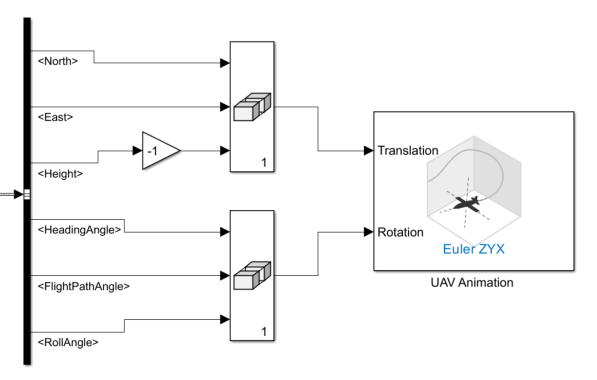
UAV Animation block connected to configured elements of the output bus of the Guidance Model block .

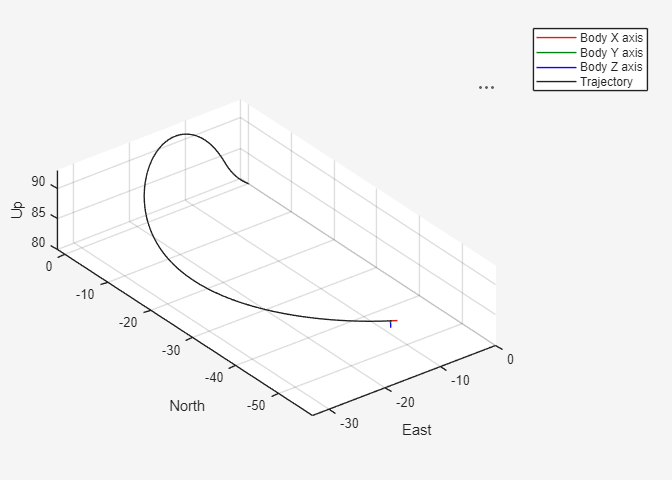
Run the Simulink model, and observe the simulation result from the UAV Animation window.
Ports

Input

expand all

Control input for UAV, specified as a bus. Specify each element of the bus as a scalar

If you set the Model Type property to MultirotorGuidance, you must specify a bus with these elements:

  • Roll — Roll angle of the UAV in radians.

  • Pitch — Pitch angle of the UAV in radians.

  • YawRate — Yaw rate of the UAV in radians per second.

  • Thrust — Vertical thrust of the UAV in Newtons.

If you set the Model Type property to FixedWingGuidance, you must specify a bus with these elements:

  • Height — Height of the UAV above the ground in meters.

  • AirSpeed — Airspeed of the UAV in meters per second.

  • RollAngle — Roll angle of the UAV in radians.

Specify the name of the control input bus by using the Control Bus Name property.

Environment inputs, specified as a bus. Specify each element of the bus as a scalar

If you set the Model Type property to MultirotorGuidance, you must specify a bus with Gravity element which contains the gravitational acceleration for the UAV in the z-axis direction of the inertial frame in meters per second squared.

If you set the Model Type property to FixedWingGuidance, you must specify a bus with these elements:

  • WindNorth — Wind velocity in the north direction of the UAV in meters per second.

  • WindEast — Wind velocity in the east direction of the UAV in meters per second.

  • WindDown — Wind velocity in the downward direction of the UAV in meters per second.

  • Gravity — Gravitational acceleration of the UAV in the z-axis direction of the inertial frame in meters per second squared.

Specify the name of the environment input bus by using the Environment Bus Name property.

Data Types: bus

Output

expand all

Simulated UAV state, returned as a bus.

If you set the Model Type property to MultirotorGuidance, the block returns the state output as an eight-element bus with these elements:

  • <WorldPosition> — 3-by-1 vector that contains the xyz-position of the UAV in meters. For more details on the coordinate system, see UAV Coordinate Systems.

  • <WorldVelocity> — 3-by-1 vector of that contains the xyz-velocity of the UAV in meters per second.

  • <EulerZYX> — 3-by-1 vector that contains the Euler angles of the UAV in z-,y-,x-axis (yaw-pitch-roll) rotation sequence.

  • <BodyAngularRateRPY> — 3-by-1 vector that contains the angular rates of the UAV with respect to the x-,y-, and z- axes (roll rate, pitch rate, and yaw rate, respectively) in radians per second.

  • <Thrust> — Scalar that contains the thrust of the UAV in newtons.

For more details on the multirotor guidance model equations that results in the multirotor states, see UAV Multirotor Guidance Model Equations.

If you set the Model Type property to FixedWingGuidance, the block returns the state output as a bus with eight elements, where each element is a scalar. The bus contains these elements:

  • <North> — Position in the north direction of the UAV in meters.

  • <East> — Position in the east direction of the each UAV in meters.

  • <Height> — Height above the ground of the each UAV in meters.

  • <AirSpeed> — Speed relative to the wind of the UAV in meters per second.

  • <HeadingAngle> — Angle between the ground velocity and north direction of the in radians.

  • <FlightPathAngle> — Angle between the ground velocity and north-east plane of the UAV in radians.

  • <RollAngle> — Angle of rotation along the body x-axis of the UAV in radians per second.

  • <RollAngleRate> — Angular velocity of rotation along the body x-axis of the UAV in radians per second.

For more details on the fixed-wing guidance model equations that results in the fixed-wing states, see UAV Fixed-Wing Guidance Model Equations.

Specify the name of the state output bus by using the State Bus Name property.

Data Types: bus

Parameters

expand all

UAV guidance model type. Select MultirotorGuidance to simulate a multirotor UAV or FixedWingGuidance to simulate a fixed wing UAV.

Specify the input and output numeric data types as double or single.

  • Code generation — Simulate model using generated C code. The first time you run a simulation, Simulink® generates C code for the block. The C code is reused for subsequent simulations, as long as the model does not change. This option requires additional startup time, but the speed of the subsequent simulations is comparable to Interpreted execution.

  • Interpreted execution — Simulate model using the MATLAB® interpreter. This option shortens startup time but has a slower simulation speed than Code generation. In this mode, you can debug the source code of the block.

Initial UAV state tab, specified as multiple table entries.

For a multirotor UAV, you must specify these initial states:

  • World Position — 3-by-1 vector that contains the initial xyz-position of the UAV in meters. The default value is [0;0;0].

  • World Velocity — 3-by-1 vector that contains the initial xyz-velocity of the UAV in meters per second. The default is [0;0;0].

  • Euler Angles (ZYX) — 3-by-1 vector that contains the initial Euler angles of the UAV in z-,y-,x-axis (yaw-pitch-roll) rotation sequence. The default value is [0;0;0].

  • Body Angular Rates — 3-by-1 vector that contains the initial angular rate of the UAV with respect to the x-,y-, and z-axes (roll rate, pitch rate, and yaw rate, respectively) in radians per second. The default value is [0;0;0].

  • Thrust — scalar that contains the initial thrust of a UAV in newtons. The default value for each UAV is 0.

For a fixed-wing UAV, you must specify these initial states as a scalar:

  • North Position — Initial position in the north direction of the UAV in meters. The default is 0.

  • East Position — Initial position in the east direction of the UAV in meters. The default value is 0.

  • Height — Initial height above the ground each of the UAV in meters. The default value is 0.

  • Air Speed — Initial speed relative to the wind of the UAV in meters per second. The default value is 0.

  • Heading Angle — Initial angle between the ground velocity and north direction of the UAV in radians. The default value is 0.

  • Flight Path Angle — Initial angle between the ground velocity and north-east plane of the UAV in radians. The default value is 0.

  • Roll Angle — Initial angle of rotation along the body x-axis of the UAV in radians. The default value is 0.

  • Roll Angle Rate — Initial angular velocity of rotation along the body x-axis of the UAV in radians per second. The default value is 0.

Tunable: No

UAV controller configuration tab, specified as multiple table entries.

For multirotor UAV, specify these parameters:

  • PD Roll — 1-by-2 vector that contains the proportional and derivative gains of the roll angle controller of the UAV. The default value is [3402.97 116.67].

  • PD Pitch — 1-by-2 vector that contains the proportional and derivative gains of the pitch angle controller of the UAV. The default value is [3402.97 116.67].

  • P YawRate — Scalar that contains the proportional gain of the yaw rate controller of the UAV. The default value is 1950.

  • P Thrust — Scalar that contains the proportional gain of the thrust controller of the UAV. The default value is 3900.

  • Mass — Scalar that contains the mass of the UAV in Kg. The default is 0.1.

For fixed-wing UAV, specify these parameters:

  • P Height — Scalar that contains the proportional gain of the height controller of the UAV. The default value is 3.9.

  • P Flight Path Angle — Scalar that contains the proportional gain of the flight path angle controller of the UAV. The default value is 39.

  • PD Roll — 1-by-2 vector that contains the proportional and derivative gains of the pitch angle controller of the UAV. The default value is [3402.97 116.67].

  • P Air Speed — Scalar that contains the proportional gain of the air speed controller of the UAV. The default value is 1.

  • Min/Max Flight Path Angle — 1-by-2 vector that contains the minimum and maximum flight path angle of the UAV in radians. The default value is [-pi/2 pi/2]

This tab contains the State Bus Name, Control Bus Name, and Environment Bus Name parameters, which specify the name of the output state bus, the input control bus, and the input environment bus, respectively. Each bus has a default name based on the UAV model and input type.

Model Type ParameterDefault State Bus NameDefault Control Bus NameDefault Environment Bus Name
FixedWingGuidanceFixedWingGuidanceStateBusFixedWingGuidanceControlBusFixedWingGuidanceEnvironmentBus
MultirotorGuidanceMultirotorGuidanceStateBusMultirotorGuidanceControlBusMultirotorGuidanceEnvironmentBus

To use multiple guidance models in the same Simulink model, specify bus names for each Guidance Model block that do not intersect with one another.

More About

expand all

References

[1] Randal W. Beard and Timothy W. McLain. "Chapter 9." Small Unmanned Aircraft Theory and Practice, NJ: Princeton University Press, 2012.

[2] Mellinger, Daniel, and Nathan Michael. "Trajectory Generation and Control for Precise Aggressive Maneuvers with Quadrotors." The International Journal of Robotics Research. 2012, pp. 664-74.

Extended Capabilities

expand all

C/C++ Code Generation
Generate C and C++ code using Simulink® Coder™.

Version History

Introduced in R2018b