templateECOC
R2026bError-correcting output codes learner template
Description
returns an error-correcting output
codes (ECOC) classification learner template.t = templateECOC
returns a template with additional options specified by one or more name-value
arguments. For example, you can specify a coding design, whether to fit posterior
probabilities, or the types of binary learners.t = templateECOC(Name=Value)
The display of t in the Command Window
shows all configurable options as empty ([]), except those that you specify
using name-value arguments. During training, the software uses the default values for empty
options.
Examples
Use templateECOC to create a default ECOC template.
t = templateECOC
t =
Fit template with properties:
Method: 'ECOC'
Type: 'classification'
Configurable Options:
Learners: ''
Coding: ''
FitPosterior: []
Verbose: []
All configurable options of the template object are empty. When you pass t to testckfold, the software fills in the empty options with their respective default values. For example, the software uses a Learners value of "svm". For details on other default values, see fitcecoc.
t is a plan for an ECOC learner. When you create it, no computation occurs. You can pass t to testckfold to specify a plan for an ECOC classification model to statistically compare with another model.
One way to select predictors or features is to train two models where one that uses a subset of the predictors that trained the other. Statistically compare the predictive performances of the models. If there is sufficient evidence that model trained on fewer predictors performs better than the model trained using more of the predictors, then you can proceed with a more efficient model.
Load Fisher's iris data set. Plot all 2-dimensional combinations of predictors.
load fisheriris d = size(meas,2); % Number of predictors pairs = nchoosek(1:d,2)
pairs = 6×2
1 2
1 3
1 4
2 3
2 4
3 4
for j = 1:size(pairs,1) subplot(3,2,j) gscatter(meas(:,pairs(j,1)),meas(:,pairs(j,2)),species) xlabel(sprintf("meas(:,%d)",pairs(j,1))) ylabel(sprintf("meas(:,%d)",pairs(j,2))) legend off end
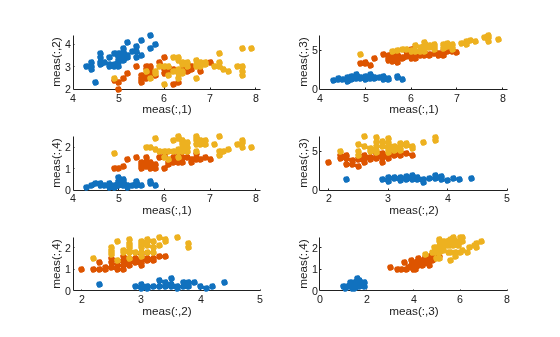
Based on the scatterplot, meas(:,3) and meas(:,4) seem like they separate the groups well.
Create an ECOC template. Specify to use a one-versus-all coding design.
t = templateECOC(Coding="onevsall");By default, the ECOC model uses linear SVM binary learners. You can choose other supported algorithms by specifying them using the Learners name-value argument.
Test whether an ECOC model that is just trained using predictors 3 and 4 performs at most as well as an ECOC model that is trained using all predictors. Rejecting this null hypothesis means that the ECOC model trained using predictors 3 and 4 performs better than the ECOC model trained using all predictors. Suppose represents the classification error of the ECOC model trained using predictors 3 and 4 and represents the classification error of the ECOC model trained using all predictors, then the test is:
By default, testckfold conducts a 5-by-2 k-fold F test, which is not appropriate as a one-tailed test. Specify to conduct a 5-by-2 k-fold t test.
rng(1); % For reproducibility [h,pValue] = testckfold(t,t,meas(:,pairs(6,:)),meas,species, ... Alternative="greater",Test="5x2t")
h = logical
0
pValue = 0.8940
The h = 0 indicates that there is not enough evidence to suggest that the model trained using predictors 3 and 4 is more accurate than the model trained using all predictors.
Name-Value Arguments
Specify optional pairs of arguments as
Name1=Value1,...,NameN=ValueN, where Name is
the argument name and Value is the corresponding value.
Name-value arguments must appear after other arguments, but the order of the
pairs does not matter.
Example: templateECOC(Coding="ternarycomplete",FitPosterior=true,Learners="tree")
specifies a ternary complete coding design, to transform scores to posterior
probabilities, and to grow classification trees for all binary
learners.
Coding design name, specified as a numeric matrix or a value in this table.
| Value | Number of Binary Learners | Description |
|---|---|---|
"allpairs" and "onevsone" | K(K – 1)/2 | For each binary learner, one class is positive, another is negative, and the software ignores the rest. This design exhausts all combinations of class pair assignments. |
"binarycomplete" | This design partitions the classes into all binary combinations, and does not ignore any
classes. For each binary learner, all class assignments are
–1 and 1 with at least one positive
class and one negative class in the assignment. | |
"denserandom" | Random, but approximately 10 log2K | For each binary learner, the software randomly assigns classes into positive or negative classes, with at least one of each type. For more details, see Random Coding Design Matrices. |
"onevsall" | K | For each binary learner, one class is positive and the rest are negative. This design exhausts all combinations of positive class assignments. |
"ordinal" | K – 1 | For the first binary learner, the first class is negative and the rest are positive. For the second binary learner, the first two classes are negative and the rest are positive, and so on. |
"sparserandom" | Random, but approximately 15 log2K | For each binary learner, the software randomly assigns classes as positive or negative with probability 0.25 for each, and ignores classes with probability 0.5. For more details, see Random Coding Design Matrices. |
"ternarycomplete" | This design partitions the classes into all ternary combinations. All class assignments are
0, –1, and 1 with
at least one positive class and one negative class in each assignment. |
You can also specify a coding design using a custom coding matrix, which is a
K-by-L matrix. Each row corresponds to a class
and each column corresponds to a binary learner. The class order (rows) corresponds to
the order in ClassNames. Create the
matrix by following these guidelines:
Every element of the custom coding matrix must be
–1,0, or1, and the value must correspond to a dichotomous class assignment. ConsiderCoding(i,j), the class that learnerjassigns to observations in classi.Value Dichotomous Class Assignment –1Learner jassigns observations in classito a negative class.0Before training, learner jremoves observations in classifrom the data set.1Learner jassigns observations in classito a positive class.Every column must contain at least one
–1and one1.For all column indices
i,jwherei≠j,Coding(:,i)cannot equalCoding(:,j), andCoding(:,i)cannot equal–Coding(:,j).All rows of the custom coding matrix must be different.
For more details on the form of custom coding design matrices, see Custom Coding Design Matrices.
Example: Coding="ternarycomplete"
Data Types: char | string | double | single | int16 | int32 | int64 | int8
Flag indicating whether to transform scores to posterior probabilities, specified as
true (1) or false
(0).
If FitPosterior is true,
then the software transforms binary-learner classification scores
to posterior probabilities. You can obtain posterior probabilities
by using kfoldPredict, predict,
or resubPredict.
fitcecoc does not support fitting posterior probabilities if:
The ensemble method is
AdaBoostM2,LPBoost,RUSBoost,RobustBoost, orTotalBoost.The binary learners (
Learners) are linear or kernel classification models that implement SVM. To obtain posterior probabilities for linear or kernel classification models, implement logistic regression instead.
Example: FitPosterior=true
Data Types: logical
Binary learner templates, specified as a character vector, string scalar, template object, or
cell vector of template objects. Specifically, you can specify binary classifiers such
as SVM, and the ensembles that use GentleBoost,
LogitBoost, and RobustBoost, to solve
multiclass problems. However, fitcecoc also supports multiclass
models as binary classifiers.
If
Learnersis a character vector or string scalar, then the software trains each binary learner using the default values of the specified algorithm. This table summarizes the available algorithms.Value Description "discriminant"Discriminant analysis. For default options, see templateDiscriminant."ensemble"(since R2024a)Ensemble learning model. By default, the ensemble uses an adaptive logistic regression ( "LogitBoost") aggregation method, 100 learning cycles, and tree weak learners. For other default options, seetemplateEnsemble."kernel"Kernel classification model. For default options, see templateKernel."knn"k-nearest neighbors. For default options, see templateKNN."linear"Linear classification model. For default options, see templateLinear."naivebayes"Naive Bayes. For default options, see templateNaiveBayes."svm"SVM. For default options, see templateSVM."tree"Classification trees. For default options, see templateTree.If
Learnersis a template object, then each binary learner trains according to the stored options. You can create a template object using:templateDiscriminant, for discriminant analysis.templateEnsemble, for ensemble learning. You must at least specify the learning method (Method), the number of learners (NLearn), and the type of learner (Learners). You cannot use the"AdaBoostM2"ensemble method for binary learning. If you want to perform hyperparameter optimization using theOptimizeHyperparametersname-value argument, the ensemble method must be"AdaBoostM1","GentleBoost", or"LogitBoost", and the ensemble weak learners must be trees.templateKernel, for kernel classification.templateKNN, for k-nearest neighbors.templateLinear, for linear classification.templateNaiveBayes, for naive Bayes.templateSVM, for SVM.templateTree, for classification trees.
If
Learnersis a cell vector of template objects, then:Cell j corresponds to binary learner j (in other words, column j of the coding design matrix), and the cell vector must have length L. L is the number of columns in the coding design matrix. For details, see
Coding.To use one of the built-in loss functions for prediction, then all binary learners must return a score in the same range. For example, you cannot include default SVM binary learners with default naive Bayes binary learners. The former returns a score in the range (-∞,∞), and the latter returns a posterior probability as a score. Otherwise, you must provide a custom loss as a function handle to functions such as
predictandloss.You cannot specify linear classification model learner templates with any other template.
Similarly, you cannot specify kernel classification model learner templates with any other template.
By default, the software trains learners using default SVM templates.
Example: Learners="tree"
Since R2026b
Verbosity level, specified as 0,
1, or 2.
Verbose controls the amount of diagnostic
information per binary learner that the software displays in the Command
Window.
This table describes the verbosity level values.
| Value | Description |
|---|---|
0 | The software does not display diagnostic information. |
1 | The software displays diagnostic messages every time it trains a new binary learner. |
2 | The software displays extra diagnostic messages every time it trains a new binary learner. |
Example: Verbose=1
Data Types: double | single
Output Arguments
ECOC classification template, returned as a template object.
Pass t to testckfold to
specify how to create an ECOC classifier whose predictive performance
you want to compare with another classifier.
If you display t in the Command Window, then all unspecified configurable
options appear empty ([]). However, the software replaces
empty options with their corresponding default values during
training.
Algorithms
Custom coding matrices must have a certain form. The software validates a custom coding matrix by ensuring:
Every element is –1, 0, or 1.
Every column contains as least one –1 and one 1.
For all distinct column vectors u and v, u ≠ v and u ≠ –v.
All row vectors are unique.
The matrix can separate any two classes. That is, you can move from any row to any other row following these rules:
Move vertically from 1 to –1 or –1 to 1.
Move horizontally from a nonzero element to another nonzero element.
Use a column of the matrix for a vertical move only once.
If it is not possible to move from row i to row j using these rules, then classes i and j cannot be separated by the design. For example, in the coding design
classes 1 and 2 cannot be separated from classes 3 and 4 (that is, you cannot move horizontally from –1 in row 2 to column 2 because that position contains a 0). Therefore, the software rejects this coding design.
For a given number of classes K, the software generates random coding design matrices as follows.
The software generates one of these matrices:
Dense random — The software assigns 1 or –1 with equal probability to each element of the K-by-Ld coding design matrix, where .
Sparse random — The software assigns 1 to each element of the K-by-Ls coding design matrix with probability 0.25, –1 with probability 0.25, and 0 with probability 0.5, where .
If a column does not contain at least one 1 and one –1, then the software removes that column.
For distinct columns u and v, if u = v or u = –v, then the software removes v from the coding design matrix.
The software randomly generates 10,000 matrices by default, and retains the matrix with the largest, minimal, pairwise row distance based on the Hamming measure ([2]) given by
where mkjl is an element of coding design matrix j.
References
[1] Fürnkranz, Johannes. “Round Robin Classification.” J. Mach. Learn. Res., Vol. 2, 2002, pp. 721–747.
[2] Escalera, S., O. Pujol, and P. Radeva. “Separability of ternary codes for sparse designs of error-correcting output codes.” Pattern Recog. Lett. Vol. 30, Issue 3, 2009, pp. 285–297.
Version History
Introduced in R2015atemplateECOC returns a template object with a new display in the Command
Window. The display always includes the Method and
Type properties, as well as the configurable options that you
specify using name-value arguments in the call to templateECOC.
See Also
ClassificationECOC | fitcecoc | designecoc | templateDiscriminant | templateEnsemble | templateKNN | templateSVM | templateTree | predict | testckfold
MATLAB Command
You clicked a link that corresponds to this MATLAB command:
Run the command by entering it in the MATLAB Command Window. Web browsers do not support MATLAB commands.
Select a Web Site
Choose a web site to get translated content where available and see local events and offers. Based on your location, we recommend that you select: .
You can also select a web site from the following list
How to Get Best Site Performance
Select the China site (in Chinese or English) for best site performance. Other MathWorks country sites are not optimized for visits from your location.
Americas
- América Latina (Español)
- Canada (English)
- United States (English)
Europe
- Belgium (English)
- Denmark (English)
- Deutschland (Deutsch)
- España (Español)
- Finland (English)
- France (Français)
- Ireland (English)
- Italia (Italiano)
- Luxembourg (English)
- Netherlands (English)
- Norway (English)
- Österreich (Deutsch)
- Portugal (English)
- Sweden (English)
- Switzerland
- United Kingdom (English)