upsample
R2026bIncrease sample rate by integer factor
Description
Examples
Increase the sample rate of a sequence by a factor of 3.
x = [1 2 3 4];
y = upsample(x,3)
y = 1×12

     1     0     0     2     0     0     3     0     0     4     0     0
Increase the sample rate of the sequence by a factor of 3 and add a phase offset of 2.
x = [1 2 3 4];
y = upsample(x,3,2)
y = 1×12

     0     0     1     0     0     2     0     0     3     0     0     4
Increase the sample rate of a matrix by a factor of 3.
x = [1 2;
     3 4;
     5 6];
y = upsample(x,3)
y = 9×2
1 2
0 0
0 0
3 4
0 0
0 0
5 6
0 0
0 0
Since R2026b
Generate a 101-second sine waveform with a fundamental frequency of 0.01 Hz and a space of 5 seconds between consecutive samples.
ts = 5;
tx = (1:ts:101)';
x = sin(2*pi*0.01*tx);
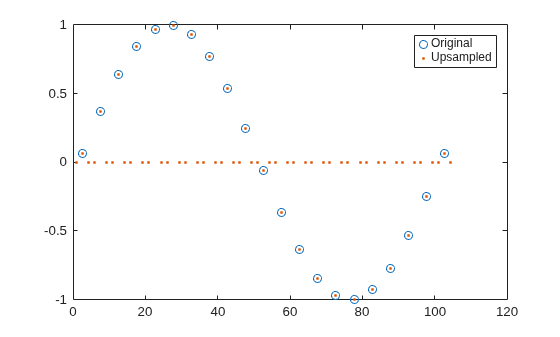
Upsample the signal using an upsampling factor of 3. Compare the original and upsampled signals. To produce the upsampled signal, the upsample function inserts two zeros between sine samples.
n = 3;
ty = (1:ts/n:ts*numel(x))';
y = upsample(x,n);
plot(tx,x,"o",ty,y,".")
legend(["Original" "Upsampled"])
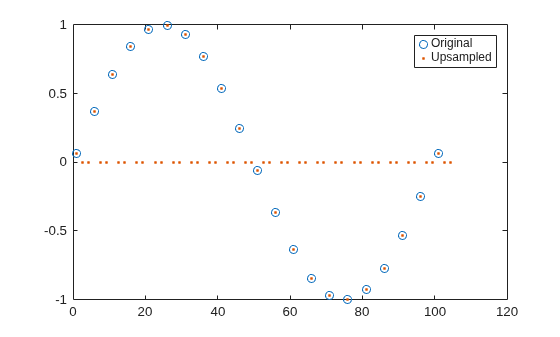
Upsample the signal using an upsampling factor of 3 and a phase offset of 1. Compare the original and upsampled signals. Because of the specified phase offset, the first sample of the original signal matches with the second sample on the upsampled signal.
p = 1;
ty = (1:ts/n:ts*numel(x))';
y = upsample(x,n,p);
plot(ts/n*p+tx,x,"o",ty,y,".")
legend(["Original" "Upsampled"])