Main Content

coneplot

Plot cones in 3-D vector field

  • Cone plot

Description

coneplot(X,Y,Z,U,V,W,Cx,Cy,Cz) plots cones at sample locations (Cx, Cy, Cz) within a Cartesian vector field. The magnitudes and orientations of the cones are determined by the vector coordinates (X, Y, Z) and the vector components (U, V, W). The vector coordinates define the location of each vector in 3-D space, and the vector components define the magnitude and orientation of each vector.

example

coneplot(U,V,W,Cx,Cy,Cz) uses the column, row, and page indices of the elements in U as the vector coordinates. For example, if U has 10 columns, then the x-coordinates of the vectors are the numbers 1 through 10.

coneplot(___,s) specifies a scale factor for the lengths of the cones:

  • If s is a positive number, coneplot adjusts the lengths of the cones so they do not overlap. Then it stretches the cones by a factor of s. A scale factor of 2 doubles the lengths of the cones, and a scale factor of 0.5 halves the lengths of the cones. Larger values of s might result in overlapping cones.

  • If s is 0, coneplot does not adjust or scale the lengths of the cones.

Specify s as the last argument in any of the preceding syntaxes.

coneplot(___,colors) specifies an array for controlling the colors of the cones. The colors array must be the same size as one of the vector field arrays (X, Y, Z, U, V, or W).

example

coneplot(___,"quiver") draws arrows instead of cones. This syntax does not support the colors argument.

coneplot(___,method) specifies the interpolation method for calculating the magnitudes and orientations of the cones.

coneplot(X,Y,Z,U,V,W,"nointerp") places the bases of the cones at (X, Y, Z) with orientations (U, V, W) and does not use interpolation.

coneplot(ax,___) plots into the target axes ax.

p = coneplot(___) returns a Patch or Quiver object p. Most syntaxes return a Patch object, but if you specify the "quiver" option, coneplot returns a Quiver object. Use p to set properties of the object after creating it. For a list of properties, see Patch Properties or Quiver Properties.

Examples

collapse all

Create a set of vector coordinates and vector components.

[X,Y,Z] = meshgrid(-5:2:5);
U = sign(X);
V = sign(Y);
W = sign(Z);

Create a set of cone coordinates. Then create a cone plot, and return the Patch object p so you can change its properties later. Configure the axes to display a 3-D view.

[Cx,Cy,Cz] = meshgrid(-2:2:2);
p = coneplot(X,Y,Z,U,V,W,Cx,Cy,Cz);
view([305 55])
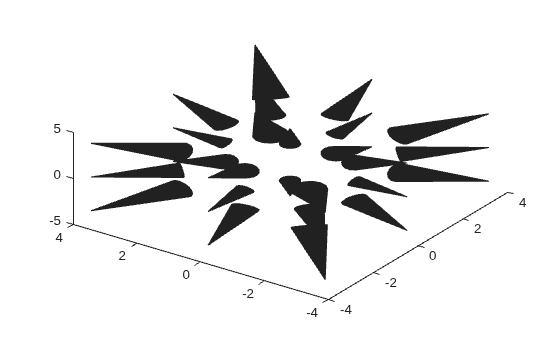
Figure contains an axes object. The axes object contains an object of type patch.

Change the cone colors by setting the FaceColor property of the Patch object. Remove the patch edges by setting the EdgeColor property of the Patch object to "none". Then give the cones a 3-D appearance by adding a light and displaying the axes grid.

p.FaceColor = "cyan";
p.EdgeColor = "none";
camlight
grid on
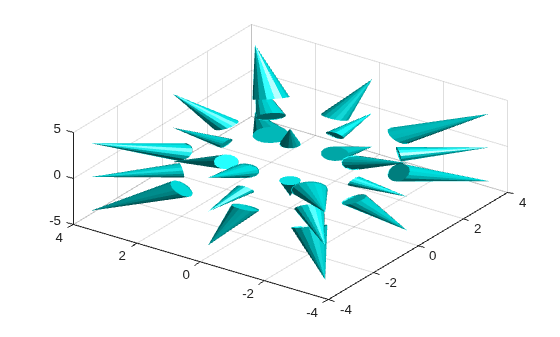
Figure contains an axes object. The axes object contains an object of type patch.

To ensure that the cones have the right proportions, configure the axes to have the same scale in each dimension.

axis equal

Figure contains an axes object. The axes object contains an object of type patch.

You can use color as an additional dimension for visualizing your data. In this example, create an array that varies the cone colors according to their cross-sectional differences along the lengths of the cones.

Read the flow data set and calculate a set of vector components.

[X,Y,Z,M] = flow(8);
[U,V,W] = gradient(M);

Find the vectors with magnitudes greater than 1. Use the locations of those vectors as the query points for positioning the cones.

mag = sqrt(U.^2 + V.^2 + W.^2);
idx = mag > 1;
Cx = X(idx);
Cy = Y(idx);
Cz = Z(idx);

Create an array colors that contains the cross-sectional differences between the bases and tips of the cones. Create a cone plot, using the colors array to control the colors of the cones. Then configure the axes to display a 3-D view.

Remove the patch edges by setting the EdgeColor property to "none", and display labels for each of the axes.

colors = hypot(Y+V,Z+W) - hypot(Y,Z);
p = coneplot(X,Y,Z,U,V,W,Cx,Cy,Cz,colors);
view(3)
p.EdgeColor = "none";
xlabel("X")
ylabel("Y")
zlabel("Z")
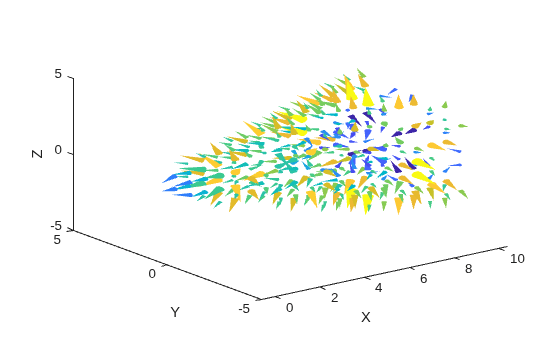
Figure contains an axes object. The axes object with xlabel X, ylabel Y contains an object of type patch.

Input Arguments

collapse all

Vector x-coordinates, specified as a 3-D array containing monotonic values. X, Y, Z, U, V, and W must be the same size. Together, X, Y, and Z form the vector field coordinates in 3-D Cartesian space.

You can create a grid of coordinates using the meshgrid function. For example, [X,Y,Z] = meshgrid(1:5) creates a 5-by-5-by-5 grid that ranges from 1 to 5 in each dimension.

Data Types: single | double

Vector y-coordinates, specified as a 3-D array containing monotonic values. X, Y, Z, U, V, and W must be the same size. Together, X, Y, and Z form the vector field coordinates in 3-D Cartesian space.

Data Types: single | double

Vector z-coordinates, specified as a 3-D array containing monotonic values. X, Y, Z, U, V, and W must be the same size. Together, X, Y, and Z form the vector field coordinates in 3-D Cartesian space.

Data Types: single | double

Vector x-components, specified as a 3-D array. X, Y, Z, U, V, and W must be the same size. Together, U, V, and W form the vector components in the x-, y-, and z-directions, respectively.

Data Types: single | double | int8 | int16 | int32 | int64 | uint8 | uint16 | uint32 | uint64

Vector y-components, specified as a 3-D array. X, Y, Z, U, V, and W must be the same size. Together, U, V, and W form the vector components in the x-, y-, and z-directions, respectively.

Data Types: single | double | int8 | int16 | int32 | int64 | uint8 | uint16 | uint32 | uint64

Vector z-components, specified as a 3-D array. X, Y, Z, U, V, and W must be the same size. Together, U, V, and W form the vector components in the x-, y-, and z-directions, respectively.

Data Types: single | double | int8 | int16 | int32 | int64 | uint8 | uint16 | uint32 | uint64

x-coordinates of the cones, specified as a scalar, vector, matrix, or multidimensional array. Together, Cx, Cy, and Cz form the sample coordinates within the vector field for positioning the bases (wide ends) of the cones.

Data Types: single | double

y-coordinates of the cones, specified as a scalar, vector, matrix, or multidimensional array. Together, Cx, Cy, and Cz form the sample coordinates within the vector field for positioning the bases (wide ends) of the cones.

Data Types: single | double

z-coordinates of the cones, specified as a scalar, vector, matrix, or multidimensional array. Together, Cx, Cy, and Cz form the sample coordinates within the vector field for positioning the bases (wide ends) of the cones.

Data Types: single | double

Cone scale factor, specified as a nonnegative number. The scale factor, along with U, V, and W, determine the magnitudes of the cones. By default, coneplot adjusts the lengths of the cones so they do not overlap. Then it stretches the cones by a factor of s. A scale factor of 2 doubles the lengths of the cones, and a scale factor of 0.5 halves the lengths of the cones.

To disable all scaling and length adjustments, specify the scale factor as 0.

Data Types: single | double

Color data, specified as a 3-D array. Use this argument to add additional visual information to your plot. The array must be the same size as U, V, and W.

coneplot assigns the values of the array to locations in the vector field. Those values are interpolated at the sample coordinates (Cx, Cy, Cz). The interpolated values and the colormap determine the colors of the cones.

You can make further adjustments to the colors using these options:

  • To control the range of colormap colors, use the clim function.

  • To change the colormap, use the colormap function.

  • To control whether all cones have the same color, different (solid) colors, or a gradient of different colors, call the coneplot function with an output argument to store the Patch object. Then set the FaceColor property of the Patch object.

  • To control the outlines around the faces of the cones, set the EdgeColor property of the Patch object.

  • To display the relationship between the on-screen colors and the colors data values, create a colorbar.

Data Types: single | double

Interpolation method for calculating the magnitudes and orientations of the cones, specified as one of these values:

  • "linear" — Linear interpolation of the neighboring vector coordinates in each dimension.

  • "cubic" — Cubic interpolation of the neighboring vector coordinates in each dimension. The interpolation is based on a cubic convolution.

  • "nearest" — Nearest-neighbor interpolation, which uses the nearest vector coordinates.

  • "makima" — Modified Akima cubic Hermite interpolation. The interpolation is based on a piecewise function of polynomials with a degree of (at most) three. The polynomials are evaluated using the values of neighboring vector coordinates in each respective dimension. The Akima formula is modified to avoid overshoots.

  • "spline" — Cubic interpolation of the neighboring vector coordinates in each dimension. The interpolation is based on a cubic spline using not-a-knot end conditions.

Target axes, specified as an Axes object. If you do not specify the axes, coneplot uses the current axes, or it creates an Axes object if one does not exist.

Output Arguments

collapse all

Cone plot, returned as a Patch object or Quiver object. Most syntaxes return a Patch object, but if you specify the "quiver" input, the function returns a Quiver object.

Extended Capabilities

expand all

Version History

Introduced before R2006a