GMSK Modulator Baseband
R2026bModulate signal using Gaussian minimum shift keying method
GMSK Modulator Baseband block
To add a block to a model, double-click the canvas and start typing the block name. Then, select the block from the list.
Libraries:
Communications Toolbox /
Modulation /
Digital Baseband Modulation /
CPM
Description
The GMSK Modulator Baseband block modulates an input signal using the Gaussian minimum shift keying (GMSK) method. The output is a baseband representation of the modulated signal. For more information about the modulation and the filtering applied, see Algorithms.
Examples
The cm_gmsk_vs_msk model compares Gaussian minimum shift keying (GMSK) and minimum shift keying (MSK) modulation schemes.
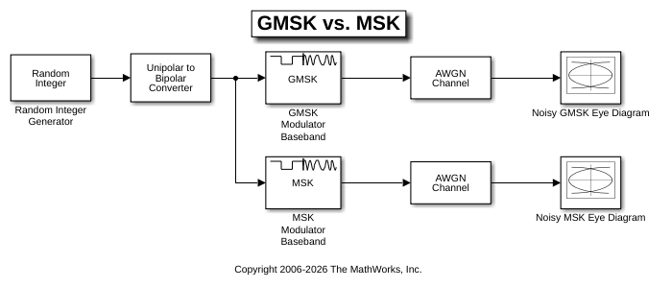
The Random Integer Generator block provides a source of uniformly distributed random integers in the range [0, M-1], where M is the constellation size of the GMSK or MSK signal. The Unipolar to Bipolar Converter block maps a unipolar input signal to a bipolar output signal consisting of integers between -(M-1) and +(M-1). The bipolar data is routed to separate paths. The top path applies GMSK modulation by using the GMSK Modulator Baseband block. The bottom path applies MSK modulation by using the MSK Modulator Baseband block. Noise is added to both the GMSK and MSK signals by using AWGN Channel blocks. The Eye Diagram blocks are used to visualize eye diagrams of both signals.
The eye diagrams show the similarity between the GMSK and MSK signals when you set the initial pulse length of the GMSK Modulator Baseband block to 1.
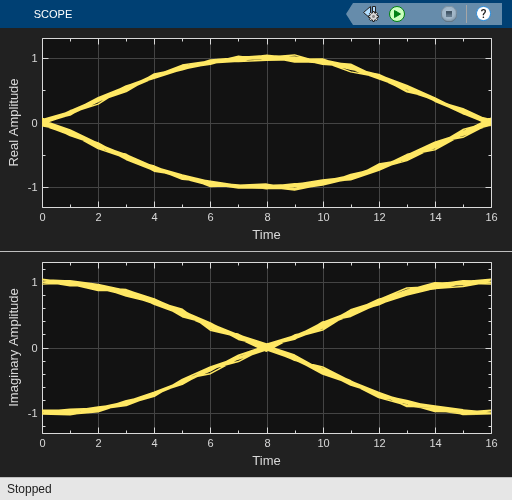
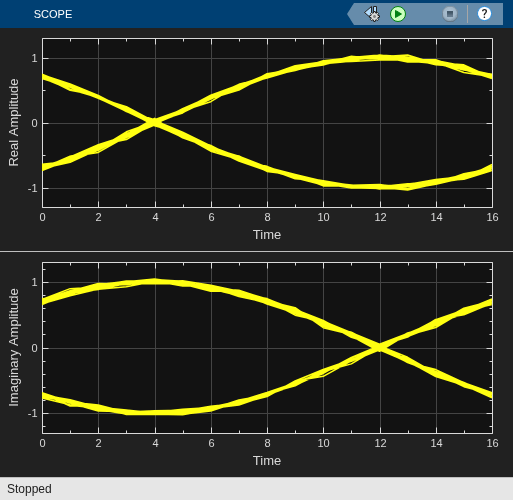
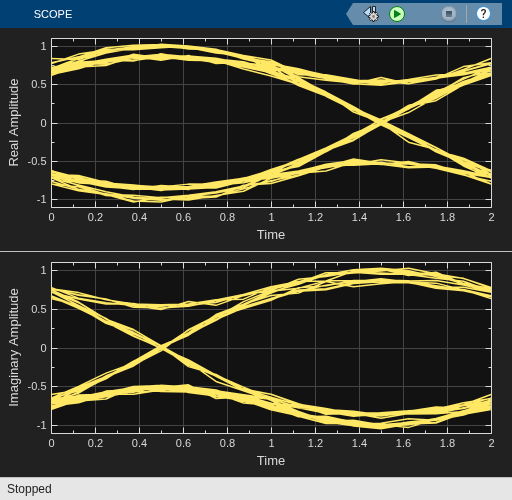
To view the difference that a partial response modulation has on the eye diagram, set the initial pulse length in the GMSK modulator to 5. The increased pulse length results in an increase in the number of paths, showing that the CPM waveform depends on values of the previous symbols as well as the present symbol. Plot the eye diagram of the GMSK signal.
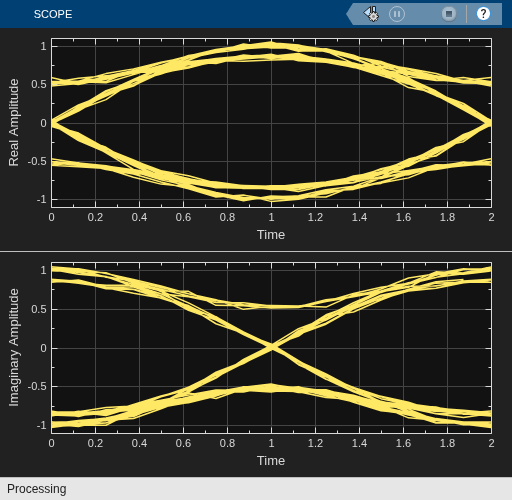
If you change the initial pulse length to an even number, such as 4, you should set the initial phase offset of the GMSK modulator to pi/4 and the offset argument of the eye diagram to 0 for a better view of the modulated signal. To more clearly view the Gaussian pulse shape, you must use scopes that enable you to view the phase of the signal, as described in the View CPM Phase Tree Using Simulink example.
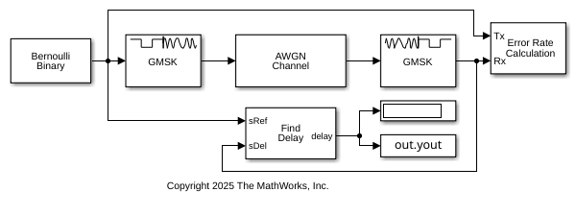
Demodulate a GMSK-modulated signal impaired by AWGN and compute the bit error rate.
The cm_gmsk_mod_demod model generates random Bernoulli distributed binary data and then applies GMSK modulation to frames data. The GMSK-modulated signal passes through an AWGN channel and then is demodulated by using the GMSK method. The bit error rate is calculated on frames of data.
The Error Rate Calculation block has the receive delay set to the value of the traceback depth used by the GMSK Baseband Demodulator block. The model uses the Find Delay block to confirm the delay equals the value of the traceback depth.
Transmit to receive delay is 16 symbols.
BER = 7.7939e-05
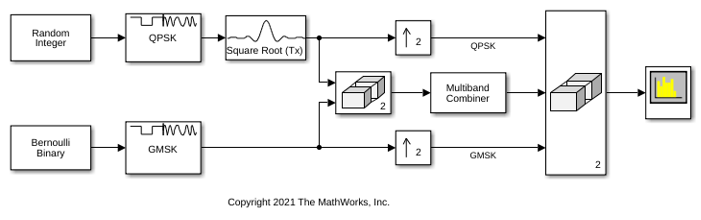
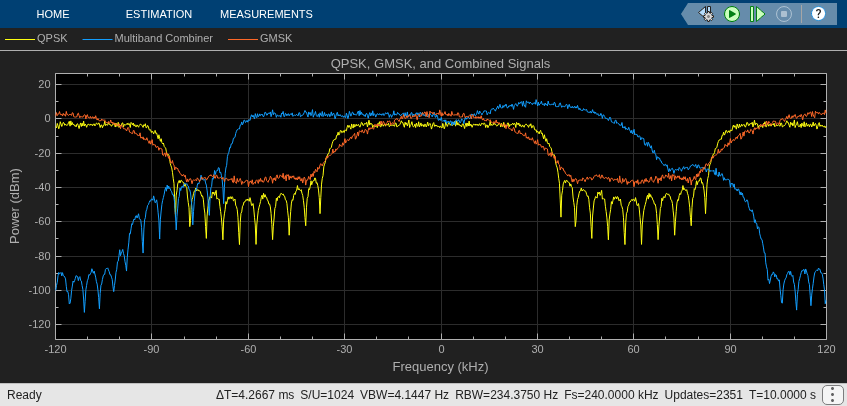
Combine two 60 KHz frequency bands adjacent to each other.
Run the model to explore how combining the frames affects the signals. The model frequency shifts and combines frames of QPSK and GMSK baseband modulated signals. A spectrum analyzer displays the individual and combined signals.
Extended Examples
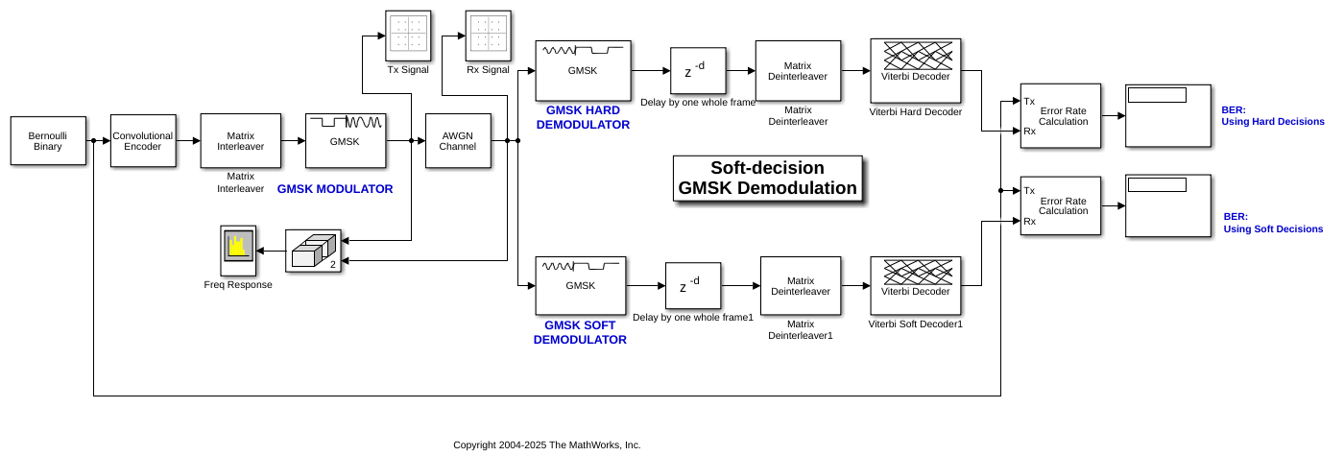
Soft Decision GMSK Demodulator
A system that includes convolutional coding and GMSK modulation. The receiver in this model includes two parallel paths, one that uses soft decisions and another that uses hard decisions. The model computes bit error rates for the two paths to illustrate that the soft decision receiver performs better. The performance advantage for soft decision reception over hard decision reception is expected because soft decisions enable the system to retain more information from the demodulation operation to use in the decoding operation.
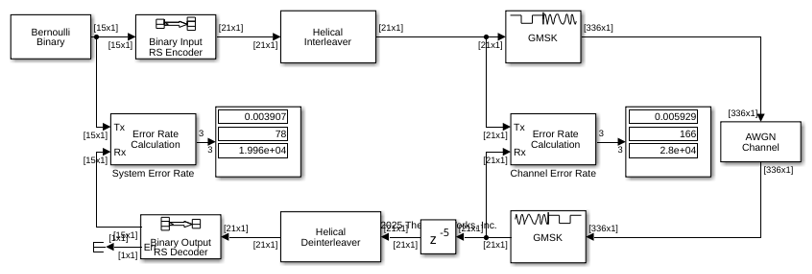
Correct Misalignment of Interleaved Words Due to Demodulation
In communications systems, you can use techniques such as interleaving to protect against burst errors. Interleaving is a process that rearranges the order of data bits or symbols. The effectiveness of interleaving depends on the precise alignment of data words prior to this process. This example shows how to correct for the misalignment of codewords due to delays incurred in digital demodulation, when performing deinterleaving and outer block decoding.
Ports
Input
Output
Parameters
Block Characteristics
Data Types |
|
Multidimensional Signals |
|
Variable-Size Signals |
|
More About
Algorithms
References
[1] Anderson, John B., Tor Aulin, and Carl-Erik Sundberg. Digital Phase Modulation. New York: Plenum Press, 1986.
Extended Capabilities
Version History
Introduced before R2006a
See Also
Blocks
- GMSK Demodulator Baseband | CPM Modulator Baseband | CPFSK Modulator Baseband | MSK Modulator Baseband

