Tune Single PI Controller Gains For Multiple Operating Points Using Reinforcement Learning
This example demonstrates how to tune the parameters of a controller using a reinforcement learning (RL) algorithm. Specifically, this example shows the first of three common approaches to using RL for proportional-integral-derivative (PID) parameter tuning:
1) Single fixed (PI) gains across multiple operating points (this example)
2) Per-simulation gain scheduling
3) Online adaptive PI gain adjustment
Tuning PI Gains Using RL: Three Approaches
For relatively simple control tasks with a small number of tunable parameters, model-based tuning techniques can get good results with a faster tuning process compared to model-free RL-based methods. See Control System Design and Tuning (Control System Toolbox) and Get Started with Simulink Design Optimization (Simulink Design Optimization) for more information. However, RL methods are more suitable for highly nonlinear systems or adaptive controller tuning. While this example focuses on PI controller tuning for a simple system, you can extend it to general parameter tuning or calibration in more complex control systems.
1. Single set of gains across multiple operating points (this example)

- Goal: Find one set of gains that performs well across different contexts (that is, across different operating conditions). This is also the preferred approach when you know the plant operating conditions and you know that they do not change substantially.
- Approach: Treat the PI controller as a linear RL policy where the weights directly map to PI gains. Learning the policy weights is equivalent to tuning the PI gains. The policy outputs the control command from the error signal. You can also extend this approach for parameter tuning or calibration applications.
- Alternatives: For many PI tuning problems, model-based tuning algorithm (see Tune a Control System Using Control System Tuner (Simulink Control Design)), swarm particle optimization (see Field-Oriented Control of PMSM Using Fuzzy PI Controller (Fuzzy Logic Toolbox)), or Bayesian optimization can be simpler and more sample-efficient.
2. Per-simulation gain scheduling

- Goal: Learn a mapping from a possible operating condition (hereby also referred to as context) to its PI gains, assuming that the context does not change while the plant is operating. Here, the RL policy associates a given operating condition to a specific set of PI gains.
- Approach: Use a contextual bandit approach (also referred to as single-step RL) to select the PI gains based on the current operating condition. Each RL environment step corresponds to a single simulation run, during which the PI gains remain fixed. Specifying the range of the actions (PI gains) is recommended for effective training. For an example on contextual bandits, see Train Reinforcement Learning Agent for Simple Contextual Bandit Problem.
- Alternatives: If your context space is small or you do not know the range of the PI gains, preparing multiple policies using the first approach or traditional approaches (see systune (Simulink Control Design) for example) can be a better choice. If the context changes during an episode, try the third approach (online adaptive PI gain adjustment).
3. Online adaptive PI gain adjustment

- Goal: Continuously adapt gains to improve performance. This is a more general approach than the previous ones, as the operating conditions and the PI gains are allowed to change while the plant is operating.
- Approach: Use an RL policy that updates the PI gains at each time step based on the current error. The context can also be used as additional observation.
- Alternatives: Using an RL based controller, in which the output of the RL agent is u instead of PI gains, or Gain Scheduling (Control System Toolbox) can be a better choice for plants that have a dynamics which is reasonably well known in advance. For an example on how to implement an RL-based controller, see Control Water Level in a Tank Using a DDPG Agent.
Environment Model
The environment model in this example is a water tank. The goal of this control system is to maintain the water level in the tank at a reference value.
WaterTankModel = 'watertankLQG';
open_system(WaterTankModel)
The model includes process noise with variance . The PID controller block used in the model is a discrete-time PID controller. simout is a To Workspace block that stores the water levels, and cost is a To Workspace block that stores the costs recorded during the simulation. The model includes process noise with variance .
To maintain the water level while minimizing control effort u, the controller in this example uses the following a linear quadratic Gaussian (LQG) criterion for the discrete-time PID controller.
Here, is the desired water level, is the number of time steps, and is the sample time. This LQG goal includes the integration error term to keep the steady-state error close to zero. To simulate the controller in this model, you must specify the simulation time Tf and the controller sample time Ts in seconds.
Ts = 1;
Tf = 100;
For more information about the water tank model, see watertank Simulink Model (Simulink Control Design).
Fix Random Number Stream for Reproducibility
The example code might involve computation of random numbers at several stages. Fixing the random number stream at the beginning of some sections in the example code preserves the random number sequence in the section every time you run it, which increases the likelihood of reproducing the results. For more information, see Results Reproducibility.
Fix the random number stream with the seed 0 and random number algorithm Mersenne Twister. For more information on controlling the seed used for random number generation, see rng.
previousRngState = rng(0,"twister");The output previousRngState is a structure that contains information about the previous state of the stream. You will restore the state at the end of the example.
Create Environment Object
In this example, you implement the PI controller as a reinforcement learning policy that is linear in the observations. Over a training session consisting of 3000 episodes, where each episode is a simulation of the Simulink closed loop model lasting 100 time steps. During the simulation the reinforcement learning agent acts on the pump, observes the water level and its corresponding reward, and uses these observations to tune the weights of its actor model (which are the PI gains) with the objective to maximize the expected cumulative reward.
To define the model for training the RL agent, modify the water tank model using the following steps.
Delete the PID Controller.
Insert an RL Agent block.
Create the observation vector , where , is the level of the water in the tank, and is the reference water level. Connect the observation signal to the RL Agent block.
Define the reward function for the RL agent as the negative of the scaled LQG cost, that is, . The RL agent maximizes this reward, thus minimizing the LQG cost. A scaling factor
0.01is applied to each step's reward so that its expected range is approximately between -1 and 0. This results in a better optimization in general. The integral error term in the LQG cost is not required for reinforcement learning; however, it is included in this example for consistency with the Control System Tuner approach presented later for comparison.
The resulting model is rlWatertankPITuningUseCase1.slx.

The Water-Tank System in rlWatertankPITuningUseCase1 is shown below:
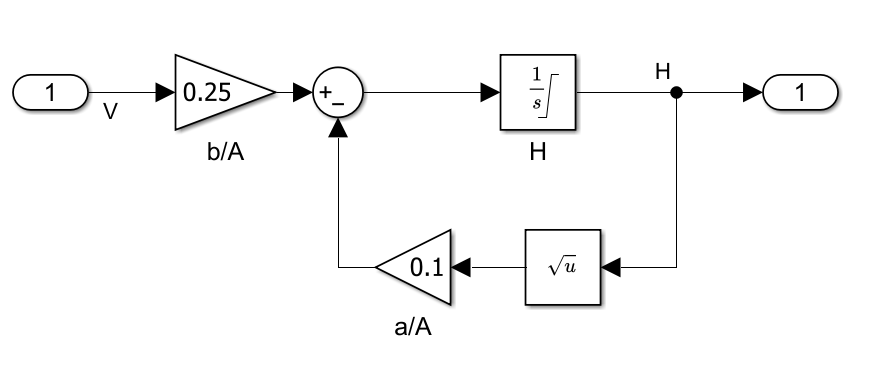
Here, is the voltage applied to the pump, is the water level in the tank. For more information about the water tank model, see watertank Simulink Model (Simulink Control Design).
Define the observation specification obsInfo and the action specification actInfo.
obsInfo = rlNumericSpec([2 1]);
obsInfo.Name = 'observations';
obsInfo.Description = 'integrated error and error';

actInfo = rlNumericSpec([1 1]);
actInfo.Name = 'PID output';
actInfo.LowerLimit =  0;
actInfo.UpperLimit = 12;
Create the water tank RL environment object using rlSimulinkEnv.
mdl = 'rlWatertankPITuningUseCase1';
env = rlSimulinkEnv(mdl,[mdl '/RL Agent'],obsInfo,actInfo);
Set a custom reset function that randomizes the reference value and the initial water level for the model. To set the reset function, use localResetFcn, which is defined at the end of this example.
env.ResetFcn = @(in)localResetFcn(in,mdl);
Extract the observation and action dimensions for this environment. Use prod(obsInfo.Dimension) and prod(actInfo.Dimension) to obtain the number of dimensions of the observation and action spaces, respectively, regardless of whether they are arranged as row vectors, column vectors, or matrices.
numObs = prod(obsInfo.Dimension);
numAct = prod(actInfo.Dimension);
Create RL Agent
Fix the random stream for reproducibility.
rng(0,"twister");You can model a PI controller as an actor. The actor uses both the error integral and the error as inputs, and outputs the control signal.
Here:
uis the output of the actor.KiandKpare the weights of the actor., where is the water level of the water in the tank, and is the reference water level.
To create the actor, use rlContinuousDeterministicActor with a basis function myBasisFcn, which is provided as a separate file in the example folder.
Display the file implementing the basis function.
type("myBasisFcn.m")function feature = myBasisFcn(obs)
% A basis function for Tune PI Controller Using Reinforcement Learning example
% Copyright 2024 The MathWorks Inc.
feature = obs;
end
Define the initial controller gains (Ki and Kp, respectively).
initialGain = single([1e-3 2]);
Create the actor. For more information, see rlContinuousDeterministicActor.
actor = rlContinuousDeterministicActor( ...
    {@myBasisFcn,initialGain'},obsInfo, actInfo);
The agent in this example is a twin-delayed deep deterministic policy gradient (TD3) agent. TD3 agents rely on actor and critic approximator objects to learn the optimal policy. A TD3 agent approximates the long-term reward, given its observations and actions, by using two critic value-function representations.
Create the critic network using the function createCriticNet, which is defined in the following code section. Use the same network structure for both critic representations.
obsInputName = 'stateInLyr';
actInputName = 'actionInLyr';
criticNet1 = createCriticNet(numObs,numAct,obsInputName,actInputName);
criticNet2 = createCriticNet(numObs,numAct,obsInputName,actInputName);

function criticNet ...
        = createCriticNet(numObs,numAct,obsInputName,actInputName)
    statePath = [
        featureInputLayer(numObs,Name=obsInputName)
        fullyConnectedLayer(64,Name='fc1')
        ];

    actionPath = [
        featureInputLayer(numAct,Name=actInputName)
        fullyConnectedLayer(64,Name='fc2')
        ];

    commonPath = [
        concatenationLayer(1,2,Name='concat')
        reluLayer
        fullyConnectedLayer(64)
        reluLayer
        fullyConnectedLayer(1,Name='qvalOutLyr')
        ];

    criticNet = dlnetwork();
    criticNet = addLayers(criticNet,statePath);
    criticNet = addLayers(criticNet,actionPath);
    criticNet = addLayers(criticNet,commonPath);

    criticNet = connectLayers(criticNet,'fc1','concat/in1');
    criticNet = connectLayers(criticNet,'fc2','concat/in2');
end
Create the critic objects using the specified neural network, the environment action and observation specifications, and the names of the network layers to be connected with the observation and action channels.
critic1 = rlQValueFunction(criticNet1, ...
    obsInfo,actInfo, ...
    ObservationInputNames=obsInputName, ...
    ActionInputNames=actInputName);

critic2 = rlQValueFunction(criticNet2, ...
    obsInfo,actInfo, ...
    ObservationInputNames=obsInputName,...
    ActionInputNames=actInputName);
Define the vector of critic objects.
critic = [critic1 critic2];
Specify the training options for the actor and critic.
actorOpts = rlOptimizerOptions( ...
    LearnRate=5e-4, ...
    GradientThreshold=0.5);

criticOpts = rlOptimizerOptions( ...
    LearnRate=5e-4, ...
    GradientThreshold=0.5);
Specify the TD3 agent options using rlTD3AgentOptions. Include the training options for the actor and critic.
Set the agent to use the controller sample time
Ts.Set the mini-batch size to
256experience samples.Set the experience buffer length to
1e6.Set the learning frequency to
-1to update the agent at the end of each episode (default value).Set the max number of minibatches per epoch to
20.
agentOpts = rlTD3AgentOptions( ...
    SampleTime=Ts, ...
    MiniBatchSize=256, ...
    DiscountFactor=0.99,...
    ExperienceBufferLength = 1e6, ...
    MaxMiniBatchPerEpoch = 20,...
    LearningFrequency = -1,...
    ActorOptimizerOptions=actorOpts, ...
    CriticOptimizerOptions=criticOpts);
To modify the exploration model, use dot notation.
agentOpts.ExplorationModel.StandardDeviation = 0.5;
agentOpts.ExplorationModel.StandardDeviationDecayRate = 5e-5;
agentOpts.TargetPolicySmoothModel.StandardDeviation = sqrt(0.1);
Create the TD3 agent using the specified actor representation, critic representation, and agent options. For more information, see rlTD3AgentOptions.
agent1 = rlTD3Agent(actor,critic,agentOpts);
Train RL Agent
Fix the random number stream for reproducibility.
rng(0,"twister");Create an evaluator object to evaluate the performance of the agent over 10 simulations every 50 episodes, using the random seeds 1 to 10. The different random seed allows different random initial conditions. The evaluation score is the average cumulative reward over the 10 evaluation episodes.
evaluatorObj = rlEvaluator("NumEpisodes",10,...
    "EvaluationFrequency",50,...
    "RandomSeeds",1:10);
To train the agent, first specify the following training options.
Run each training for a maximum of
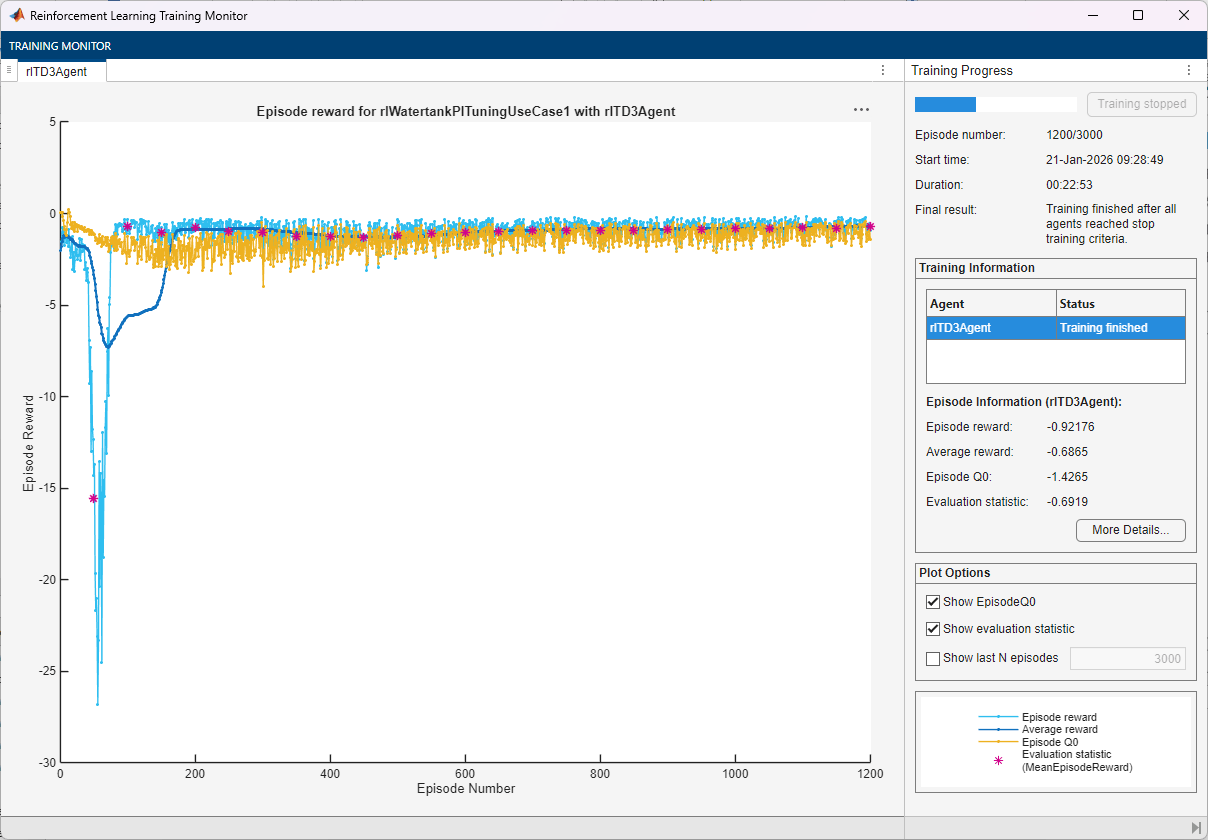
3000episodes, with each episode lasting a maximum of100time steps.Display the training progress in the Reinforcement Learning Training Monitor (set the
Plotsoption as "training-progress").Disable the command-line display (set the
Verboseoption astrue).Stop the training when the evaluation score reaches
-0.7. At this point, the agent can control the level of water in the tank.
For more information on training options, see rlTrainingOptions.
maxepisodes = 3000;
maxsteps = ceil(Tf/Ts);
trainOpts = rlTrainingOptions( ...
    MaxEpisodes=maxepisodes, ...
    MaxStepsPerEpisode=maxsteps, ...
    ScoreAveragingWindowLength=100, ...
    Verbose=false, ...
    Plots="training-progress", ...
    StopTrainingCriteria="EvaluationStatistic", ...
    StopTrainingValue=-0.7);
Train the agent using the train function. Training this agent is a computationally intensive process. To save time while running this example, load a pretrained agent by setting doTraining to false. To train the agent yourself, set doTraining to true.
doTraining =false; if doTraining % Train the agent. trainingStats = train(agent1,env,trainOpts,Evaluator=evaluatorObj); save("WaterTankPITuningTD3AgentUseCase1.mat","agent1") else % Load pretrained agent for the example. load("WaterTankPITuningTD3AgentUseCase1.mat","agent1") end
Validate Trained Agent
Fix the random stream for reproducibility.
rng(0,"twister");By default, the agent uses a greedy (hence deterministic) policy in simulation. To use the exploratory policy instead, set the UseExplorationPolicy agent property to true. To validate the trained agent, simulate it within the environment maxsteps steps. For more information on agent simulation, see sim.
simOpts = rlSimulationOptions(MaxSteps=maxsteps);
experiences = sim(env,agent1,simOpts);
Compare Performance of RL and Control System Tuner Gains
You can tune a controller in Simulink using Control System Tuner (CST). To do so, you must specify the controller block as a tuned block and define the goals for the tuning process, and then on the Tuning tab, click Tune. For more information on using Control System Tuner, see Tune a Control System Using Control System Tuner (Simulink Control Design).
The values of the PI gains obtained using CST are as follows:
Kp_CST = 3.43726595858363;
Ki_CST = 0.0357784909005128;
The PI gains of the RL controller are the weights of the actor approximation model. To obtain the weights, first extract the learnable parameters from the actor.
actor = getActor(agent1);
parameters = getLearnableParameters(actor);
Obtain the controller gains.
Ki = parameters{1}(1)Ki = single
0.1130
Kp = parameters{1}(2)Kp = single
3.8090
Apply the gains obtained from the trained RL agent to the original PI controller block and run a step-response simulation.
open_system(WaterTankModel);
set_param(WaterTankModel,"FastRestart","off")
Use the Simulink.SimulationInput (Simulink) object simIn to temporarily set the random seed for the noise, reference, and initial water levels in the respective blocks.
refWaterLevel = 10;
initialWaterLevel = 1;
randomSeed = 1;
simIn = Simulink.SimulationInput(WaterTankModel);
noiseBlk = sprintf([WaterTankModel '/Band-Limited\nWhite Noise/']);
simIn = setBlockParameter(simIn,noiseBlk,'Seed',num2str(randomSeed));
refBlk = sprintf([WaterTankModel '/Desired \nWater Level']);
simIn = setBlockParameter(simIn,refBlk,'Value',num2str(refWaterLevel));
initBlk = [WaterTankModel '/Water-Tank System/H'];
simIn = setBlockParameter(simIn,initBlk,'InitialCondition',num2str(initialWaterLevel));
Set the PI gains obtained from the trained RL agent in the PID controller block.
PIBlk = [WaterTankModel '/PID Controller'];
set_param([WaterTankModel '/PID Controller'],'P',num2str(Kp))
set_param([WaterTankModel '/PID Controller'],'I',num2str(Ki))
Use the Simulink sim function to simulate the water tank model with the applied temporary changes. Collect the water level and cost recorded during simulation in simResult. These values were obtained using To Workspace blocks (simout and cost) in the model.
simResults = sim(simIn);
rlStep1 = simResults.simout;
rlCost1 = simResults.cost;
Calculate the stability margin for the open-loop system. To compute the stability margin, use the localStabilityAnalysis function defined at the end of this example. The function returns a structure containing several stability margins for a snapshot of the system at a given time. Here, a time of 50 seconds is selected because it represents the midpoint of the 100-second simulation, when the system is expected to be near or at steady state.
blockIn  = [WaterTankModel '/Sum1'];
blockOut = [WaterTankModel '/Water-Tank System'];
stabilityAnalysisTime = 50;
rlStabilityMargin = localStabilityAnalysis(WaterTankModel,...
                                            blockIn,...
                                            blockOut,...
                                            stabilityAnalysisTime);
Apply the gains obtained using Control System Tuner to the original PI controller block and run a step-response simulation.
set_param([WaterTankModel '/PID Controller'],'P',num2str(Kp_CST))
set_param([WaterTankModel '/PID Controller'],'I',num2str(Ki_CST))
Use the Simulink sim function to simulate the water tank model with the applied temporary changes. Collect the simulation results in simResult.
simResults = sim(simIn);
cstStep = simResults.simout;
cstCost = simResults.cost;
Calculate the stability margin for the open-loop system using localStabilityAnalysis. Use the same stabilityAnalysisTime value of 50 seconds as for the RL controller.
cstStabilityMargin = localStabilityAnalysis(WaterTankModel,...
                                              blockIn,...
                                              blockOut,...
                                              stabilityAnalysisTime);
To analyze the step response for both simulations, use the stepinfo (Control System Toolbox) function.
rlStepInfo = stepinfo(rlStep1.Data,rlStep1.Time);
cstStepInfo = stepinfo(cstStep.Data,cstStep.Time);
Convert the structure returned from stepinfo (Control System Toolbox) into a table variable. For more information about table data type, see Tables.
stepInfoTable = struct2table([cstStepInfo rlStepInfo]);
stepInfoTable = removevars(stepInfoTable,{'SettlingMin', ...
    'TransientTime','SettlingMax','Undershoot','PeakTime'});
stepInfoTable.Properties.RowNames = {'CST','RL1'};
Display the table.
stepInfoTable
stepInfoTable=2×4 table
           RiseTime    SettlingTime    Overshoot     Peak
           ________    ____________    _________    ______

    CST     2.8482         3.896        0.75978     9.9904
    RL1     2.8737        12.582         2.7717     10.269
Convert the stability margin structures to table variables.
stabilityMarginTable = struct2table( ...
    [cstStabilityMargin rlStabilityMargin]);
Remove unneeded variables, and add row names.
stabilityMarginTable = removevars(stabilityMarginTable,{...
    'GMFrequency','PMFrequency','DelayMargin','DMFrequency'});
stabilityMarginTable.Properties.RowNames = {'CST','RL1'};
Display the stability margin table.
stabilityMarginTable
stabilityMarginTable=2×3 table
           GainMargin    PhaseMargin    Stable
           __________    ___________    ______

    CST      2.3401        67.134       true
    RL1      2.1324        63.126       true
Both controllers produce stable responses.
Compute the cumulative LQG costs for the two controllers.
rlCumulativeCost = sum(rlCost1.Data)
rlCumulativeCost =
-155.3710
cstCumulativeCost = sum(cstCost.Data)
cstCumulativeCost =
-155.7214
The step response, stability margin, and LQG cost results are comparable between the two tuning approaches.
Local Functions
The localResetFcn function randomizes the reference signal and the initial water level.
function in = localResetFcn(in,mdl)
    % Randomize disturbance signal.
    randomSeed = randi(10000);
    noiseBlk = sprintf([mdl '/Band-Limited\nWhite Noise/']);
    in = setBlockParameter(in,noiseBlk,'Seed',num2str(randomSeed));

    % Randomize reference signal.
    hRef = 10 + 4*(rand-0.5);
    hRefBlk = sprintf([mdl '/Desired \nWater Level']);
    in = setBlockParameter(in,hRefBlk,'Value',num2str(hRef));

    % Randomize initial water level.
    hInit = 2*rand;
    hInitBlk = [mdl '/Water-Tank System/H'];
    in = setBlockParameter(in,hInitBlk,'InitialCondition',num2str(hInit));
end
The localStabilityAnalysis function computes the stability margin by linearizing the closed-loop model at a specified time using loop opening analysis points
function margin = localStabilityAnalysis(mdl,blockIn,blockOut,time)
    set_param(mdl,"FastRestart","off")
    io(1) = linio(blockIn,1,'input');
    io(2) = linio(blockOut,1,'openoutput');
    op = operpoint(mdl);
    op.Time = time;
    linsys = linearize(mdl,io,op);
    margin =  allmargin(linsys);
end
See Also
Functions
train|sim|rlSimulinkEnv

