Control Water Level in a Tank Using a DDPG Agent
R2026bThis example shows how to convert the PI controller in the rlwatertank Simulink® model to a reinforcement learning deep deterministic policy gradient (DDPG) agent. For an example that trains a DDPG agent in MATLAB®, see Compare DDPG Agent to LQR Controller.
Specify Random Number Stream Seed and Algorithm for Reproducibility
The example code might involve computation of random numbers at several stages. Fixing the random number stream at the beginning of some sections in the example code preserves the random number sequence in the section every time you run it, which is a necessary condition to reproduce the results. For more information, see Results Reproducibility.
Specify the random number stream with seed zero and random number algorithm Mersenne Twister. For more information on controlling the seed used for random number generation, see rng.
previousRngState = rng(0,"twister");The output previousRngState is a structure that contains information about the previous state of the stream. You will restore the state at the end of the example.
Water Tank Model
The original model for this example is the water tank model. The goal is to control the level of the water in the tank. For more information about the water tank model, see watertank Simulink Model (Simulink Control Design).
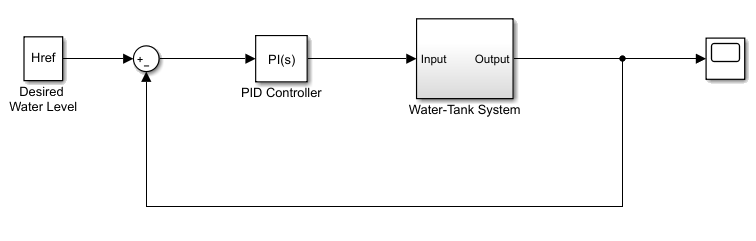
Modify the original model by making the following changes:
Delete the PID Controller.
Insert the RL Agent block.
Connect the observation vector , where is the height of the water in the tank, , and is the reference height.
Set up the reward .
Configure the termination signal such that the simulation stops if or .
The resulting model is rlwatertank.slx. For more information on this model and these changes, see Water Tank Custom Simulink Environment for Reinforcement Learning.
open_system("rlwatertank")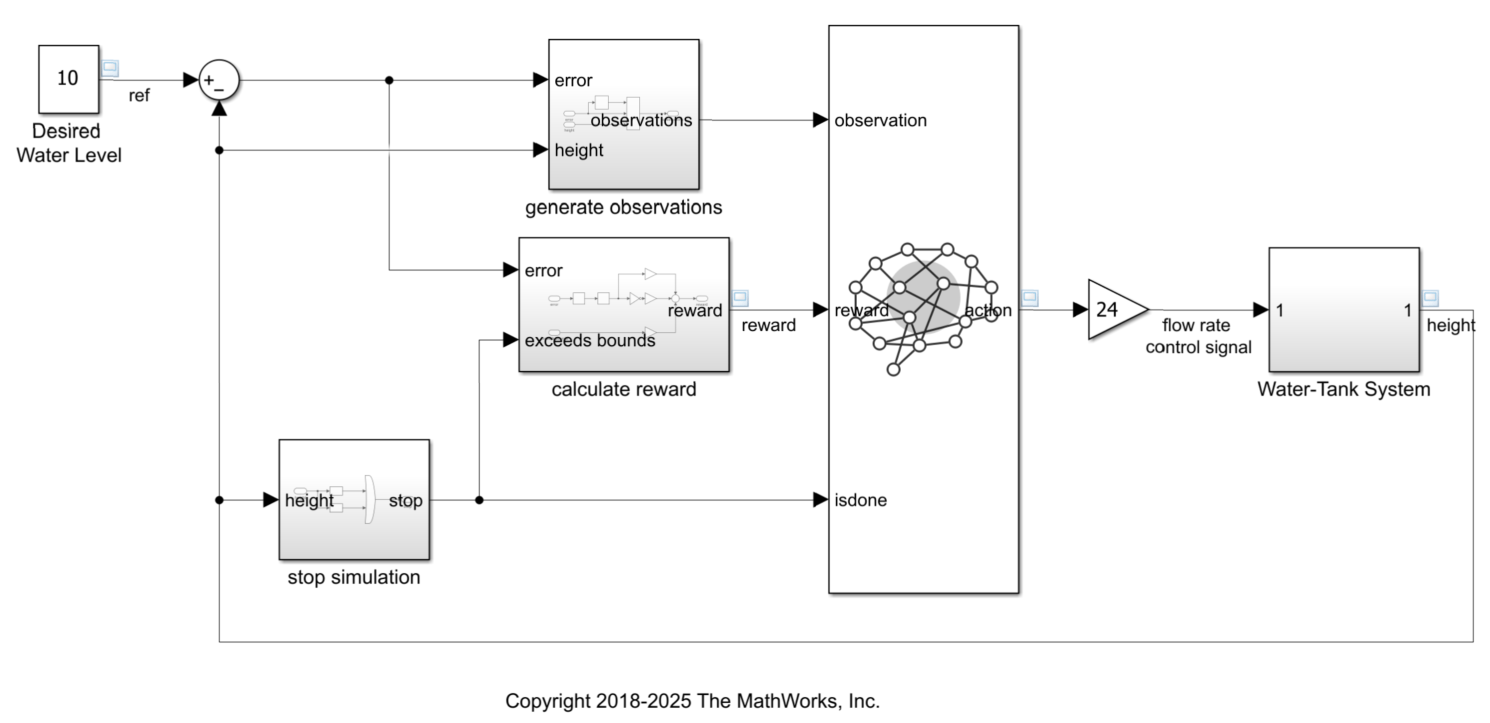
For more information about custom Simulink environments, see Create Custom Simulink Environments.
Create the Environment
Creating an environment model includes defining the following:
Action and observation signals that the agent uses to interact with the environment. For more information, see
rlNumericSpecandrlFiniteSetSpec.Reward signal that the agent uses to measure its success. For more information, see Define Observation, Reward and Is-Done Signals.
Define the observation specification obsInfo and action specification actInfo.
% Observation info
obsInfo = rlNumericSpec([3 1], ...
    LowerLimit=[-inf -inf 0  ]', ...
    UpperLimit=[ inf  inf inf]');

% Name and description are optional and not used
% by the software
obsInfo.Name = "observations";
obsInfo.Description = "integrated error, error," + ...
    " and measured height";

% Action info
actInfo = rlNumericSpec([1 1], LowerLimit=0, UpperLimit=1);
actInfo.Name = "flow rate control signal";
Create the environment object.
env = rlSimulinkEnv("rlwatertank","rlwatertank/RL Agent", ...
    obsInfo,actInfo);
Set a custom reset function that randomizes the reference values for the model. The localResetFcn function is provided at the end of the example.
env.ResetFcn = @(in)localResetFcn(in);
Specify the agent sample time Ts and the simulation time Tf in seconds.
Ts = 1.0;
Tf = 100;
Create the Critic
DDPG agents use a parameterized Q-value function approximator to estimate the value of the policy. A Q-value function critic takes the current observation and an action as inputs and returns a single scalar as output. The output is the estimated value of the policy, that is the estimated discounted cumulative long-term reward when the agent starts from the state corresponding to the current observation, takes the action, and follows the policy thereafter.
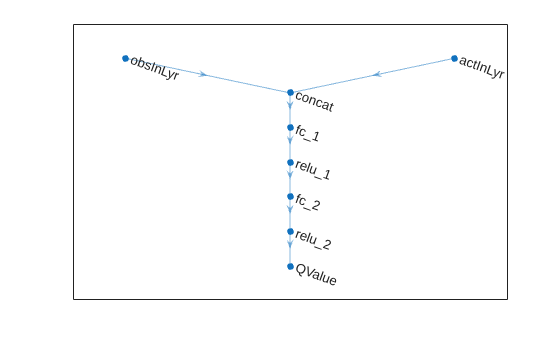
To model the parameterized Q-value function within the critic, use a neural network with two input layers (one for the observation channel, as specified by obsInfo, and the other for the action channel, as specified by actInfo) and one output layer (which returns the scalar value).
Define each network path as an array of layer objects. Assign names to the input and output layers of each path. These names allow you to connect the paths and then later explicitly associate the network input and output layers with the appropriate environment channel. Obtain the dimension of the observation and action spaces from the obsInfo and actInfo specifications.
% Observation path
obsPath = featureInputLayer(obsInfo.Dimension(1), ...
    Name="obsInLyr");

% Action path
actPath = featureInputLayer(actInfo.Dimension(1), ...
    Name="actInLyr");

% Common path
commonPath = [
    concatenationLayer(1,2,Name="concat")
    fullyConnectedLayer(25)
    reluLayer()
    fullyConnectedLayer(25)
    reluLayer()
    fullyConnectedLayer(1,Name="QValue")
    ];

% Create the network object and add the layers
criticNet = dlnetwork();
criticNet = addLayers(criticNet,obsPath);
criticNet = addLayers(criticNet,actPath);
criticNet = addLayers(criticNet,commonPath);

% Connect the layers
criticNet = connectLayers(criticNet, ...
    "obsInLyr","concat/in1");
criticNet = connectLayers(criticNet, ...
    "actInLyr","concat/in2");
View the critic network configuration.
plot(criticNet)
Initialize the dlnetwork object and summarize its properties. The initial parameters of the critic network are initialized with random values. Specify the random number stream so that the network is always initialized with the same parameter values.
rng(0,"twister");
criticNet = initialize(criticNet);
summary(criticNet)
Initialized: true
Number of learnables: 801
Inputs:
1 'obsInLyr' 3 features
2 'actInLyr' 1 features
Create the critic approximator object using the specified deep neural network, the environment specification objects, and the names if the network inputs to be associated with the observation and action channels.
critic = rlQValueFunction(criticNet, ...
    obsInfo,actInfo, ...
    ObservationInputNames="obsInLyr", ...
    ActionInputNames="actInLyr");
For more information on Q-value function objects, see rlQValueFunction.
Check the critic with a random input observation and action.
getValue(critic, ...
    {rand(obsInfo.Dimension)}, ...
    {rand(actInfo.Dimension)})
ans = single

-0.4320
For more information on creating critics, see Create Actors, Critics, and Policy Objects.
Create the Actor
DDPG agents use a parameterized deterministic policy over continuous action spaces, which is learned by a continuous deterministic actor.
A continuous deterministic actor implements a parameterized deterministic policy for a continuous action space. This actor takes the current observation as input and returns as output an action that is a deterministic function of the observation.
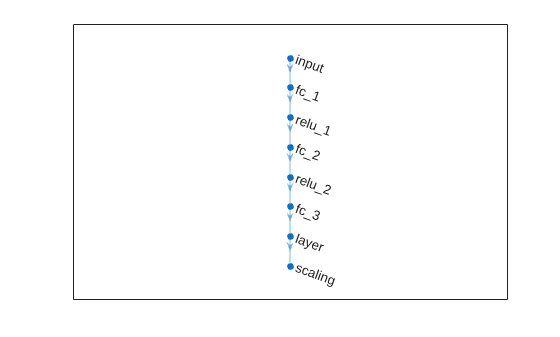
To model the parameterized policy within the actor, use a neural network with one input layer (which receives the content of the environment observation channel, as specified by obsInfo) and one output layer (which returns the action to the environment action channel, as specified by actInfo).
Define the network as an array of layer objects.
actorNet = [
    featureInputLayer(obsInfo.Dimension(1))
    fullyConnectedLayer(25)
    reluLayer()
    fullyConnectedLayer(25)
    reluLayer()
    fullyConnectedLayer(actInfo.Dimension(1))
    tanhLayer()
    scalingLayer("Scale",0.5,"Offset",0.5)
    ];
Convert the network to a dlnetwork object and summarize its properties. The initial parameters of the actor network are initialized with random values. Specify the random number stream so that the network is always initialized with the same parameter values.
rng(0,"twister");
actorNet = dlnetwork(actorNet);
summary(actorNet)
Initialized: true
Number of learnables: 776
Inputs:
1 'input' 3 features
View the actor network configuration.
plot(actorNet)
Create the actor approximator object using the specified deep neural network, the environment specification objects, and the name of the network input to be associated with the observation channel.
actor = rlContinuousDeterministicActor(actorNet,obsInfo,actInfo);
For more information, see rlContinuousDeterministicActor.
Check the actor with a random input observation.
getAction(actor,{rand(obsInfo.Dimension)})ans = 1×1 cell array
{[0.4500]}
For more information on creating critics, see Create Actors, Critics, and Policy Objects.
Create the DDPG Agent
Create the DDPG agent using the specified actor and critic approximator objects.
agent = rlDDPGAgent(actor,critic);
For more information, see rlDDPGAgent.
Specify options for the agent, the actor, and the critic using dot notation. For this training:
Use an experience buffer with capacity
1e6to store experiences. A larger experience buffer can store a diverse set of experiences.Specify the actor and critic learning rates to be
1e-4and1e-3respectively. A large learning rate causes drastic updates which might lead to divergent behaviors, while a low learning rate might cause the training to take longer.Use a gradient threshold of
1to clip the gradients. Clipping the gradients can improve training stability.Use mini-batches of
400experiences. Smaller mini-batches are computationally efficient but might introduce variance in training. By contrast, larger batch sizes can make the training stable but require higher memory.Use a discount factor of
0.99to enhance the importance of long term rewards.Use a sample time of one second is assigned to the agent.
agent.AgentOptions.SampleTime = Ts;
agent.AgentOptions.DiscountFactor = 0.99;
agent.AgentOptions.MiniBatchSize = 400;
agent.AgentOptions.ExperienceBufferLength = 1e6;

actorOpts = rlOptimizerOptions( ...
    LearnRate=1e-4, ...
    GradientThreshold=1);
criticOpts = rlOptimizerOptions( ...
    LearnRate=1e-3, ...
    GradientThreshold=1);
agent.AgentOptions.ActorOptimizerOptions = actorOpts;
agent.AgentOptions.CriticOptimizerOptions = criticOpts;
The DDPG agent in this example uses an Ornstein-Uhlenbeck (OU) noise model for exploration. For the noise model:
Specify a standard deviation value of
0.03to improve exploration during training.Specify a decay rate of
5e-5for the standard deviation. The decay causes exploration to reduce gradually as the training progresses.
agent.AgentOptions.NoiseOptions.StandardDeviation = 0.03;
agent.AgentOptions.NoiseOptions.StandardDeviationMin = 0.001;
agent.AgentOptions.NoiseOptions.StandardDeviationDecayRate = 5e-5;
Alternatively, you can specify the agent options using the rlDDPGAgentOptions object.
Check the agent with a random input observation.
getAction(agent,{rand(obsInfo.Dimension)})ans = 1×1 cell array
{[0.5506]}
Train Agent
To train the agent, first specify the training options. For this example, use the following options:
Run each training for a maximum of
5000episodes. Specify that each episode lasts for a maximum ofceil(Tf/Ts)(that is,100) time steps.Display the training progress in the Reinforcement Learning Training Monitor dialog box (set the
Plotsoption) and disable the command line display (set theVerboseoption tofalse).Evaluate the performance of the greedy policy every
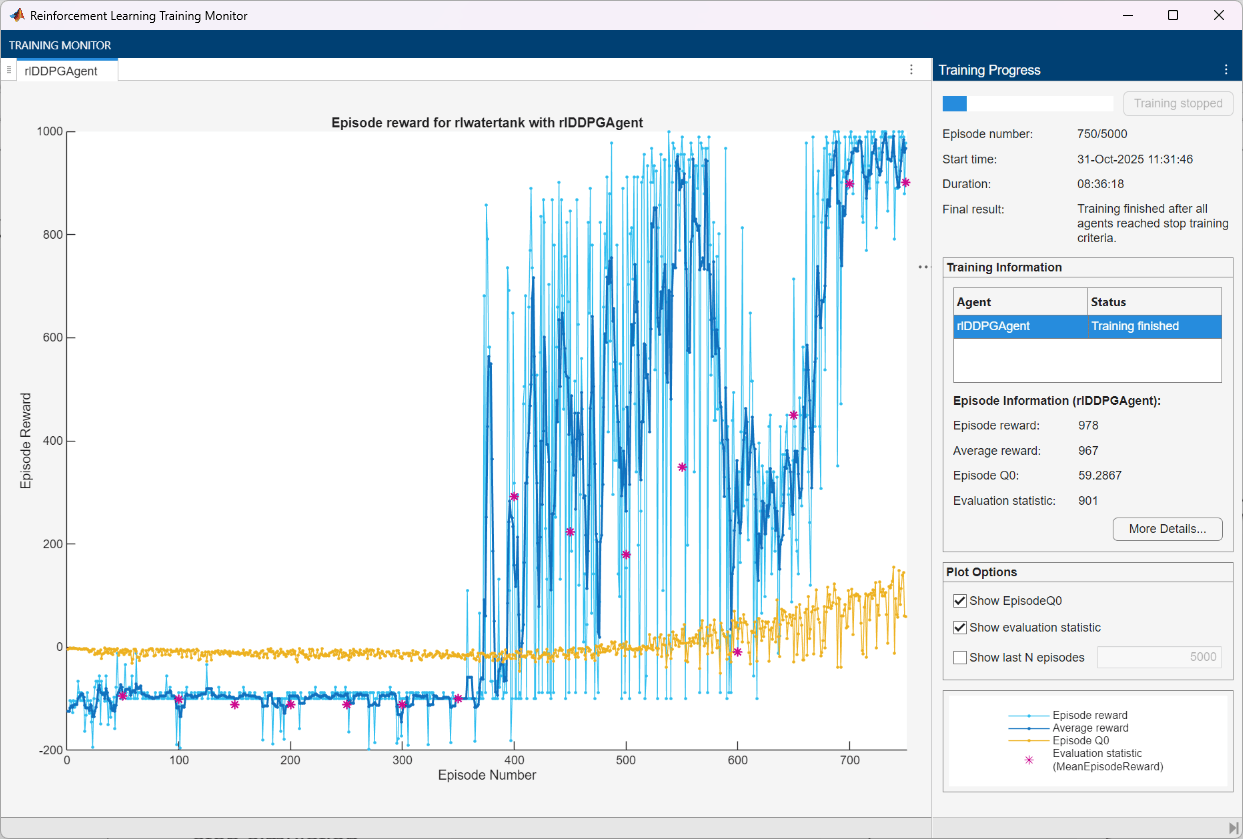
10training episodes, averaging the cumulative reward of5simulations.Stop the training when the evaluation score reaches
900. At this point, the agent can control the level of water in the tank.
For more information on training options, see rlTrainingOptions.
% training options
trainOpts = rlTrainingOptions( ...
    MaxEpisodes=5000, ...
    MaxStepsPerEpisode=ceil(Tf/Ts), ...
    Plots="training-progress", ...
    Verbose=false, ...
    StopTrainingCriteria="EvaluationStatistic", ...
    StopTrainingValue=900);

% agent evaluator
evl = rlEvaluator(EvaluationFrequency=50,NumEpisodes=5,RandomSeeds=1:5);
To reproduce the results of this section, specify the seed and algorithm used for random number generation.
rng(0,"twister");Train the agent using the train function. Training is a computationally intensive process that takes several minutes to complete. To save time, load a pretrained agent by setting doTraining to false. To train the agent yourself, set doTraining to true.
doTraining =false; if doTraining % Train the agent. trainingStats = train(agent,env,trainOpts,Evaluator=evl); else % Load the pretrained agent for the example. load("WaterTankDDPG.mat","agent") end
Validate Trained Agent
To reproduce the results of this section, specify the seed and algorithm used for random number generation.
rng(0,"twister");By default, the agent uses a greedy (hence deterministic) policy in simulation. To use the exploratory policy instead, set the UseExplorationPolicy agent property to true.
To use a specific initial condition, set a custom reset function, localValidationResetFcn. This function is provided at the end of the example.
env.ResetFcn = @(in)localValidationResetFcn(in);
Simulate the agent within the environment, and return the experience as output. To use a specific initial conditions, set reset function for the environment.
simOpts = rlSimulationOptions( ...
    MaxSteps=ceil(Tf/Ts), ...
    StopOnError="on");
experience = sim(env,agent,simOpts);
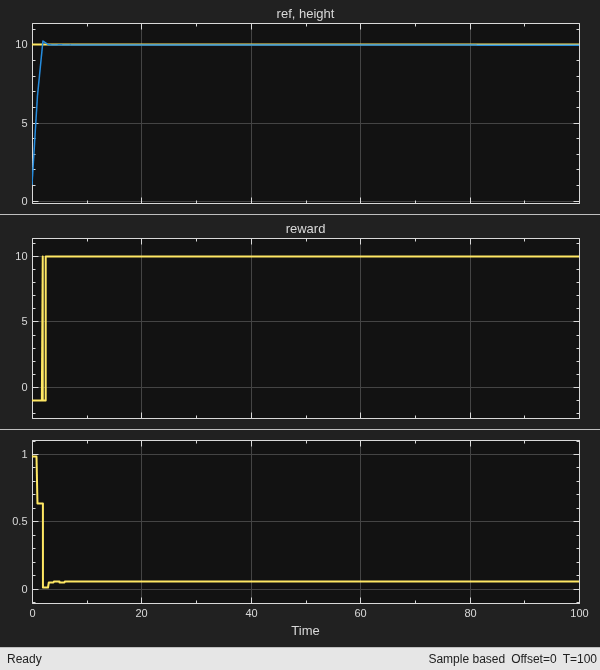
Display the total reward that the agent collects in the simulation.
sum(experience.Reward)
ans =
978
View the performance of the closed loop system using the Scope block in the Simulink model. The agent tracks the reference signal within 5 seconds.
Restore the random number stream using the information stored in previousRngState.
rng(previousRngState);
Local Reset Function
The sim function calls the reset function at the start of each simulation episode, and the train function calls it at the start of each training episode. The reset function takes as input, and returns as output, a Simulink.SimulationInput (Simulink) object. The output object specifies temporary changes applied to model, which are then discarded when the simulation or training completes. For this example, the reset function uses setBlockParameter (Simulink) to specify random values of the reference signal and the initial water height. For more information, see Reset Function for Simulink Environments.
function in = localResetFcn(in)

    % Randomize reference signal
    blk = sprintf("rlwatertank/Desired \nWater Level");
    h = 3*randn + 10;
    while h <= 0 || h >= 20
        h = 3*randn + 10;
    end
    in = setBlockParameter(in,blk,Value=num2str(h));

    % Randomize initial water height
    h = 3*randn + 10;
    while h <= 0 || h >= 20
        h = 3*randn + 10;
    end
    blk = "rlwatertank/Water-Tank System/H";
    in = setBlockParameter(in,blk,InitialCondition=num2str(h));
end

function in = localValidationResetFcn(in)
    % Set reference signal
    blk = sprintf("rlwatertank/Desired \nWater Level");
    h = 10;
    in = setBlockParameter(in,blk,Value=num2str(h));

    % Set initial height
    h = 1;
    blk = "rlwatertank/Water-Tank System/H";
    in = setBlockParameter(in,blk,InitialCondition=num2str(h));
end
See Also
Functions
Objects
rlFiniteSetSpec|rlNumericSpec|rlQValueFunction|rlContinuousDeterministicActor|rlDDPGAgent|rlDDPGAgentOptions|rlTrainingOptions|rlSimulationOptions
Topics
- Compare DDPG Agent to LQR Controller
- Train Default DQN Agent to Balance Discrete Cart-Pole
- Train Default DQN Agent to Swing Up and Balance Discrete Pendulum
- Tune Fixed PI Gains Using Reinforcement Learning
- Train Default TD3 Agent to Control Quanser QUBE Pendulum
- watertank Simulink Model (Simulink Control Design)
- Water Tank Custom Simulink Environment for Reinforcement Learning
- Reinforcement Learning for Control Systems Applications
- Create Custom Simulink Environments
- Define Observation, Reward and Is-Done Signals
- Reinforcement Learning Agents
- Train Reinforcement Learning Agents

