"block choice " button doesn't seem on Simulink

Show older comments
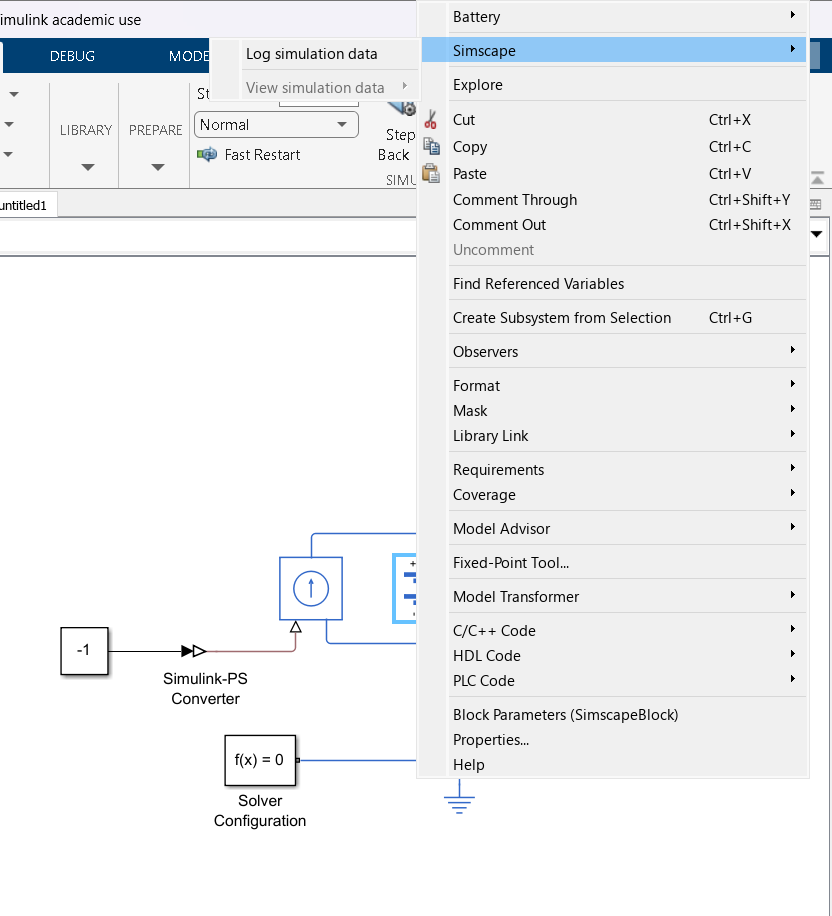
ı m tryna prepare a battery simulation with simulink but when ı push right click on "battery-table based" , and then ı go simscape button, and ı just only see "log simulation data" . Have you any reccomend for this problem? It s probably an easy solution, but ı can't
Answers (1)

Vinay
on 30 Jan 2025
0 votes
The 'block choice' is disabled in the MATLAB R2023b for the 'Battery' block. The thermal port can be modeled by enabling the thermal port in the block parameters.
- Open the 'Battery' block parameters.
- In the 'Thermal' tab , change 'Thermal port' as 'Model'
- Model the 'Thermal mass' parameter for the block.
Also the modeling option can be configured by enabling the 'Fade characteristic' in the block parameter as shown below

Kindly refer to the below documentation of 'Battery' and Matlab answer for more details
I hope this helps!
Categories
Find more on Creating Custom Components and Libraries in Help Center and File Exchange
on 1 Feb 2025
Community Treasure Hunt
Find the treasures in MATLAB Central and discover how the community can help you!
Start Hunting!
