Main Content

bundleAdjustmentMotion

R2026b

Adjust collection of 3-D points and camera poses using motion-only bundle adjustment

Description

refinedPose = bundleAdjustmentMotion(xyzPoints,imagePoints,absolutePose,intrinsics) returns the refined absolute camera pose of a single camera that minimizes reprojection errors.

The motion-only refinement procedure is a special case of the Levenberg-Marquardt algorithm for bundle adjustment with 3-D points fixed during optimization. The 3-D points and the camera pose are placed in the same world coordinate system.

example

[refinedPose,reprojectionErrors] = bundleAdjustmentMotion(___) additionally returns an N-element vector containing the mean reprojection error for each 3-D world point using the arguments from the previous syntax.

[___] = bundleAdjustmentMotion(___,Name,Value) uses additional options specified by one or more name-value arguments. Unspecified arguments have default values.

Examples

collapse all

Load data for initialization into the workspace.

data = load("globeMotionOnlyBA.mat");

Refine the absolute camera poses.

refinedPose = bundleAdjustmentMotion(data.xyzPoints,data.imagePoints,data.absPose,data.intrinsics);

Display the 3-D world points.

pcshow(data.xyzPoints,AxesVisibility="on",VerticalAxis="y",VerticalAxisDir="down",MarkerSize=45);
hold on

Plot the absolute camera poses before and after refinement.

plotCamera(AbsolutePose=data.absPose,Color="r",Size=2);
plotCamera(AbsolutePose=refinedPose,Color="m",Size=2);
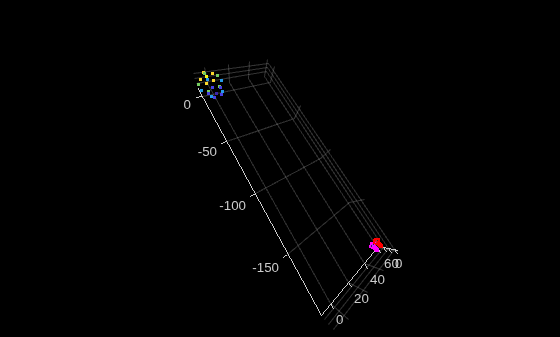
Figure contains an axes object. The axes object contains 21 objects of type line, text, patch, scatter.

Input Arguments

collapse all

Unrefined 3-D points, specified as an M-by-3 matrix of [x,y,z] locations.

Data Types: single | double

Image points, specified as an M-by-2 matrix or an M-element Point Feature Types array.

Absolute camera pose, specified as a rigidtform3d object.

Camera intrinsics, specified as a cameraIntrinsics object.

Name-Value Arguments

collapse all

Specify optional pairs of arguments as Name1=Value1,...,NameN=ValueN, where Name is the argument name and Value is the corresponding value. Name-value arguments must appear after other arguments, but the order of the pairs does not matter.

Before R2021a, use commas to separate each name and value, and enclose Name in quotes.

Example: "MaxIterations",50

Maximum number of iterations before the Levenberg-Marquardt algorithm stops, specified as a positive integer.

Absolute termination tolerance of the mean squared reprojection error in pixels, specified as a positive scalar.

Relative termination tolerance of the reduction in reprojection error between iterations, specified as a positive scalar.

Flag to indicate lens distortion, specified as false or true. When you set PointsUndistorted to false, the 2-D points in pointTracks must be from images with lens distortion. To use undistorted points, use the undistortImage function first, then set PointsUndistorted to true.

Name of loss function used for optimization, specified as "squared-euclidean", "huber", or "cauchy". Each loss function is intended for different data conditions:

  • "squared-euclidean" — Data is reliable and contains few or no outliers. Provides the most precise results.

  • "huber" — Data contains some moderate outliers. Provides robustness to outliers with accuracy for the majority of your data.

  • "cauchy" — Data contains many outliers. Provides maximum robustness by strongly limiting the influence of large errors.

Using the "huber" and "cauchy" robust loss functions may reduce overall optimization accuracy because they limit the influence of all errors, including legitimate large measurements, not just outliers. These robust loss functions may also increase computational complexity, which can slow the optimization compared to the "squared-euclidean" loss function.

Transition point of the robust loss function, specified as a positive scalar. Increasing this value makes the loss function behave more like standard least squares and increases the influence of large errors. Decreasing this value reduces the influence of large errors. Typical values are in the range [0.1,10]. This argument applies only when the LossFunction is not set to "squared-euclidean".

Display progress information, specified as false or true.

Output Arguments

collapse all

Refined absolute pose of the camera, returned as a rigidtform3d object.

Reprojection errors, returned as an M-element vector. The function projects each world point back into each camera. Then in each image, the function calculates the reprojection error as the distance between the detected and the reprojected point. The reprojectionErrors vector contains the average reprojection error for each world point.
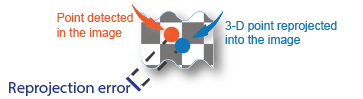
Visual showing the reprojection error as the distance between point detected in the image and the 3-D point reprojected into the image.

References

[1] Lourakis, Manolis I. A., and Antonis A. Argyros. "SBA: A Software Package for Generic Sparse Bundle Adjustment." ACM Transactions on Mathematical Software 36, no. 1 (March 2009): 2:1–2:30.

[2] Hartley, Richard, and Andrew Zisserman. Multiple View Geometry in Computer Vision. 2nd ed. Cambridge, UK ; New York: Cambridge University Press, 2003.

[3] Triggs, Bill, Philip F. McLauchlan, Richard I. Hartley, and Andrew W. Fitzgibbon. "Bundle Adjustment — A Modern Synthesis." In Proceedings of the International Workshop on Vision Algorithms, 298–372. Springer-Verlag, 1999.

Extended Capabilities

expand all

Version History

Introduced in R2020a

expand all