Interface Editor
R2026bCreate and author interfaces in local and shared data dictionaries
Description
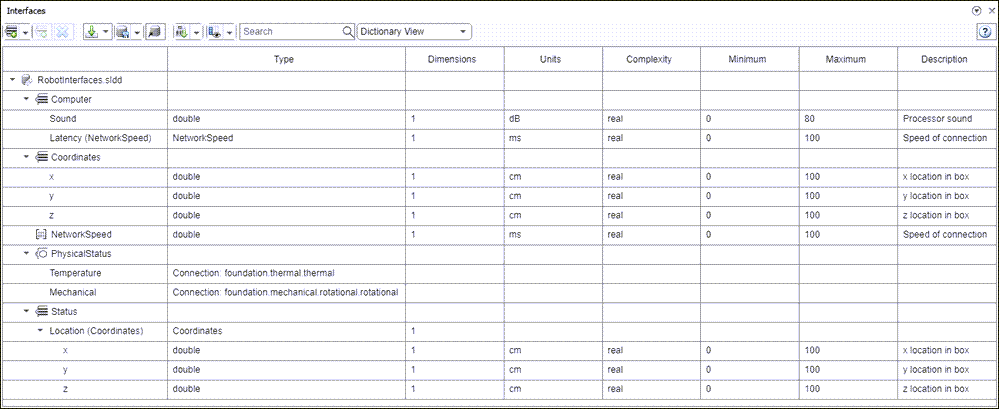
The Interface Editor allows you to define interfaces in System Composer™ that might contain attributes. In System Composer architecture models, interfaces are necessary to specify information that flows through ports between components.
Types of interfaces include:
Composite Data Interface — Represents the information that is shared through a connector and enters or exits a component through a port. A data interface can be composite, meaning that it can include data elements that describe the properties of an interface signal.
Value Type — Can be used as a port interface to define the atomic piece of data that flows through that port and has a top-level type, dimension, unit, complexity, minimum, maximum, and description. You can also assign the type of data elements in data interfaces to value types.
Physical Interface — Defines the kind of information that flows through a physical port, The same interface can be assigned to multiple ports. A physical interface bundles physical elements to describe a physical model using at least one physical domain
Service Interface — Defines service elements with function arguments for a client-server port. This interface is only available for software architectures.
You can save a locally defined model data dictionary as a shared data dictionary to reuse interface definitions across architecture models. Apply a profile to your data dictionary to assign stereotypes to interfaces. These interfaces typed by a stereotype now contain metadata, and you can set the property values for each interface independently.
The Interface Editor displays interfaces in dictionaries. To view interfaces local to a port, select the port, open the Property Inspector, and go to the Parameters tab.
Open the Interface Editor
System Composer toolstrip: Navigate to Modeling > Interface Editor.
System Composer toolstrip: Navigate to Modeling > Architecture Views to launch the Architecture Views Gallery tool. In the View Browser, select a new or existing architecture view. On the toolstrip, click the Interface Editor button.
Examples
Parameters
Add a new interface by clicking  or select one of these options from the drop-down
list:
or select one of these options from the drop-down
list:
Composite Data Interface — Represents the information that is shared through a connector and enters or exits a component through a port. A data interface can be composite, meaning that it can include data elements that describe the properties of an interface signal.
Value Type — Can be used as a port interface to define the atomic piece of data that flows through that port and has a top-level type, dimension, unit, complexity, minimum, maximum, and description. You can also assign the type of data elements in data interfaces to value types.
Physical Interface — Defines the kind of information that flows through a physical port, The same interface can be assigned to multiple ports. A physical interface bundles physical elements to describe a physical model using at least one physical domain
Service Interface — Defines service elements with function arguments for a client-server port. This interface is only available for software architectures.
Add a new element by clicking  . If the selected interface is one of these, the new
element added is one of these types:
. If the selected interface is one of these, the new
element added is one of these types:
Composite Data Interface — Data Element
Physical Interface — Physical Element
Service Interface — Service Element — Function Arguments, which are only available for software architectures
Delete the selected interface or element in the Interface Editor.
Import interfaces from these locations:
Base Workspace
MAT file
Save interfaces on the current data dictionary or link an existing data dictionary to your model. Select a specific option from the list:
Save dictionary
Save all dictionaries
Save to new dictionary
Link existing dictionary
Manage interfaces, data types, and data dictionary references in the Architectural Data Editor.
Choose a profile XML file to import into the currently selected data dictionary or remove existing profile from dictionary.
Context menu selections for interfaces in Interface Editor:
Highlight port(s) using this interface — Highlight ports in the System Composer model canvas where the selected interface is used.
Assign to selected port(s) — Assign the selected interface to the selected ports on the System Composer model canvas.
Move Interface(s) To — When you link a data dictionary SLDD file to the model, and when that SLDD file references another data dictionary SLDD file, you can move interfaces from one data dictionary to another. The move operation preserves the port associations to these interfaces, so interfaces are still assigned to the same ports.
More About
Version History
Introduced in R2019a
See Also
addInterface | moveInterface | removeInterface | addElement | removeElement | connect | setInterface | addValueType | connect | getDestinationElement | getSourceElement | createInterface | createOwnedType | Adapter | createDictionary | openDictionary | saveToDictionary | linkDictionary | unlinkDictionary | addReference | removeReference

