fimplicit
Plot implicit symbolic equation or function
Syntax
Description
fimplicit( plots the implicit
symbolic equation or function f)f over the default interval
[-5 5] for x and
y.
fimplicit( plots f,[xmin xmax
ymin ymax])f over the interval
xmin < x <
xmax and ymin <
y < ymax. The fimplicit function uses
symvar to order the variables and assign intervals.
fimplicit(___,
specifies line properties using one or more Name,Value)Name,Value pair
arguments. Use this option with any of the input argument combinations in the
previous syntaxes. Name,Value pair settings apply to all the
lines plotted. To set options for individual lines, use the objects returned by
fimplicit.
fimplicit( plots
into the axes specified by ax,___)ax instead of the current axes
gca.
fi = fimplicit(___)
Examples
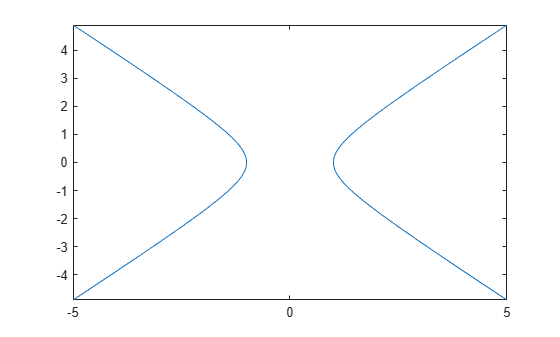
Plot the hyperbola by using fimplicit. The fimplicit function uses the default interval of for and .
syms x y
fimplicit(x^2 - y^2 == 1)
Plot the hyperbola described by the function by first declaring the symbolic function f(x,y) using syms. The fimplicit function uses the default interval of for and .
syms f(x,y)
f(x,y) = x^2 - y^2 - 1;
fimplicit(f)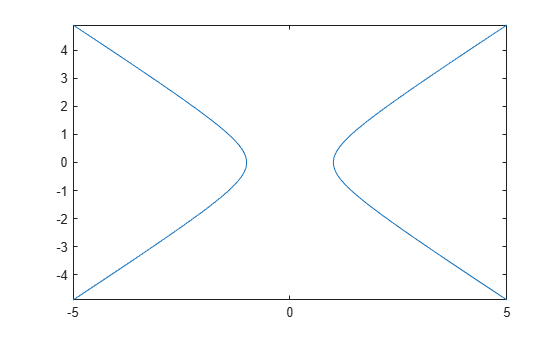
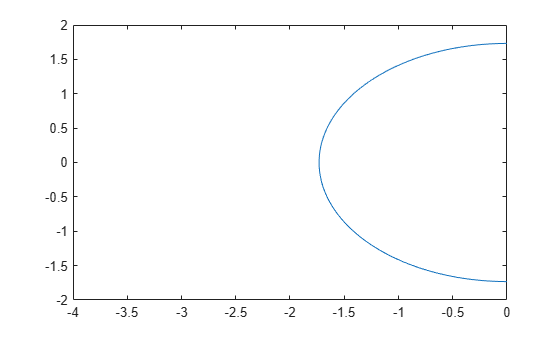
Plot half of the circle by using the intervals and . Specify the plotting interval as the second argument of fimplicit.
syms x y
circle = x^2 + y^2 == 3;
fimplicit(circle, [-4 0 -2 2])
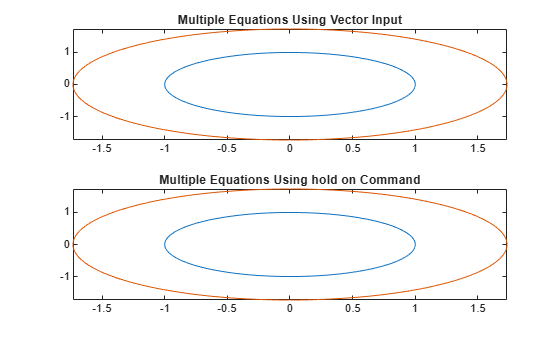
You can plot multiple equations either by passing the inputs as a vector or by using hold on to successively plot on the same figure. If you specify LineSpec and Name-Value arguments, they apply to all lines. To set options for individual plots, use the function handles returned by fimplicit.
Divide a figure into two subplots by using subplot. On the first subplot, plot and using vector input. On the second subplot, plot the same inputs by using hold on.
syms x y
circle1 = x^2 + y^2 == 1;
circle2 = x^2 + y^2 == 3;

subplot(2,1,1)
fimplicit([circle1 circle2])
title('Multiple Equations Using Vector Input')

subplot(2,1,2)
fimplicit(circle1)
hold on
fimplicit(circle2)
title('Multiple Equations Using hold on Command')

hold off
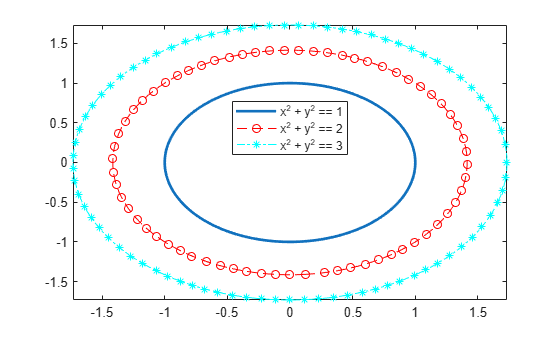
Plot three concentric circles of increasing diameter. For the first line, use a linewidth of 2. For the second, specify a dashed red line style with circle markers. For the third, specify a cyan, dash-dot line style with asterisk markers. Display the legend.
syms x y
circle = x^2 + y^2;
fimplicit(circle == 1,Linewidth = 2)
hold on
fimplicit(circle == 2,"--or")
fimplicit(circle == 3,"-.*c")
legend(Location="best")
hold off
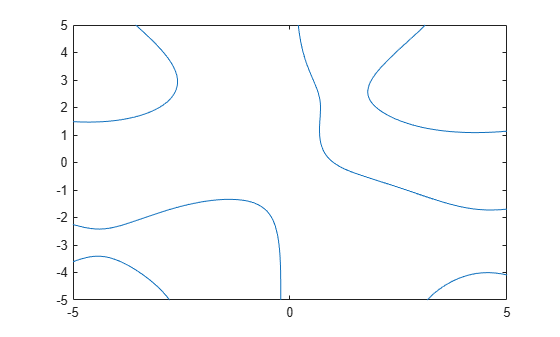
Plot . Specify an output to make fimplicit return the plot object.
syms x y
eqn = y*sin(x) + x*cos(y) == 1;
fi = fimplicit(eqn)
fi =
  ImplicitFunctionLine with properties:

     Function: x*cos(y) + y*sin(x) == 1
        Color: [0.0660 0.4430 0.7450]
    LineStyle: '-'
    LineWidth: 0.5000

  Show all properties
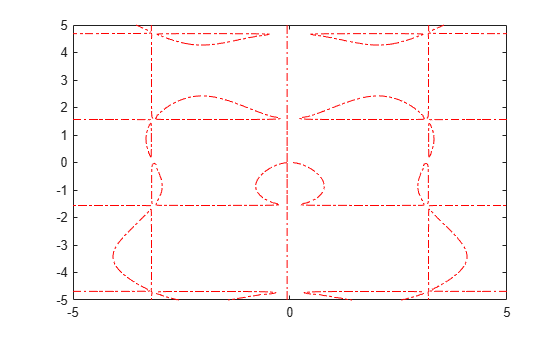
Change the plotted equation to by using dot notation to set properties. Similarly, change the line color to red and line style to a dash-dot line. The horizontal and vertical lines in the output are artifacts that should be ignored.
fi.Function = x/cos(y) + y/sin(x) == 0;
fi.Color = 'r';
fi.LineStyle = '-.';
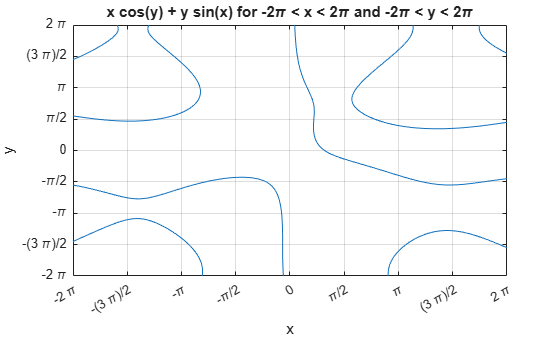
Plot over the interval and . Add a title and axis labels. Create the x-axis ticks by spanning the x-axis limits at intervals of pi/2. Display these ticks by using the XTick property. Create x-axis labels by using arrayfun to apply texlabel to S. Display these labels by using the XTickLabel property. Repeat these steps for the y-axis.
To use LaTeX in plots, see latex.
syms x y
eqn = x*cos(y) + y*sin(x) == 1;
fimplicit(eqn, [-2*pi 2*pi])
grid on
title('x cos(y) + y sin(x) for -2\pi < x < 2\pi and -2\pi < y < 2\pi')
xlabel('x')
ylabel('y')
ax = gca;

S = sym(ax.XLim(1):pi/2:ax.XLim(2));
ax.XTick = double(S);
ax.XTickLabel = arrayfun(@texlabel, S, 'UniformOutput', false);

S = sym(ax.YLim(1):pi/2:ax.YLim(2));
ax.YTick = double(S);
ax.YTickLabel = arrayfun(@texlabel, S, 'UniformOutput', false);
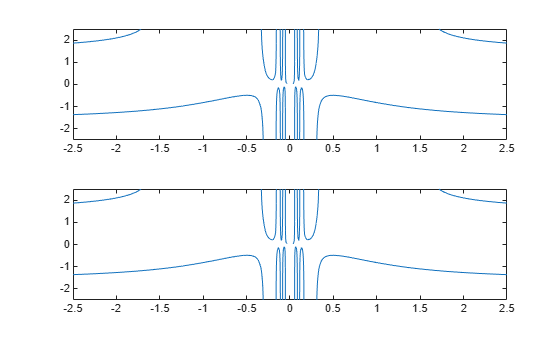
When you zoom into a plot, fimplicit re-evaluates the plot automatically. This re-evaluation on zoom can reveal hidden detail at smaller scales.
Divide a figure into two by using subplot. Plot in both the first and second subplots. Zoom into the second subplot by using zoom. The zoomed subplot shows detail that is not visible in the first subplot.
syms x y
eqn = x*cos(y) + y*sin(1/x) == 0;

subplot(2,1,1)
fimplicit(eqn)

subplot(2,1,2)
fimplicit(eqn)
zoom(2)
Input Arguments
Implicit equation or function to plot, specified as a symbolic equation,
expression, or function. If the right-hand side is not specified, then it is
assumed to be 0.
Plotting range for x and y,
specified as a vector of two numbers. The default range is [-5
5].
Plotting range for x and y,
specified as a vector of four numbers. The default range is [-5 5
-5 5].
Axes object. If you do not specify an axes object, then
fimplicit uses the current axes
gca.
Line style, marker, and color, specified as a string scalar or character vector containing symbols. The symbols can appear in any order. You do not need to specify all three characteristics (line style, marker, and color). For example, if you omit the line style and specify the marker, then the plot shows only the marker and no line.
Example: "--or" is a red dashed line with circle markers.
| Line Style | Description | Resulting Line |
|---|---|---|
"-" | Solid line |
|
"--" | Dashed line |
|
":" | Dotted line |
|
"-." | Dash-dotted line |
|


| Marker | Description | Resulting Marker |
|---|---|---|
"o" | Circle |
|
"+" | Plus sign |
|
"*" | Asterisk |
|
"." | Point |
|
"x" | Cross |
|
"_" | Horizontal line |
|
"|" | Vertical line |
|
"square" | Square |
|
"diamond" | Diamond |
|
"^" | Upward-pointing triangle |
|
"v" | Downward-pointing triangle |
|
">" | Right-pointing triangle |
|
"<" | Left-pointing triangle |
|
"pentagram" | Pentagram |
|
"hexagram" | Hexagram |
|


| Color Name | Short Name | RGB Triplet | Appearance |
|---|---|---|---|
"red" | "r" | [1 0 0] |
|
"green" | "g" | [0 1 0] |
|
"blue" | "b" | [0 0 1] |
|
"cyan"
| "c" | [0 1 1] |
|
"magenta" | "m" | [1 0 1] |
|
"yellow" | "y" | [1 1 0] |
|
"black" | "k" | [0 0 0] |
|
"white" | "w" | [1 1 1] |
|








Name-Value Arguments
Specify optional pairs of arguments as
Name1=Value1,...,NameN=ValueN, where Name is
the argument name and Value is the corresponding value.
Name-value arguments must appear after other arguments, but the order of the
pairs does not matter.
Before R2021a, use commas to separate each name and value, and enclose
Name in quotes.
Example: 'Marker','o','MarkerFaceColor','red'
The function line properties listed here are only a subset. For a complete list, see ImplicitFunctionLine Properties.
Number of evaluation points per direction, specified as a number. The
default is 151.
Alternatively, you can specify some common colors by name. This table lists the named color options, the equivalent RGB triplets, and the hexadecimal color codes.
| Color Name | Short Name | RGB Triplet | Hexadecimal Color Code | Appearance |
|---|---|---|---|---|
"red" | "r" | [1 0 0] | "#FF0000" |
|
"green" | "g" | [0 1 0] | "#00FF00" |
|
"blue" | "b" | [0 0 1] | "#0000FF" |
|
"cyan"
| "c" | [0 1 1] | "#00FFFF" |
|
"magenta" | "m" | [1 0 1] | "#FF00FF" |
|
"yellow" | "y" | [1 1 0] | "#FFFF00" |
|
"black" | "k" | [0 0 0] | "#000000" |
|
"white" | "w" | [1 1 1] | "#FFFFFF" |
|
This table lists the default color palettes for plots in the light and dark themes.
| Palette | Palette Colors |
|---|---|
Before R2025a: Most plots use these colors by default. |
|
|
|


You can get the RGB triplets and hexadecimal color codes for these palettes using the orderedcolors and rgb2hex functions. For example, get the RGB triplets for the "gem" palette and convert them to hexadecimal color codes.
RGB = orderedcolors("gem");
H = rgb2hex(RGB);
Before R2023b: Get the RGB triplets using RGB =
get(groot,"FactoryAxesColorOrder").
Before R2024a: Get the hexadecimal color codes using H =
compose("#%02X%02X%02X",round(RGB*255)).
Example: "blue"
Example: [0
0 1]
Example: "#0000FF"
Line style, specified as one of the options listed in this table.
| Line Style | Description | Resulting Line |
|---|---|---|
"-" | Solid line |
|
"--" | Dashed line |
|
":" | Dotted line |
|
"-." | Dash-dotted line |
|
"none" | No line | No line |
Marker symbol, specified as one of the values listed in this table. By default, the object does not display markers. Specifying a marker symbol adds markers at each data point or vertex.
| Marker | Description | Resulting Marker |
|---|---|---|
"o" | Circle |
|
"+" | Plus sign |
|
"*" | Asterisk |
|
"." | Point |
|
"x" | Cross |
|
"_" | Horizontal line |
|
"|" | Vertical line |
|
"square" | Square |
|
"diamond" | Diamond |
|
"^" | Upward-pointing triangle |
|
"v" | Downward-pointing triangle |
|
">" | Right-pointing triangle |
|
"<" | Left-pointing triangle |
|
"pentagram" | Pentagram |
|
"hexagram" | Hexagram |
|
"none" | No markers | Not applicable |
Alternatively, you can specify some common colors by name. This table lists the named color options, the equivalent RGB triplets, and the hexadecimal color codes.
| Color Name | Short Name | RGB Triplet | Hexadecimal Color Code | Appearance |
|---|---|---|---|---|
"red" | "r" | [1 0 0] | "#FF0000" |
|
"green" | "g" | [0 1 0] | "#00FF00" |
|
"blue" | "b" | [0 0 1] | "#0000FF" |
|
"cyan"
| "c" | [0 1 1] | "#00FFFF" |
|
"magenta" | "m" | [1 0 1] | "#FF00FF" |
|
"yellow" | "y" | [1 1 0] | "#FFFF00" |
|
"black" | "k" | [0 0 0] | "#000000" |
|
"white" | "w" | [1 1 1] | "#FFFFFF" |
|
"none" | Not applicable | Not applicable | Not applicable | No color |
This table lists the default color palettes for plots in the light and dark themes.
| Palette | Palette Colors |
|---|---|
Before R2025a: Most plots use these colors by default. |
|
|
|
You can get the RGB triplets and hexadecimal color codes for these palettes using the orderedcolors and rgb2hex functions. For example, get the RGB triplets for the "gem" palette and convert them to hexadecimal color codes.
RGB = orderedcolors("gem");
H = rgb2hex(RGB);
Before R2023b: Get the RGB triplets using RGB =
get(groot,"FactoryAxesColorOrder").
Before R2024a: Get the hexadecimal color codes using H =
compose("#%02X%02X%02X",round(RGB*255)).
Alternatively, you can specify some common colors by name. This table lists the named color options, the equivalent RGB triplets, and the hexadecimal color codes.
| Color Name | Short Name | RGB Triplet | Hexadecimal Color Code | Appearance |
|---|---|---|---|---|
"red" | "r" | [1 0 0] | "#FF0000" |
|
"green" | "g" | [0 1 0] | "#00FF00" |
|
"blue" | "b" | [0 0 1] | "#0000FF" |
|
"cyan"
| "c" | [0 1 1] | "#00FFFF" |
|
"magenta" | "m" | [1 0 1] | "#FF00FF" |
|
"yellow" | "y" | [1 1 0] | "#FFFF00" |
|
"black" | "k" | [0 0 0] | "#000000" |
|
"white" | "w" | [1 1 1] | "#FFFFFF" |
|
"none" | Not applicable | Not applicable | Not applicable | No color |
This table lists the default color palettes for plots in the light and dark themes.
| Palette | Palette Colors |
|---|---|
Before R2025a: Most plots use these colors by default. |
|
|
|
You can get the RGB triplets and hexadecimal color codes for these palettes using the orderedcolors and rgb2hex functions. For example, get the RGB triplets for the "gem" palette and convert them to hexadecimal color codes.
RGB = orderedcolors("gem");
H = rgb2hex(RGB);
Before R2023b: Get the RGB triplets using RGB =
get(groot,"FactoryAxesColorOrder").
Before R2024a: Get the hexadecimal color codes using H =
compose("#%02X%02X%02X",round(RGB*255)).
Example: [0.3 0.2 0.1]
Example: "green"
Example: "#D2F9A7"
Output Arguments
Algorithms
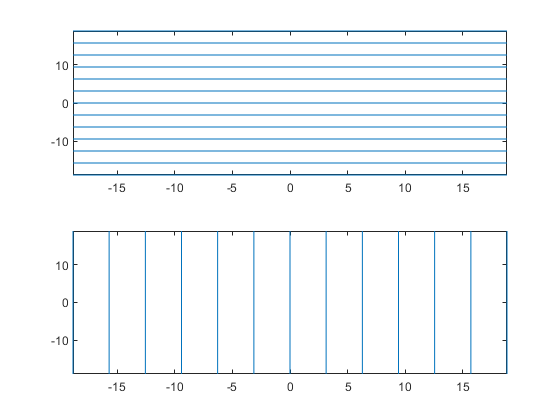
fimplicit assigns the symbolic variables
in f to the x-axis, then the y-axis,
and symvar determines the order of the variables to be assigned. Therefore, variable
and axis names might not correspond. To force fimplicit to assign
x or y to its corresponding axis, create the symbolic
function to plot, then pass the symbolic function to fimplicit.
For example, the following code plots the roots of the implicit function f(x,y) = sin(y) in two ways. The first way forces the waves to oscillate with respect to the y-axis. In other words, the first plot assigns the y variable to the corresponding y-axis. The second plot assigns y to the x-axis because it is the first (and only) variable in the symbolic function.
syms x y;
f(x,y) = sin(y);
intvl = [-6 6]*pi;

figure;
subplot(2,1,1)
fimplicit(f,intvl);
subplot(2,1,2)
fimplicit(f(x,y),intvl); % Or fimplicit(sin(y) == 0,intvl);
Version History
Introduced in R2016b

