Rotation Matrix to VR Rotation
R2026b(Removed) Convert rotation matrix to axis/angle rotation
Rotation Matrix to VR Rotation has been removed. For more information, see Version History.
Rotation Matrix to VR Rotation block
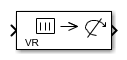
To add a block to a model, double-click the canvas and start typing the block name. Then, select the block from the list.
Libraries:
Simulink 3D Animation /
Utilities
Description
The Rotation Matrix to VR Rotation converts Rotation Matrix (defined columnwise as 3-by-3 matrix or as a 9-element column vector) into the Axis / Angle rotation representation used for defining rotations in VR.
Ports
Input
Output
Parameters
Programmatic Use: Add Block
To add the block programmatically, use the add_block function with one of these library block paths as the source.
"vrlib/Utilities/Rotation Matrix to VR Rotation"
Example: add_block("vrlib/Utilities/Rotation Matrix to VR Rotation","myModel/myBlock",MakeNameUnique="on")

