Real-Time Model Preparation
R2026bPreparing a Simscape model for real-time involves iteratively balancing the performance and fidelity to produce accurate results at a small enough cost and time step for the target machine. Begin by obtaining reference results from your model. When your model produces accurate results compared to the reference results using a fixed-step solver, you can attempt to deploy your model to the real-time target. Take these steps as needed to balance performance and fidelity:
Use ideal or system-level blocks and ideal parameterizations in place of more complex blocks and parameterizations.
Remove sources of fast dynamics.
Remove sources of numerical stiffness.
Remove sources of zero-crossings.
Use the Partitioning Solver.
Partition the model.
Minimize solver iterations.
For FPGA deployment, reduce sources of modes.
To analyze solver performance for fast dynamics and numerical
stiffness, use the Solver
Profiler tool. When you are ready to convert to fixed-step,
fixed-cost, use the simscape.getLocalSolverFixedCostInfo
function to determine how many nonlinear iterations to perform.
Tools
| Solver Profiler | Identify solver performance bottlenecks |
Functions
simscape.getLocalSolverFixedCostInfo | Determine the iteration requirement for fixed-cost solvers |
Topics
Fixed-Step Fixed-Cost Setup
- Examine Model Dynamics Using Solver Profiler
Identify factors affecting model simulation using the Solver Profiler. - Solvers for Real-Time Simulation
The fixed-step solver, step size, and number of iterations that you specify affect how your Simscape™ model simulates in real time. - Identify and Resolve System Stiffness in Simscape Models
Analyze the effect of particular block variables on overall system stiffness of a Simscape network. - Define Step Size and Number of Nonlinear Iterations for Simscape Real-Time Simulation
Determine the step size and number of nonlinear iterations for fixed-step, fixed-cost simulation. - Estimate Computation Costs
Determine if your Simscape model is likely to cause an overrun when you simulate it on your real-time target machine by estimating computational costs.
Performance Optimization
- Reduce Zero Crossings
Eliminate components that cause zero crossings to increase the minimal step-size for fixed-step simulation and to make your Simscape model real-time capable. - Increase Simulation Speed Using the Partitioning Solver
Improve performance by using the Simscape Partitioning solver to convert a large system of equations into several smaller systems of equations that are easier to solve.
FPGA Deployment
- Get Started with Simscape Hardware-in-the-Loop Workflow (HDL Coder)
Simscape Hardware-in-the-Loop workflow modeling guidelines and restrictions. - Simscape Language Support for FPGA HIL Deployment (HDL Coder)
Simscape language support in Simscape Hardware-in-the-Loop Workflow. - Modeling Guidelines for Simscape Subsystem Replacement (HDL Coder)
Simscape modeling best practices for replacing Simscape subsystem with state-space algorithm. - Replace Piecewise-Constant Resistor with Switched Linear Components (HDL Coder)
Convert a Simscape model with nonlinear component into a switched linear model. - Estimate Achievable Target Frequency Without Running Synthesis (HDL Coder)
Estimate the optimal frequency that you want your Simscape models to achieve on FPGA without running synthesis. - Modeling Techniques for Simscape Components for FPGA HIL Deployment (HDL Coder)
Model your power electronic converter by using hardware-in-the-loop (HIL) simulation in a real-time target machine.
Generic Platforms
- Requirements for Using Alternative Platforms
Follow the recommendations for minimum hardware, software, and compiler specifications to deploy your Simscape model for hardware-in-the-loop (HIL) simulation using a custom standalone application. - Embedded and Generic Real-Time Resources
Simulink® Coder™ and Embedded Coder® use system target files (STFs) to generate code for interfacing with specific real-time operating systems.
Featured Examples
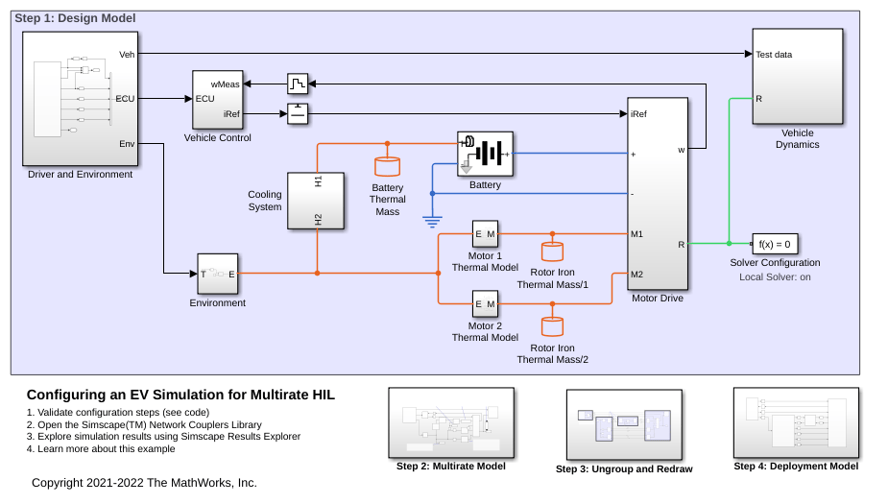
Configuring an EV Simulation for Multirate HIL
An electric vehicle model suitable for multirate Hardware-In-the-Loop (HIL) deployment. The example uses the Simscape™ Network Couplers Library to split the model into separate Simulink® subsystems that can be deployed at different sample rates. This allows you to run parts of the system (for example thermal components) with a slower sample time thereby reducing overall computational cost.
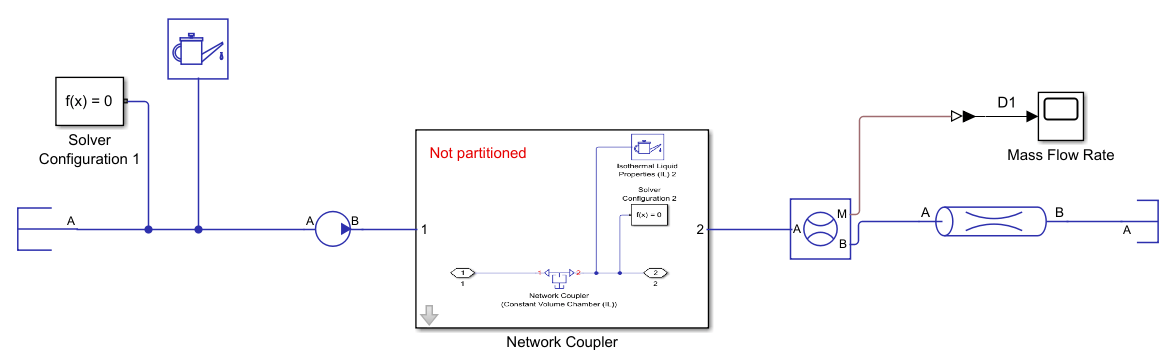
Partition a Model By Using a Network Coupler Block
Partition a Simscape model for parallel processing on real-time processors.

