Code Generation from Multirate Models
R2026bYou can generate HDL code from single-rate and multirate models. Multirate models have data moving through at different rates, such as they use more than one sample time in the same model or use data-valid signals to handle rate changes. Multirate models can include algorithms that run at different sample rates in the design under test (DUT), in the test bench that drives the DUT, or in both the test bench and the DUT.
To generate HDL code from a multirate model, the model must have compatible model configuration parameters and contain supported blocks. For more information, see Multirate Model Requirements for HDL Code Generation.
Multirate Design Options
To pass signals between the portions of your design with differing sampling rates, you generally need to either downsample the data—to reduce the output rate—or upsample the data—to increase the output rate.
Depending on your application goals, your hardware constraints, and your requirements for area, speed, and throughput, you have a few options for how to create multirate designs:
Design multi-rate logic manually in Simulink®.
Design your own filters in MATLAB®. You can use these filters in your Simulink design by implementing MATLAB Function Blocks.
Use DSP System Toolbox™ or DSP HDL Toolbox™ blocks to model multirate designs.
DSP System Toolbox blocks are designed for algorithm modeling using frame-based designs. These blocks allow you to model different sample rates directly in Simulink using sample time settings, which HDL Coder™ maps to clock enable signals in the generated code.
DSP HDL Toolbox blocks are designed for streaming architectures and hardware efficiency optimizations. These blocks are configured for FPGA use and handle rate changes by using data-valid signals rather than Simulink sample times.
The following sections describe the benefits and considerations for each option you have to generate HDL code from a multirate model.
How HDL Coder Generates Code from Multirate Designs in Simulink
When you generate HDL code from a multirate model in Simulink, HDL Coder generates clock bundle signals to control the different rates in the target.
The clock bundle signals consist of clock, reset, and clock enable signals. For more information on how HDL Coder generates clock bundle signals, see Generation of Clock Bundle Signals in HDL Coder.
Generate Code for a Multirate DUT Designed in Simulink
To generate HDL code for a multirate model, set the Clock inputs model
configuration parameter to single. HDL Coder generates a clock, reset, and clock enable signal for each sample rate
in the model.
For example, in this model, the DUT contains blocks that have different sample
times. The Counter_8bit and Counter_4bit
Counter Free-Running blocks have sample times of 10 seconds and 20
seconds, respectively. The counter signals output to the Outport
blocks ST10 and ST20, which inherit the sample
times of the Counter Free-Running blocks. The signal connected to the
ST10 block runs at the base rate of the model. The signal
connected to the ST20 block is a subrate signal that runs at half
the base rate of the model.
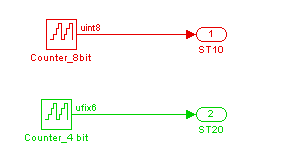
In the top level of the model, the outputs of the DUT connect to To Workspace blocks. The To Workspace blocks inherit the sample times of the DUT outputs.

When you generate HDL code from the model, the generated code includes the VHDL® entity declaration for the DUT.
ENTITY DUT IS
  PORT( clk                               :   IN    std_logic;
        reset                             :   IN    std_logic;
        clk_enable                        :   IN    std_logic;
        ce_out_0                          :   OUT   std_logic;
        ce_out_1                          :   OUT   std_logic;
        ST10                              :   OUT   std_logic_vector(7 DOWNTO 0);  -- uint8
        ST20                              :   OUT   std_logic_vector(5 DOWNTO 0)  -- ufix6
        );
END DUT;
The VHDL entity has the standard clock, reset, and clock enable inputs and data
outputs for the ST10 and ST20 signals:
Input signal
clkInput signal
resetInput signal
clk_enableOutput signal
ST10Output signal
ST20
In addition, the VHDL entity has two clock enable outputs:
Output
ce_out_0Output
ce_out_1
HDL Coder also generates a timing controller that controls the clocking to the portions of the model that run at a slower rate. The timing controller entity maintains the clock enable outputs. For more information on the timing controller, see Timing Controller for Multirate Models.
Implement a Multirate System in MATLAB
You can design a multirate system in MATLAB suitable for HDL code generation by using valid and ready input and output signals. You can then incorporate this algorithm into Simulink designs by using MATLAB Function Blocks, such as in Generate HDL Code from a MATLAB Function Block. For an example that shows how to design a MATLAB algorithm that downsamples a signal by decimating the input by a factor of 2, see Decimate an Input by a Factor of 2.
Generate Code from DSP System Toolbox and DSP HDL Toolbox Multirate Designs
DSP System Toolbox blocks are designed to model streaming signal processing systems in Simulink. You use these blocks to model multirate designs in Simulink by using sample time settings which HDL Coder maps to clock enable signals in generated HDL code, depending on your oversampling settings. You can use DSP System Toolbox blocks with HDL Coder optimizations for frame-based processing, scheduling, and resource sharing.
DSP HDL Toolbox blocks are designed for streaming architectures and for hardware efficiency. These blocks are configured for direct HDL use and handle rate changes by using data-valid signals rather than Simulink sample times.
For an example that shows how to generate code from a model that uses DSP System Toolbox blocks to decimate a signal, see Generate Multirate HDL Code to Decimate Input Signal Using DSP System Toolbox Blocks.
For an example that shows how to generate code from a model that uses DSP HDL Toolbox blocks to downsample data, see Implement Downsampler For HDL (DSP HDL Toolbox).
See Also
Clock inputs | Clock input port | Reset input port | Clock enable input port

