Model Design for Frame-Based IP Core Generation
R2026bYou can use the frame-to-sample optimization to generate IP cores for frame-based models. The frame-to-sample optimization maps matrices and vectors to the AXI4-Stream ports and matrices to AXI4-Stream Video interfaces, and then creates the necessary logic to handle the streamed data in the frame-based design.
Frame-Based Modeling for AXI4-Stream Interfaces
If your model includes streamed data, but does not process videos, you can use the frame-to-sample optimization to generate an IP core that operates on frames of data, then map the data ports to the streaming interface. You can then translate and implement your frame-based models on pixel-based hardware. See HDL Code Generation from Frame-Based Algorithms.
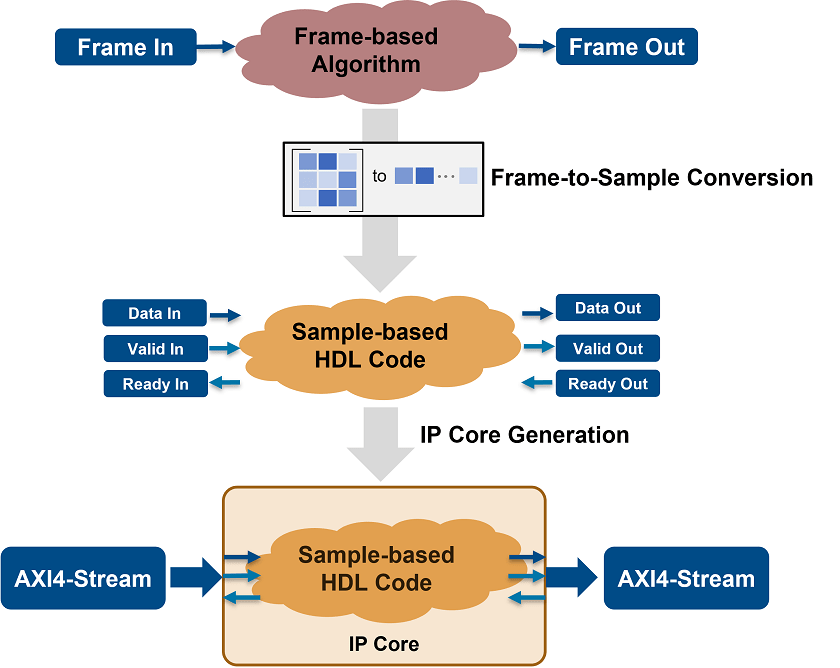
When you generate the IP core, you map the frame data ports at the DUT boundary to AXI4-Stream interfaces. HDL Coder™ generates the Valid and Ready signals for each port. This image shows a top-level overview of the frame-to-sample optimization and IP core generation.
Map vectors, complex vectors, matrices, and complex matrix data to AXI4-Stream interfaces by using frame-to-sample conversion optimization. The TLAST signal is created in the generated IP core and the signal is asserted when the number of valid samples counts to the frame size of the data port.
For an example on modeling a frame-based model with AXI4-Stream interfaces, see Generate IP Core for Frame-Based Model with AXI4 Stream Interfaces.
To model your algorithm using a simplified streaming protocol and a sample-based DUT, see Model Design for AXI4-Stream Interface Generation.
Frame-Based Modeling for AXI4-Stream Video Interfaces
If your model includes streamed video ports, you can use the frame-to-sample optimization to map the two-dimensional matrix ports of your DUT to an AXI4-Stream Video interface. You can then prototype your algorithm in Simulink® using frame-based modeling and test the functionality on live video inputs and outputs.
When you use the frame-to-sample optimization, HDL Coder:
Converts the interface and generates the Data, Valid, and Ready signals for each port.
Inserts the video porch and handles the start of frame (SOF) signal.
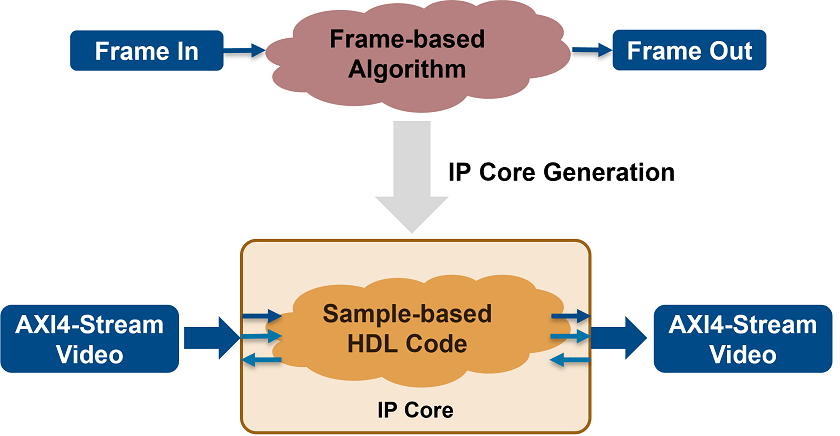
This image shows a top-level overview of the frame-to-sample optimization and IP core generation.
Map matrix ports to an AXI4-Stream Video interface by using the frame-to-sample optimization. The TUSER and TLAST signals are created during IP core generation. TUSER is asserted at the start of every frame and TLAST is asserted at the end of each line.
Video Porch Insertion Logic
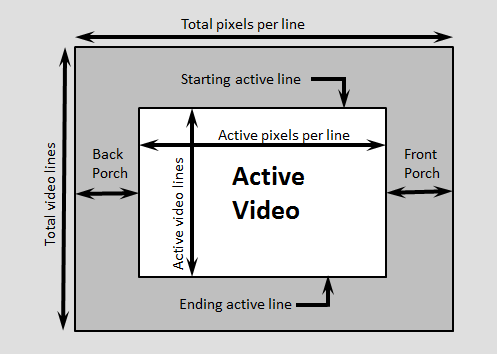
Video capture systems scan video signals from left to right and from top to bottom. As these systems scan, they generate inactive intervals between lines and frames of active video. This inactive interval is called a video porch. When you generate an IP core using frame-to-sample conversion, the active pixels per line and the active lines in each frame are defined by the frame size of the frame-based model and they are not configurable at runtime. However, you can configure the horizontal and vertical porch. HDL Coder inserts vertical and horizontal porch to the pixel stream based on the AXI4-Lite registers in the generated IP core. You can customize these porch parameters for each video frame:
Horizontal porch length (Default: 280)
Vertical porch length (Default: 45)
The default values correspond to the porch values of a 1080p video frame.
This figure shows a video frame with the horizontal porch split into a front and a back porch.
To model your algorithm using a sample-based DUT and the streaming pixel protocol, see Model Design for AXI4-Stream Video Interface Generation.
For an example on modeling a frame-based model with AXI4-Stream Video interfaces, see Generate IP Core from Frame-Based Model with AXI4 Stream Video Interface.
Enable the Optimization
To use the frame-to-sample optimization:
Enable the frame-to-sample optimization. SeeEnable frame to sample conversion.
Enable frame-to-sample optimization on the input data signal on the DUT that maps to the AXI4 Stream or AXI4-Stream Video interfaces.
Stream Multiple Samples per Cycle
Since R2025a
To stream multiple samples per cycle, set the Samples per cycle parameter to a value greater than one. When you specify more than one sample per cycle, during IP core generation, HDL Coder packs the samples together and streams them in a single clock cycle.
When your streamed ports are non-complex ports, you can set the Packing
Mode parameter for the streamed ports to Bit Aligned
or Power of 2 Aligned in the Interface
Options tab of the Target Interface table. For more information on
packing modes, see Packing Mode. The resulting
packed word depends on the frame element data type, the Samples per
cycle parameter, the Input processing
order parameter, the interface data width you specify in the reference
design, and the Packing Mode parameter.
For example, if the original frame in the model is a 3-by-4 matrix, these examples show the resulting packed frame:
If the matrix frame elements use the
ufix12data type, you set the Samples per cycle parameter to 2, the interface data width is 32-bits, and you set the Input processing order parameter to row-major, HDL Coder streams the matrix by packing two elements at a time until it transmits the entire matrix. With the Packing Mode set toBit Aligned, HDL Coder places each pair of consecutive row elements directly next to each other and then pads the data with zeroes to reach the 32-bit data bit width.If you set the Packing Mode to
Power of 2
                            Aligned
, HDL Coder first pads each element with zeroes to the nearest power of two width, packs each pair, and finishes padding with zeroes to reach the 32-bit data bit width. This image shows the resulting packed data frame for each packing mode.If the matrix frame elements use the
ufix12data type, you set the Samples per cycle parameter to 3, the interface data width is 64-bits, and you set the Input processing order parameter to column-major, HDL Coder streams the matrix by packing three elements at a time until it transmits the entire matrix. With the Packing Mode set toBit Aligned, HDL Coder places each pair of consecutive column elements directly next to each other and then pads the data with zeroes. In the column-major configuration, the bit-aligned packing requires at least 48 bits of data, three elements each of data typeufix12rounded up to the nearest byte boundary.If you set the Packing Mode to
Power of 2
                            Aligned
, HDL Coder first pads each element with zeroes to the nearest power of two width, packs each pair, and finishes padding with zeroes. The power of two aligned requires 64-bits as each element is padded with data to bring it the closest power of two boundary. This image shows the resulting packed data frame for each packing mode.For frames that have complex data, HDL Coder packs each group of elements based on the Samples per cycle setting into a single word. In that word, the real parts of the complex element appear first, followed by the imaginary part. HDL Coder pads each real and imaginary word to the nearest power of two width before placing them in the packed word. This image shows the resulting packed word for a Samples per cycle setting of 1 and 2, the frame data type is
ufix12, and the input processing order is row-major.
All streamed ports, including ports that correspond to external delays, use the same value for Samples per cycle and Input processing order. When streaming frames, the Samples per cycle parameter value must evenly divide the number of elements along the dimension being streamed. For row-major processing, Samples per cycle must divide the number of columns and for column-major processing it must divide the number of rows. For example, for a 3-by-4 frame, valid values for the Samples per cycle parameter are 1, 2, and 4 in row-major mode, and 1 and 3 in column-major mode.
When you enable host script generation as part of the IP core generation, you can
specify the SamplePackingFactor and
SampleAlignment name-value arguments to the addAXI4StreamInterface function. The
SampleAlignment parameter sets the value of the
Packing Mode parameter for the streamed port.
Offload a Single Large Delay from Frame-Based Models to External Memory
Since R2023a
To map large integer delays to input and output DUT ports, use the Delay size threshold for external memory (kilobytes) parameter.
To generate an IP core for a model with a single delay when you enable frame-to-sample conversion, map the streamed inputs and outputs of your DUT to an AXI4-Stream or AXI4-Stream Video interface. Set the Delay size threshold for external memory (kilobytes) parameter and use a reference design or a generic platform that provides at least one AXI4-Master interface. HDL Coder maps the external delay ports to external memory, generates frame management logic, and generates AXI4-Master based read and write controllers to store the delays.
Offload Multiple Large Delays from Frame-Based Models to External Memory
Since R2026a
When you enable frame-to-sample conversion, offload multiple large delays to external memory by mapping the streamed inputs and outputs of your DUT to an AXI4-Stream or AXI4-Stream Video interface. Use the Offload large delays to external memory using parameter in the Interface Settings tab of the IP Core Editor to choose between using a single shared AXI4-Master interface or separate individual AXI4-Master interfaces for each delay. Choose a reference design or a generic platform that provides the required AXI4-Master interfaces based on your Offload large delays to external memory using parameter setting. HDL Coder enables efficient use of external memory by generating a frame manager that converts the streaming protocol to a burst transfer optimized memory protocol.
Map Large Delays when Streaming Multiple Samples per Cycle
Since R2026b
If your design has large frame delays and you configure the model to stream multiple samples per cycle, HDL Coder packs it by using bit-aligned packing, offloads the delay data to external memory by using an AXI4-Master interface. HDL Coder adjusts the AXI4-Master width data to accommodate the packed delay data.
If you set the Offload large delays to external memory using
model configuration parameter to Shared Interfaces,
HDL Coder sets the AXI4-Master interface data width to the largest packed width
required by any delay and zero-pads delays that require fewer bits after packing to
match this width. If you set the Offload large delays to external memory
using parameter to Independent Interfaces,
HDL Coder sizes each delay to its own packed data width, without inheriting the
width needed by other delays.
Modeling Requirements
Model only the Data signals. The frame-to-sample conversion optimization generates the Ready and Valid signals.
When you have multiple samples per cycle and both master and slave channels, the packing mode for both channels must be the same.
When you stream multiple samples per cycle, you must set the Scalarize ports configuration set option to
dutlevel.When your streamed ports are complex ports you can set the Packing Mode parameter to
Power of 2 Alignedonly.3D ports are not supported for IP core generation.
You cannot stream multiple samples per cycle when you use an AXI4-Stream Video interface.
In the MATLAB® to HDL Workflow advisor you cannot adjust the Packing Mode parameter for streamed ports.
When you offload large delays to external memory, these limitations apply:
- HDL Coder
maps only FIFO blocks generated as delays during code generation to external memory. You cannot move outside the DUT or map to external memory, delay blocks created by pipeline optimizations in the generated model and code.
If you have more than one delay in your MATLAB design, you cannot use the Offload large delays to external memory using parameter in the MATLAB to HDL Workflow Advisor. You must use a shared AXI4-Master interface for the delays.
If you set the Offload large delays to external memory using parameter to
Independent
                            interfaces
, the reference design must have at least the same number of interfaces as the number of delays in your design. HDL Coder does not generate the AXI4-Master interfaces.
See Also
Topics
- Streaming Pixel Interface (Vision HDL Toolbox)
- HDL Code Generation from Frame-Based Algorithms
- Generate IP Core for Frame-Based Model with AXI4 Stream Interfaces
- Generate IP Core from Frame-Based Model with AXI4 Stream Video Interface
- Offload Large Delays from Frame-Based Models to External Memory
- Deploy a Real-Time Video Frame Accumulator by Using External Memory

