Main Content

addFilters

Add new filters to Filter Analyzer app

Since R2024a

Description

addFilters(fa,filt1,...,filtn) imports the specified filters to the Filter Analyzer app fa and plots their responses in the active display. If there is no active display, Filter Analyzer adds a new display and plots the filters on it.

addFilters(___,Name=Value) specifies options using name-value arguments in addition to the input arguments from the previous syntax..

example

dispnum = addFilters(___) returns the identification number corresponding to a newly added display. If there is already a display, addFilters returns an empty array.

Examples

collapse all

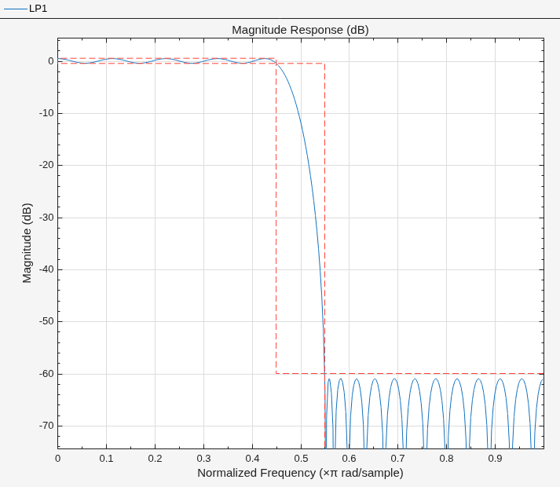
Design a lowpass filter and show it in the Filter Analyzer app.

d1 = designfilt("lowpassfir", ...
    PassbandFrequency=0.45,StopbandFrequency=0.55);
fa = filterAnalyzer(d1,FilterNames="LP1");
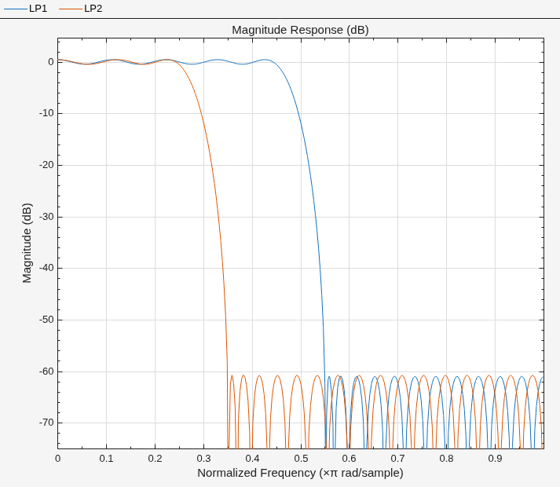
Add another lowpass filter to the display.

d2 = designfilt("lowpassfir", ...
    PassbandFrequency=0.25,StopbandFrequency=0.35);
addFilters(fa,d2,FilterNames="LP2")
Input Arguments

collapse all

Filter Analyzer app handle, specified as a filterAnalyzer object.

Input filter, specified as one of these:

  • A pair of coefficient matrices — Specify filt as two arguments B,A, where B and A are the numerator and denominator coefficients, respectively. For more information, see Import Filter Coefficients.

  • A cell array — Specify filt as a cell array with the form {B,A,g}, where B and A are the numerator and denominator coefficients, respectively, and g represents the scaling gain of the filter. For more information, see Import Filter Coefficients.

  • A digitalFilter object — Specify filt as a digitalFilter object. To generate or edit digital filters based on frequency-response specifications at the command line, use designfilt.

  • A filter System object— Specify filt as a System object. For more information, see Supported Filter System Objects.

Example: B = [1 3 3 1]/6 and A = [3 0 1 0]/3 together specify a third-order lowpass Butterworth filter with a normalized 3 dB frequency of 0.5π rad/sample.

Example: [B,A] = sos2ctf([2 4 2 6 0 2; 3 3 0 6 0 0]) and g = [1;1;1] specify a third-order lowpass Butterworth filter with a normalized 3 dB frequency of 0.5π rad/sample and with scaling gains.

Example: d = designfilt("lowpassiir",FilterOrder=3,HalfPowerFrequency=0.5) specifies a third-order lowpass Butterworth filter with a normalized 3 dB frequency of 0.5π rad/sample.

Example: hd = design(fdesign.lowpass,"butter",SystemObject=true) specifies a lowpass Butterworth filter System object.

Data Types: single | double | int8 | int16 | int32 | int64 | uint8 | uint16 | uint32 | uint64 | cell
Complex Number Support: Yes

Name-Value Arguments

collapse all

Specify optional pairs of arguments as Name1=Value1,...,NameN=ValueN, where Name is the argument name and Value is the corresponding value. Name-value arguments must appear after other arguments, but the order of the pairs does not matter.

Example: addFilters(fa,filt1,filt2,FilterNames=["LP" "HP"],SampleRates=[150 3e3]) adds filters named "LP" and "HP", with respective sample rates of 150 Hz and 3 KHz, to the specified Filter Analyzer instance fa.

Arithmetic type of filter System objects, specified as one of "double", "single", or "fixed". If you do not specify this argument, and the filter System objects are in an unlocked state, Filter Analyzer assumes the filters are double precision.

Data Types: char | string

Displays on which to plot filters, specified as a vector of display numbers. If you do not specify this argument, Filter Analyzer uses the active display. Use display identification numbers to target displays when using other Filter Analyzer functions. Identification numbers appear above the plotting area of the app, on the tabs that correspond to the different displays.

Example: [1 4]

Data Types: single | double | int8 | int16 | int32 | int64 | uint8 | uint16 | uint32 | uint64

Filter names, specified as a vector of strings or a cell array of character vectors. Filter names are the names that identify the different filters in the Filters table of the Filter Analyzer app. If you do not specify this argument:

  • If filters have been specified as numerator and denominator coefficients, Filter Analyzer uses num_den as filter names, where num is the variable that specifies the numerator coefficients of a filter and den is the variable that specifies the corresponding denominator coefficients.

  • If filters have been specified as cell arrays or objects, Filter Analyzer uses the variables that specify each cell array or object as filter names.

  • Otherwise, Filter Analyzer uses names consisting of Filter_n, where n is a number representing the order in which that filter was added to the Filters table: Filter_1, Filter_2, and so on.

Filter names in Filter Analyzer must be unique. If a name already exists, the app appends a suffix number to the name. The Filters table shows the names that already exist in the app session.

Example: ["LPbutter" "LPelliptic"]

Data Types: cell | string

Filter sample rates, specified as a scalar or vector of values specified in Hz.

  • If you specify SampleRates as a scalar, the value you specify applies to all filters.

  • If you specify SampleRates as a vector, the vector must have the same number of elements as the number of filters.

When you specify SampleRates, the Filters table shows the specified sample rate.

Example: [150 3e3]

Data Types: single | double | int8 | int16 | int32 | int64 | uint8 | uint16 | uint32 | uint64

Output Arguments

collapse all

Display identification number, returned as an integer or as a vector of integers. If addFilters adds more than one display, dispnum is a vector. If Filter Analyzer uses the current display, dispnum is an empty array.

Version History

Introduced in R2024a