roadSurface
Extract road surface information from point cloud data using road reference line
Since R2025b
Description
Add-On Required: This feature requires the Scenario Builder for Automated Driving Toolbox add-on.
The roadSurface object extracts road surface information from
point cloud data. The object stores the surface information of a road specified using a road
reference line and the road width from the road reference line.
Creation
Syntax
Description
creates a rsObj = roadSurface(roadData,roadRefLine,roadWidthFromRefLine,gridResolution)roadSurface object, rsObj, for a road in
the point cloud data roadData. The roadSurface
object contains the surface information of the road, specified by the road reference line
roadRefLine and road width from the reference line
roadWidthFromRefLine, with a grid resolution
gridResolution.
sets writable properties using one or more name-value arguments, in addition to any
combination of input arguments from the previous syntaxes. For example,
rsObj = roadSurface(___,Name=Value)InterpolationMethod="linear" specifies the linear interpolation
method for interpolating the missing point cloud data.
Input Arguments
Lidar point cloud data, specified as a pointCloud object or an M-by-3 matrix.
If you specify an M-by-3 matrix, each row specifies the x-, y-, and z-coordinates of a point in the point cloud.
The roadData you specify must contain data for the road you
specify using the roadRefLine and
roadWidthFromRefLine input arguments.
Road reference line, specified as an N-by-3 matrix,
N-by-2 matrix, or a Trajectory
object. N is the number of waypoints.
If you specify an N-by-3 matrix, each row represents the x-, y-, and z-coordinates of a waypoint.
If you specify an N-by-2 matrix, each row represents the x- and y-coordinates of a waypoint.
Waypoints are in the world coordinate system in the ENU frame of reference. Units are in meters.
This argument sets the RoadReferenceLine property.
Width of the road from the road reference line, specified as a scalar or a two-element vector of the form [a b]. The values of a and b represent the width of the road from the road reference line on the left and right sides, respectively. Units are in meters.
If you specify a scalar, the value represents the width of the road from the road reference line on each side.
This argument sets the RoadWidthFromRefLine property.
Data Types: double
Grid resolution for representing the road surface, specified as a scalar or a two-element vector of the form [longitudinalResolution lateralResolution]. Units are in meters.
If you specify a scalar, the object uses the same value for both longitudinalResolution and lateralResolution.
This argument sets the LongitudinalResolution and LateralResolution properties.
Data Types: double
ASAM OpenCRG filename, specified as a string scalar or a character vector.
You can specify filename as the absolute or relative path to
a file with the .crg extension. For example, if the file
myFile.crg is in your current folder,
C:\myFolder, you can specify the ASAM OpenCRG file as "myFile.crg" or
"C:\myFolder\myFile.crg".
Data Types: string | char
Name-Value Arguments
Specify optional pairs of arguments as
Name1=Value1,...,NameN=ValueN, where Name is
the argument name and Value is the corresponding value.
Name-value arguments must appear after other arguments, but the order of the
pairs does not matter.
Example:
roadSurface(roadData,roadRefLine,roadWidthFromRefLine,gridResolution,InterpolationMethod="linear")
specifies to use linear interpolation to interpolate the missing point cloud
data.
Interpolation method, specified as one of these options.
| Interpolation Method | Description | Continuity |
|---|---|---|
"nearest" | Nearest neighbor interpolation | Discontinuous |
"linear" | Linear interpolation | C0 |
"natural" | Natural neighbor interpolation | C1 (except at sample points) |
The object interpolates the road surface data for missing point cloud values at curved grid locations.
This argument sets the InterpolationMethod property.
Data Types: char | string
Extrapolation method, specified as one of these options.
| Extrapolation Method | Description |
|---|---|
"nearest" | Nearest neighbor extrapolation. This method evaluates to the value of the nearest neighbor. |
"linear" | Linear extrapolation based on boundary gradients. |
"boundary" | Boundary extrapolation. This method extends the values on the interpolation boundary into the extrapolation domain. |
"none" | No extrapolation. Any queries outside the convex hull of
|
The object extrapolates the road surface data at curve grid locations outside the convex hull of point cloud data.
This argument sets the ExtrapolationMethod property.
Data Types: char | string
Anchor of the road trajectory, specified as a three-element row vector of the form [latitude longitude altitude]. Units of latitude and longitude are in degrees, and units of altitude are in meters.
The LocalOrigin value defines the anchor of the trajectory
of the specified road in the local coordinate system.
For a trajectory created from sensor data other than GPS data, the
LocalOrigin value defines the origin of the local Cartesian
coordinate system, specified as a three-element row vector of the form
[x
y
z]. Units are in meters.
This argument sets the LocalOrigin property.
Data Types: double
Normalize road elevation values, specified as a logical 1
(true) or 0
(false).
By default, the roadSurface object normalizes the road
elevation values with respect to the reference line of the road surface. You can use
the normalized ASAM OpenCRG data to import it into an ASAM OpenDRIVE® road network in attached mode. For more information
on CRG modes, see the Parameters (RoadRunner) section of the RoadRunner
Road CRG Tool.
This argument sets the HasNormalizedElevation property.
Data Types: logical
Show progress bar, specified as a logical 1
(true) or 0 (false).
Specify true to display a progress bar for road surface
evaluation. Otherwise, specify false.
Output Arguments
Road surface object, returned as a roadSurface object.
Properties
This property is read-only after object creation. To set this property, use the
roadRefLine argument when calling the roadSurface
function.
Road reference line, represented as an N-by-2 matrix,
N-by-3 matrix, or a Trajectory
object. N is the number of waypoints.
If you specify an N-by-2 matrix, each row represents the x- and y-coordinates of a waypoint.
If you specify an N-by-3 matrix, each row represents the x-, y-, and z-coordinates of a waypoint.
Waypoints are in the world coordinate system in the ENU frame of reference. Units are in meters.
This property is read-only after object creation. To set this property, use the
gridResolution argument when calling the roadSurface
function, or use the updateGridResolution object function.
Resolution of the road surface along the lateral direction of the road reference line, represented as a scalar.
Data Types: double
This property is read-only after object creation. To set this property, use the
gridResolution argument when calling the roadSurface
function, or use the updateGridResolution object function.
Resolution of the road surface along the longitudinal direction of the road reference line, represented as a scalar.
Data Types: double
This property is read-only after object creation. To set this property, use the
roadWidthFromRefLine argument when calling the
roadSurface function.
Width of the road from the road reference line, represented as a two-element vector of the form [a b]. The values of a and b represent the width of the road from the road reference line on the left and right sides, respectively. Units are in meters.
Data Types: double
Anchor of the road trajectory, specified as a three-element row vector of the form [latitude longitude altitude]. Units of latitude and longitude are in degrees, and units of altitude are in meters.
The LocalOrigin value defines the anchor of the trajectory of
the specified road in the local coordinate system.
For a trajectory created from sensor data other than GPS data, the
LocalOrigin value defines the origin of the local Cartesian
coordinate system, specified as a three-element row vector of the form
[x
y
z]. Units are in meters.
Data Types: double
This property is read-only after object creation. To set this property, use the
InterpolationMethod name-value argument when calling the
roadSurface function.
Interpolation method, specified as one of these options.
| Interpolation Method | Description | Continuity |
|---|---|---|
"nearest" | Nearest neighbor interpolation | Discontinuous |
"linear" | Linear interpolation | C0 |
"natural" | Natural neighbor interpolation | C1 (except at sample points) |
The object interpolates the road surface data for missing point cloud values at curved grid locations.
Data Types: string
This property is read-only after object creation. To set this property, use the
ExtrapolationMethod name-value argument when calling the
roadSurface function.
Extrapolation method, specified as one of these options.
| Extrapolation Method | Description |
|---|---|
"nearest" | Nearest neighbor extrapolation. This method evaluates to the value of the nearest neighbor. |
"linear" | Linear extrapolation based on boundary gradients. |
"boundary" | Boundary extrapolation. This method extends the values on the interpolation boundary into the extrapolation domain. |
"none" | No extrapolation. Any queries outside the convex hull of
|
The object extrapolates the road surface data at curve grid locations outside the convex hull of point cloud data.
Data Types: string
Normalize road elevation values, specified as a logical 1
(true) or 0 (false).
By default, the roadSurface object normalizes the road elevation
values with respect to the reference line of the road surface. You can use the
normalized ASAM OpenCRG data to import it into an ASAM OpenDRIVE road network in attached mode. For more information on
CRG modes, see the Parameters (RoadRunner)
section of the RoadRunner
Road CRG Tool.
Data Types: logical
Object Functions
updateGridResolution | Update grid resolution of road surface data |
exportToASAMOpenCRG | Export road surface object to ASAM OpenCRG format |
evaluate | Extract elevation values of road surface data for location queries |
getRoadBoundaries | Extract road boundaries from road surface data |
getCurvedGridPointCloud | Extract curved regular grid of road surface data as point cloud object |
show | Display road surface from road surface object |
Examples
Load point cloud data and a road reference line into the workspace.
Note: The point cloud data must contain the road information for the specified road reference line.
data = load("roadSurfaceData.mat","ptCld","roadRefLine"); ptCld = data.ptCld; roadRefLine = data.roadRefLine;
Specify the width of the road from the reference line as 4 meters on the left and 3 meters on the right.
roadWidthFromRefLine = [4 3];
Specify the resolution of the road surface as 1 cm each in the longitudinal and lateral directions.
gridResolution = [0.01 0.01];
Create a road surface object.
rsObj = roadSurface(ptCld,roadRefLine,roadWidthFromRefLine,gridResolution)
rsObj =
roadSurface with properties:
RoadReferenceLine: [6×2 double]
LateralResolution: 0.0100
LongitudinalResolution: 0.0100
RoadWidthFromRefLine: [4 3]
InterpolationMethod: "nearest"
ExtrapolationMethod: "nearest"
LocalOrigin: []
HasNormalizedElevation: 1
Visualize the road surface.
show(rsObj)
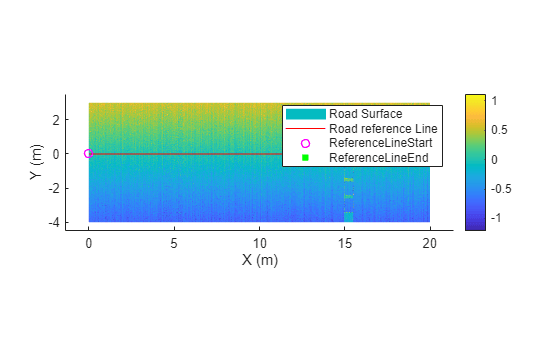
Load point cloud data and a road reference line.
Note: The point cloud data must contain the road information for the specified road reference line.
data = load("roadSurfaceData.mat","ptCld","roadRefLine"); ptCld = data.ptCld; roadRefLine = data.roadRefLine;
Specify the width of the road from reference line as 4 meters from left and 3 meters from right.
roadWidthFromRefLine = [4 3];
Specify the resolution of the road surface as 1 cm in each longitudinal and lateral direction.
gridResolution = [0.01 0.01];
Create a road surface object without normalized elevation.
rsObj = roadSurface(ptCld,roadRefLine,roadWidthFromRefLine,gridResolution,NormalizeElevation=false)
rsObj =
roadSurface with properties:
RoadReferenceLine: [6×2 double]
LateralResolution: 0.0100
LongitudinalResolution: 0.0100
RoadWidthFromRefLine: [4 3]
InterpolationMethod: "nearest"
ExtrapolationMethod: "nearest"
LocalOrigin: []
HasNormalizedElevation: 0
Visualize the road surface.
show(rsObj)
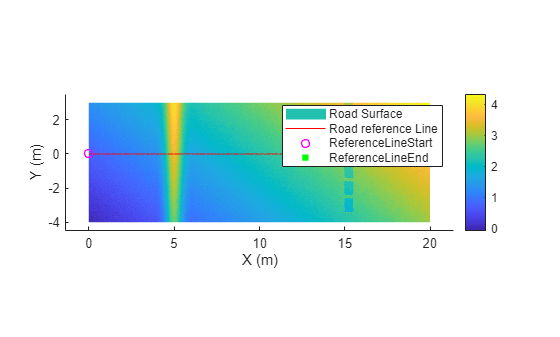
Version History
Introduced in R2025b
MATLAB Command
You clicked a link that corresponds to this MATLAB command:
Run the command by entering it in the MATLAB Command Window. Web browsers do not support MATLAB commands.
Select a Web Site
Choose a web site to get translated content where available and see local events and offers. Based on your location, we recommend that you select: .
You can also select a web site from the following list
How to Get Best Site Performance
Select the China site (in Chinese or English) for best site performance. Other MathWorks country sites are not optimized for visits from your location.
Americas
- América Latina (Español)
- Canada (English)
- United States (English)
Europe
- Belgium (English)
- Denmark (English)
- Deutschland (Deutsch)
- España (Español)
- Finland (English)
- France (Français)
- Ireland (English)
- Italia (Italiano)
- Luxembourg (English)
- Netherlands (English)
- Norway (English)
- Österreich (Deutsch)
- Portugal (English)
- Sweden (English)
- Switzerland
- United Kingdom (English)