Deep Learning Processor IP Core External Memory Data Format
R2026bDeep Learning HDL Toolbox™ uses an AXI4 interface to read and write data from the external memory. The AXI4
interface has a bit width of 32-bits. When you use the dlhdl.Workflow object
to read data from and write data to the external memory, Deep Learning HDL Toolbox formats the input data, writes it to external memory, and then reads data from
external memory and processes it before presenting you the data. If you do not use the
dlhdl.Workflow object, then you must format the input data, store it in
external memory, read the output data, and process the formatted output data.
To format the convolution module input data, see Convolution Module External Memory Data Format. To read the formatted convolution module output data from external memory, see Read Convolution Module Output Data from External Memory. To format the fully connected module input data, see Fully Connected Module External Memory Data Format.
The padding format for the external memory depends on the:
Parallel transfer data number — Number of pixels transferred every clock cycle through the AXI master interface. To calculate the parallel transfer data number, use the formula
power(2,nextpow2(sqrt(ConvThreadNumber))). For example, if the convolution thread number is nine, the calculated value of the parallel data transfer number is four. See ConvThreadNumber.Feature number — Value of the z-dimension of an x-by-y-by-z matrix. For example, most input images are of dimension x-by-y-by-3, with three referring to the red, green, and blue channels of an image.
Thread number — Number of channels of the input that a convolution style layer operates on simultaneously. To calculate the thread number, use the formula
sqrt(ConvThreadNumber). For example, if the convolution thread number is nine, the calculated thread number is three. See ConvThreadNumber.
Convolution Module External Memory Data Format
The single data type inputs of the deep learning processor
convolution module are typically three-dimensional (3-D).The external memory stores the data
in a one-dimensional (1-D) vector. To convert the 3-D input image into 1-D to for a thread
number,C, parallel data transfer number, N, and a feature number, Z:
Send N number of data along the z-dimension of the matrix.
Send the image information along the x-dimension of the input image.
Send the image information along the y-dimension of the input image.
After completing the first
NXYblock, send the nextNXYblock along the z-dimension of the matrix.
The image demonstrates how data stored in a 3-by-3-by-4 matrix translates into a 1-by-36 vector for storage in the external memory.

Data Padding for Power of Two Thread Numbers
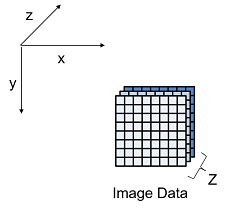
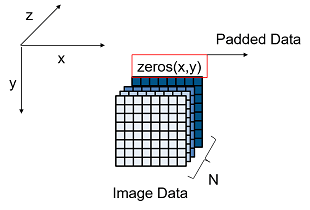
When the image feature number, Z is not a multiple of the parallel data transfer thread number, N then you must pad a zeros matrix of size x-by-y along the z-dimension of the matrix to make the image feature number, Z a multiple of the parallel data transfer number, N.
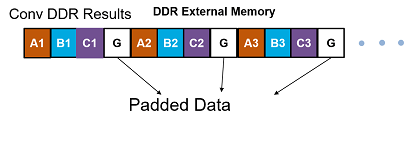
For example, if your input image is an x-by-y matrix that has a feature number, Z value of three and a parallel data transfer number, N value of four, pad the image with a zeros matrix of size x-by-y along the z-dimension to make the input to the external memory an x-by-y-by-4 matrix.
This image is the input image format before padding.
This image is the input image format after zero padding.
This image shows the external memory data format for the input matrix after the zero padding. In the image, A, B, and C are the three features of the input image and G is the zero-padded data to make the input image feature number, Z value four, which is a multiple of the parallel data transfer number, N.
If your deep learning processor consists of only a convolution
processing module, the output external data uses the convolution
module external data format, which contains padded data if your output
feature number, Z is not a multiple of the parallel data transfer
number, N. When you use a dlhdl.Workflow object,
Deep Learning HDL Toolbox removes the padded data. If you do not use the
dlhdl.Workflow object and directly read the output
from the external memory, remove the padded data.
This image shows the external memory data format for a sample 3-by-3-by-5 input matrix that has a thread number 64. The calculated parallel data transfer number, N is eight and the input array is padded with three additional 3-by-3 array of zeros, converted to a 1-D 1-by-72 vector and stored in external memory. Deep Learning HDL Toolbox completes one row before moving on to the next row.
The int8 data type outputs of the deep learning processor
convolution module are typically three-dimensional (3-D).The external memory stores the
data in a one-dimensional (1-D) vector. The external memory uses one byte for a value.
Deep Learning HDL Toolbox uses an AXI4 interface to read and write data from the external memory. The
AXI4 interface has a bit width of 32-bits. For example, if the convolution thread number
is four, then you must concatenate one byte per thread into a 32-bit wide vector and store
it in the external memory. When the int8 data type is stored in the
memory the addresses are incremented in steps of one.
This image shows a sample 3-by-3-by-5 matrix passed as an input to a deep learning processor configuration that has a thread number, C of three and a parallel data transfer number, N value of four. Deep Learning HDL Toolbox first processes the first three features and inserts a zero padding, then processes the fourth and fifth features and inserts two additional zero-padded matrices of size 3-by-3. Deep Learning HDL Toolbox writes the data in little-endian format starting with the least significant bit and ending with the most significant bit.
Data Padding for Non-Power of Two Thread Numbers
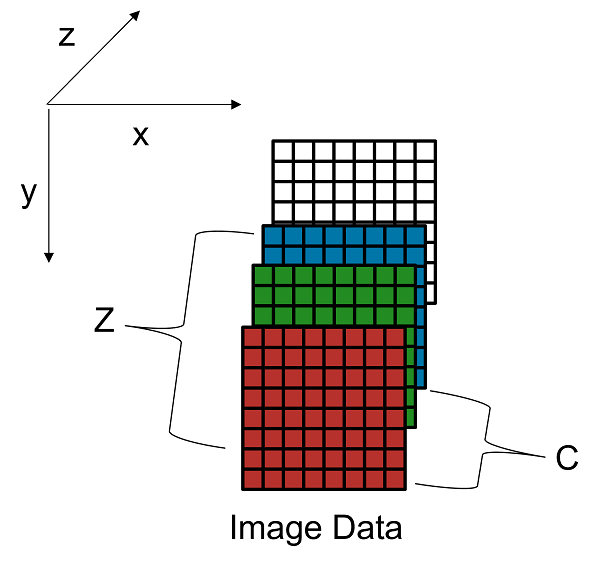
When the thread number, C is not a power of two and is lower than the parallel data transfer number, N, then you must pad a zeros matrix of size x-by-y along the z-dimension of the matrix. Insert the zeros matrix after every C number of elements along the z-dimension of the matrix to make the feature number, Z value a multiple of N.
For example, if your input image is an x-by-y matrix that has a thread number,C value of three, and a parallel data transfer number, N and feature number,Z are four, pad the image with a zeros matrix of size x-by-y after the third channel and three zeros matrices of x-by-y after the fourth channel to make the input to the external memory an x-by-y-by-eight matrix.
This image is the input image format before padding.
This image is the input image format after zero padding.
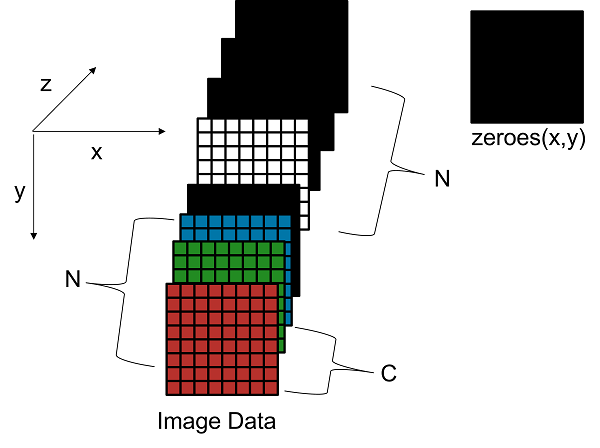
This image shows how a sample 3-by-3-by-5 matrix passed as an input to a deep learning processor configuration with a parallel thread number, C of three and a thread number, N value of four is stored in external memory. Deep Learning HDL Toolbox first processes the first three features, inserts a zero padding, then processes the fourth and fifth features and inserts two additional zero-padded matrices of size 3-by-3 along the3 z-dimension of the matrix.
When the values of C and N are equal, padding is
required only when Z is not a multiple of C.
The int8 data type outputs of the deep learning processor
convolution module are typically three-dimensional (3-D).The external memory stores the
data in a one-dimensional (1-D) vector. The external memory uses one byte for a value.
Deep Learning HDL Toolbox uses an AXI4 interface to read and write data from the external memory. The
AXI4 interface has a bit width of 32-bits. For example, if the convolution thread number
is four, then you must concatenate one byte per thread into a 32-bit wide vector and store
it in the external memory. When the int8 data type is stored in the
memory the addresses are incremented in steps of one.
This image shows the external memory data format for a 3-by-3-by-5 input matrix that has a thread number of 64. Because C is 64, the parallel data transfer number is eight and the input array is padded with three additional 3-by-3 arrays of zeros and then converted to a 1-D vector and stored in external memory. Deep Learning HDL Toolbox completes one row before moving on to the next row. Deep Learning HDL Toolbox writes the data in little-endian format starting with the least significant bit and ending with the most significant bit.
Read Convolution Module Output Data from External Memory
When you read the convolution module output data from external memory you must process the data to remove the zero-padded data. To read the 1-D data from external memory and convert it back into 3-D output matrix, you must:
Send C number of data in the z-dimension of the matrix.
Send the image information along the x-dimension of the input image.
Send the image information along the y-dimension of the input image.
After completing the first
CXYblock, send the nextCXYblock along the z-dimension of the matrix.
For example, if you have a 3-by-3-by-5 matrix that has a thread number of four, you pad the input data with a 3-by-3 matrix of zeros along the z-dimension to convert it into a 3-by-3-by-8 matrix and then store it in memory as a 1-by-72 vector. When you read this data convert the 1-by-72 matrix back into a 3-by-3-by-8 matrix, remove the zero-padded data, and return a 3-by-3--by-5 matrix. This image shows to translate the 1-by-72 vector data in external memory back into a 3-by-3-by-8 matrix.

Calculation of Output Memory Size
The size of the output for a deep learning processor IP core depends on the feature
number, Z, the thread number, C, and the parallel data transfer number, N. To calculate
the output memory size, use the formula dimension1 * dimension2 * ceil(Z/C) *
N. For example, for an input matrix of size 3-by-3-by-4 the output memory size
for a C and N value of four is 3 *3 *ceil(4/4) *4 = 36. In this example
the output is written four values at a time because the value of N is
four.
For a 3-by-3-by-4 matrix with a C value of three and
N value of four, the output size is 3 *3 *ceil(4/3) *4
=72. In this example, even when the output is written four values at a time,
only the first three values are valid because the fourth value is a zero-padded
value.
Fully Connected Module External Memory Data Format
If your deep learning network includes both convolution and fully connected layers, the output of the deep learning processor uses the fully connected module external memory data format.
The input of the fully connected layer is a 1-by-X matrix where X is the number of output features of the fully connected layer. If X is not a multiple of the parallel data transfer number, then you must pad the memory with zeros to align the memory with the parallel data transfer number, N.
This image shows the external memory format for
single data type with an output feature number of
six and a parallel data transfer number, N of eight. You must pad the
zeros at the end.
This image shows the external memory format for
int8 data type data that has an output feature
number of six and a parallel data transfer number, N of eight. The data
is padded with two zeros at the end. The data is written in
little-endian format starting with the LSB and ending with the
MSB.
Custom Layer Module External Memory Data Format
If the last layer is a sigmoid layer and the input to the sigmoid layer is a convolution layer, the custom layer module format is the same as the convolution module external memory data format. See Convolution Module External Memory Data Format.
If the last layer is a sigmoid layer and the input to the sigmoid layer is a fully connected layer, the custom layer module format is the same as the fully connected module external memory data format. See Fully Connected Module External Memory Data Format.

