Generate Audio Signals
R2026bThis example shows how to generate audio signals on all channels of a multichannel audio device. In this example, you play Handel's "Hallelujah Chorus" on all speakers of a 5.1 surround-sound system simultaneously.
Load Audio Data
Load Handel's "Hallelujah". The handel MAT-file contains the audio waveform y and the sampling frequency Fs.
load handel;
Plot Audio Signal
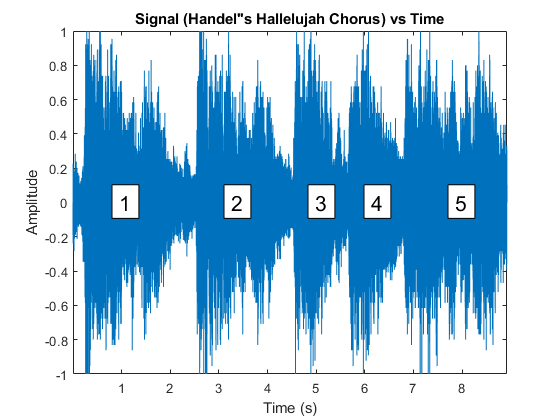
Plot the audio waveform. The waveform consists of five distinct segments, each of which represents a "Hallelujah" in the chorus.
t = (0:length(y)-1) / Fs;
fig = figure;
plot(t,y./max(y));
axis tight;
xlabel("Time (s)");
ylabel("Amplitude");
Annotate the five segments on the plot.
markers = struct("xpos",[0.2, 0.4, 0.55, 0.65, 0.8],"string",num2str((1:5)'));
for i = 1:5
    annotation(fig,"textbox",[markers.xpos(i) 0.48 0.048 0.080], ...
        "String",markers.string(i),"BackgroundColor","w","FontSize",16);
end
Create Data Acquisition Object
Create a DataAcquisition object, using directsound as the vendor ID.
dq = daq("directsound");
Add Output Channels
Add six audio output channels to the DataAcquisition object, using the addoutput function. Replace "Audio2" with the device ID of your multichannel audio device. Adjust numChannels to match the number of output channels available on your device.
deviceID = "Audio2";
numChannels = 6;
addoutput(dq,deviceID,1:numChannels,"Audio");
Set the generation scan rate to match the audio sampling frequency.
dq.Rate = Fs;
Generate Audio on All Channels
Generate the audio signal on all channels simultaneously by using the write function. The repmat function replicates the waveform across all channels.
write(dq,repmat(y,1,numChannels));

