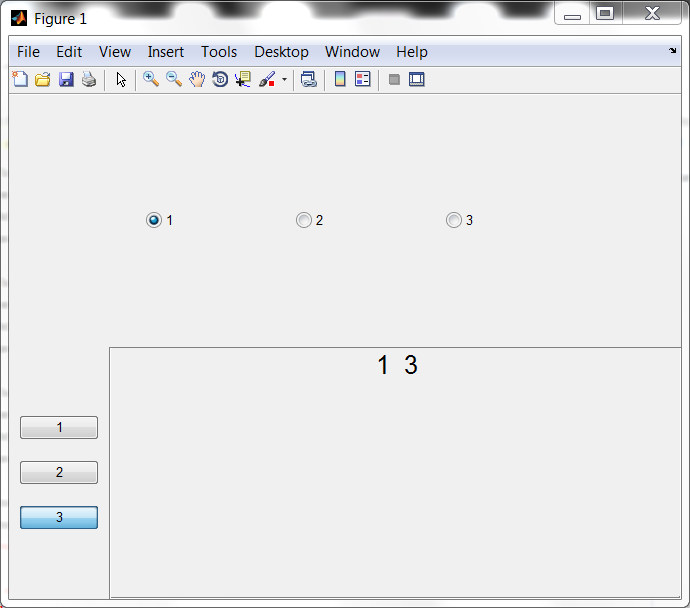
ButtonGroup Objects

Container objects to manage radio or toggle buttons with functionality of the GUI Layout Toolbox

You are now following this Submission

The ButtonGroup controls require the GUI Layout Toolbox by Ben Tordoff and David
Sampson available at:
http://www.mathworks.com/matlabcentral/fileexchange/27758-gui-layout-toolbox
The controls in this submissionshould be placed in the +uiextras folder in the GUI Layout Toolbox or in another folder called +uiextras that resides under a folder on your path. It is recommended to run rehash path after doing this.

EXample:
function buttonGroupExample
f = figure;
vb = uiextras.VBox('Parent',f,'Units','Normalized');
bgH = uiextras.HButtonGroup('Parent',vb,'Buttons',{'1','2','3'},'Spacing',50,'Padding',10,'SelectedChild',1,'SelectionChangeFcn',@onSelectionChange);
hb = uiextras.HBox('Parent',vb);
bgV = uiextras.VButtonGroup('Parent',hb,'ButtonStyle','toggle','Buttons',('123')','Spacing',20,'Padding',10,'SelectedChild',3,'SelectionChangeFcn',@onSelectionChange);
p = uiextras.Panel('Parent',hb);
set(hb,'Sizes',[100,-1]);
lblDisplay = uicontrol('Parent',p,'FontSize',16,'Style','text');
onSelectionChange([],[]);
function onSelectionChange(src,evt)
disp(evt);
set(lblDisplay,'String',int2str([bgH.SelectedChild,bgV.SelectedChild]));
end %onSelectionChange
end %buttonGroupExample

Cite As

Matthew Whitaker (2026). ButtonGroup Objects (https://nl.mathworks.com/matlabcentral/fileexchange/31902-buttongroup-objects), MATLAB Central File Exchange. Retrieved .

Acknowledgements

Inspired by: GUI Layout Toolbox

Categories

Find more on App Building in Help Center and MATLAB Answers

General Information

MATLAB Release Compatibility

  • Compatible with any release

Platform Compatibility

  • Windows
  • macOS
  • Linux
Version Published Release Notes Action
1.0.0.0