Custom State Attributes in Discrete FIR Filter Block
R2026bThis example shows how to customize the state attributes of the Discrete FIR Filter block using the Model Data
Editor and the Code Mappings Editor —
C (Simulink Coder). The Model Data Editor enables you to inspect and edit data
items in a list that you can sort, group, and filter. Using the Code Mappings Editor —
C (Simulink Coder) or code mappings API, you can configure the state of the Discrete
FIR Filter to appear in the generated code as a separate global variable.
This configuration is implemented by declaring the storage class of the state as
ExportedGlobal. For details on how the generated code
stores internal states, see How Generated Code Stores Internal Signal, State, and Parameter Data (Simulink Coder). For
more details on storage classes and how to apply them to the states, see C Data Code Interface Configuration for Model Interface Elements (Simulink Coder).
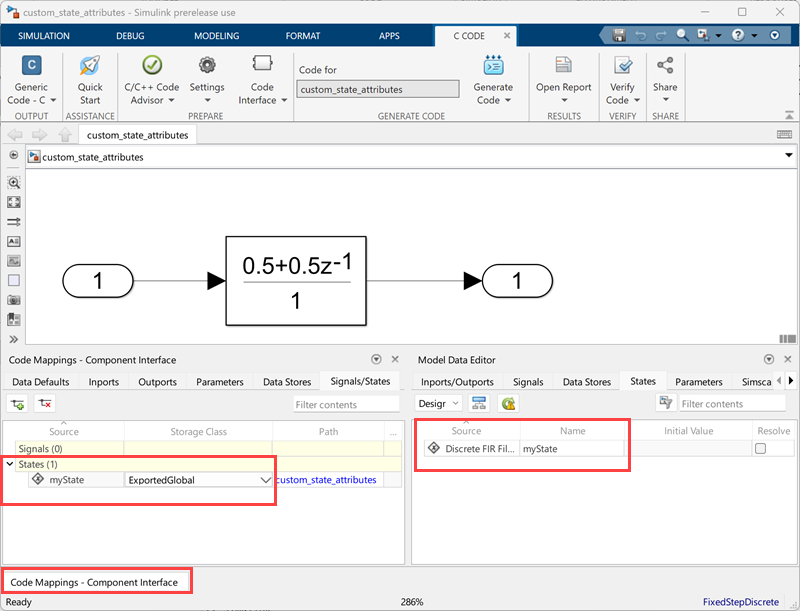
Consider a simple model that contains the Discrete FIR Filter block.

Open Model Data Editor and Code Mappings Component Interface
Open the Model Data Editor. On the Modeling tab,
click Model Data Editor. Under the
States tab, enter the Name as
myState.
Open the Simulink Coder app by clicking Simulink
Coder in the Apps tab. Open the Code Mappings - Component Interface
by clicking the Code Mappings - Component Interface button. In
the component interface window that opens, under the
Signals/States tab, set the Storage
Class of myState to
ExportedGlobal.
Build Model and Inspect Generated Code
This example configures the model to generate code only. Open the Configuration
Parameters by clicking the Model Settings
 in the Modeling tab. In the Code
Generation pane, select Generate code only.
Click Apply.
in the Modeling tab. In the Code
Generation pane, select Generate code only.
Click Apply.

In the Report pane, select Create code generation report and Open report automatically. Click Apply. These settings create a report and automatically open the report in the HTML Viewer.

To initiate the build, click the build model button  in the C Code tab or press Ctrl+B. The build process writes the code generation report files to
the
in the C Code tab or press Ctrl+B. The build process writes the code generation report files to
the html subfolder of the build folder. Next, the build process
automatically opens the HTML Viewer and displays the code generation report. Using
this report, you can view and analyze the generated code. For more information on
the generated report, see Reports for Code Generation (Simulink Coder).

In the custom_state_attributes.h file, you can see that the
filter state is declared as an external variable because the storage class is
ExportedGlobal.

If you change the storage class and rebuild the model, you can see the generated code reflect the change. With the ability to customize the state attributes, you can streamline and customize how the state appears in the generated code.
See Also
Tools
- Model Data Editor | Code Mappings Editor — C (Simulink Coder)
Blocks
Topics
- How Generated Code Stores Internal Signal, State, and Parameter Data (Simulink Coder)
- C Data Code Interface Configuration for Model Interface Elements (Simulink Coder)
- Reports for Code Generation (Simulink Coder)

