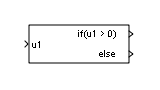
If
Select subsystem execution using logic similar to if-else
statement
Libraries:
Simulink /
Ports & Subsystems
Description
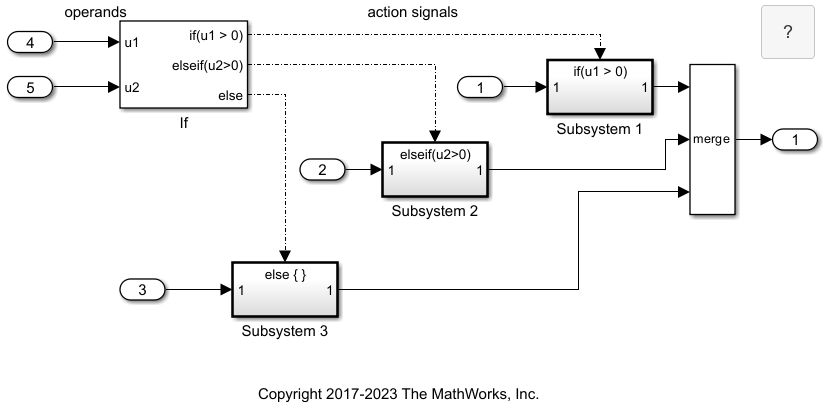
The If block, along with If Action Subsystem blocks that contain an Action Port block, implements if-else logic to control subsystem execution. For an example that uses the If block, see Select Subsystem Execution.
Examples
Simulink Subsystem Semantics
This set of examples shows different types of Simulink® Subsystems and what semantics are used when simulating these subsystems. Each example provides a description of the model and the subtleties governing how the model is executed.
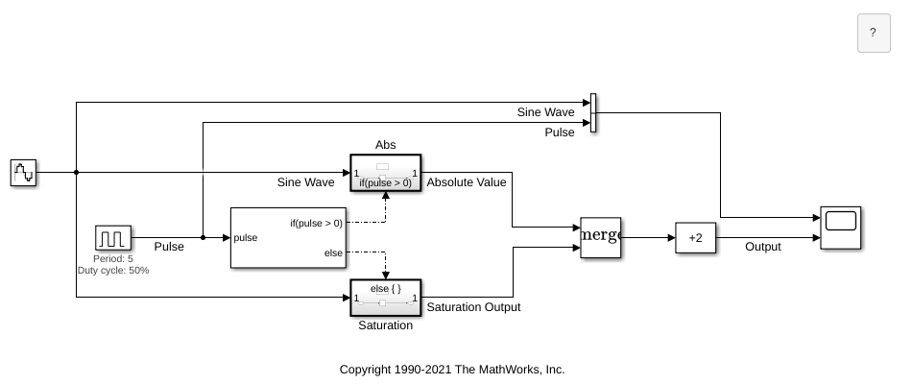
If-Then-Else Blocks
The effect of feeding a sine wave into If Action Subsystem blocks. It is designed to illustrate the similarity between the If Action Subsystem block and the Enabled Subsystem block.
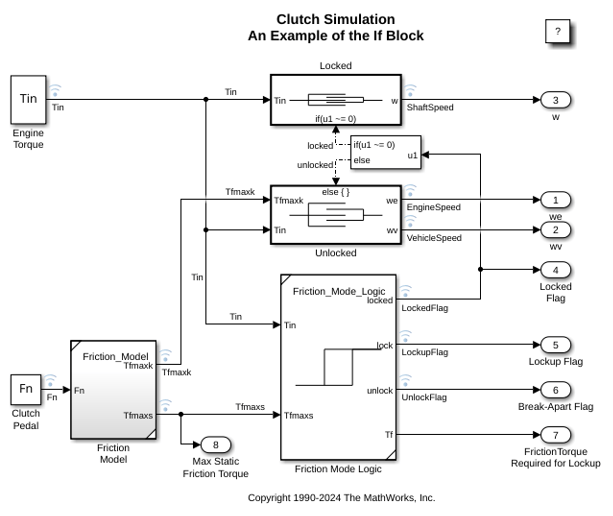
Modeling Clutch Lock-Up Using If Blocks
Use If/Else subsystems to build a clutch model. An 'If' subsystem models the clutch dynamics in the locked position while an 'Else' subsystem models the unlocked position. One or the other is enabled using the 'If' block. The dot-dashed lines from the 'If' block denote control signals, which are used to enable If/Else (or other conditional) subsystems. Checking any of the boxes on the GUI produces a plot of any of the selected variables (versus time).
Limitations
Note
The limitations listed in this section only apply to versions R2025b and earlier.
The If block has the following limitations:
It does not support tunable parameters. Values for an
iforelseifexpression cannot be tuned during a simulation in normal or accelerator mode, or when running generated code.To implement tunable if-else expressions, tune the expression outside the If block. For example, use the Relational Operator block to evaluate the expression outside of the If block or add the tunable parameter as an input to the If block.
It does not support custom storage classes. See Organize Parameter Data into a Structure by Using Struct Storage Class (Embedded Coder).
The if expression and elseif expressions cannot accept certain operators, such as
+,-,*, and/.
Ports
Input
For versions R2026a and later, you can modify the input port labels
according to the logical expressions used inside the block. To edit the
port label, pause the cursor on the default text,
u1,u2,...,un, and change the text.
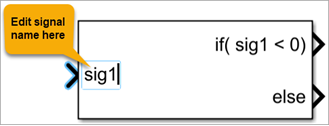
For version R2025b or earlier, the block only allows the default input port label
u1,u2,...,un. Inputs
u1,u2,...,un must have the same data type. The
inputs cannot be of any user-defined type, such as an enumerated
type.
The If block does not directly support fixed-point data types. However, you can use the Compare To Constant block to work around this limitation. See Select Subsystem Execution.
Data Types: single | double | int8 | int16 | int32 | uint8 | uint16 | uint32 | Boolean
Output
Outputs from the if, else, and
elseif ports are action signals to If Action
Subsystem blocks.
Parameters
1Specify one input port.
- integer
Specify the number of input ports. Block ports are labeled with a
'u'character followed by a number,1,2,...,n, wherenequals the number of inputs that you specify.
Programmatic Use
Block Parameter:
NumInputs |
| Type: character vector |
Values: '1'
| integer in quotes |
Default:
'1' |
When the if port and all elseif
port expressions are false, the else
port sends an action signal to execute the attached If Action
Subsystem block.
- on
Display else port.
- off
Hide else port.
Programmatic Use
Block Parameter:
ShowElse |
| Type: character vector |
Values:
'on' | 'off' |
Default:
'on' |
Control zero-crossing detection.
- on
Detect zero crossings.
- off
Do not detect zero crossings.
Programmatic Use
Block Parameter:
ZeroCross |
| Type: character vector |
Values:
'on' | 'off' |
Default:
'on' |
Since R2025a
Select this parameter to ensure only if-else statements are included in the code generated from an If block.
- on
Only if-else statements are included in the generated code. This option prevents inclusion of switch-case statements in the generated code.
- off
When this parameter is off, the code generated from an If block might contain switch-case statements, which perform the same operations as the If block.
Programmatic Use
To set the block parameter value programmatically, use
the set_param function.
Block Parameter:
EnsureIfElseCode |
| Type: character vector |
Values:
'on' | 'off' |
Default:
'off' |
The If Action Subsystem block attached to the
if port executes when the associated if
expression evaluates to true.
u1 > 0Specify sending an action signal on the output port when the input
u1is greater than0.
Logical expression (since R2026a)
Use a range of logical expressions, including expressions that use:
Tunable parameters.
General MATLAB® expressions, such as
x1 > x2 + 5.Data objects such as
Simulink.ParameterandSimulink.Signalwith custom storage classes. For more information, see Create and Apply Storage Class Defined in User-Defined Package (Embedded Coder).Fixed-point data type.
Enumerated data type.
MATLAB structure arrays.
Expressions with:
Arithmetic functions —
ceil,floor,abs, andsign.Trigonometric functions —
sin,cos,tan,asin,acos,atan,atan2,sinh,cosh, andtanh.Exponential, logarithmic and root functions —
log,log10,exp, andsqrt.
Logical expression (R2025b and earlier)
Note
Starting in R2025a, to edit the default if
expression (u1 > 0), use the
Expressions table. For a complex expression
with multiple inputs and operators, select the if
expression and edit it in the Expression
editor box.
For versions prior to R2025a, this parameter appears as If expressions in the block dialog box. You can specify logical expressions using this parameter.
However, in all Simulink® versions, this expression appears on the If block adjacent to the if output port.
The expression can include only the operators <, <=, ==,
~=, >, >=, &, |, ~, () , and
unary-minus. Operators such as +, -, *,
/, and ^ are not allowed. The expression
must not contain data type expressions, for example,
int8(6), and must not reference workspace variables
whose data type is anything other than double or
single.
Programmatic Use
Block Parameter:
IfExpression |
| Type: character vector |
Values: 'u1 >
0' | logical expression in quotes |
Default: 'u1 >
0' |
The If Action Subsystem block attached to an
elseif port executes when the associated
elseif expression evaluates to
true and all other if and
elseif expressions are false.
- empty
Logical expressions not specified.
List of logical expressions (Since R2026a)
Use a range of logical expressions that were not previously supported, including expressions that use:
Tunable parameters.
General MATLAB expressions, such as
x1 > x2 + 5.Data objects such as
Simulink.ParameterandSimulink.Signalwith custom storage classes. For more information, see Create and Apply Storage Class Defined in User-Defined Package (Embedded Coder).Fixed-point data type.
Enumerated data type.
MATLAB structure arrays.
Expressions with:
Arithmetic functions —
ceil,floor,abs, andsign.Trigonometric functions —
sin,cos,tan,asin,acos,atan,atan2,sinh,cosh, andtanh.Exponential, logarithmic and root functions —
log,log10,exp, andsqrt.
Logical expressions (R2025b and earlier)
Note
Starting in R2025a, to add and edit elseif expressions, use the Expressions table. Use the action buttons on the left of the table to add, delete, and move the expressions. The table allows you to write each elseif expression separately instead of in a comma-separated list and organize the expressions per your modeling requirements. For a complex expression with multiple inputs and operators, select the row containing that elseif expression and edit it in the Expression editor box.
For versions prior to R2025a, this parameter appears as Else expressions in the block dialog box. In those versions, specify a list of logical expressions separated by commas.
However, across all Simulink versions, the expressions appear on the If block below the if port and above the else port when you select the Show else condition check box.
Expressions can include only the operators <, <=, ==, ~=,
>, >=, &, |, ~, (), and
unary-minus. Operators such as +, -, *,
/, and ^ are not allowed. The expressions
must not contain data type expressions, for example,
int8(6), and must not reference workspace variables
whose data type is anything other than double or
single.
Programmatic Use
Block Parameter:
ElseIfExpressions |
| Type: character vector |
Values: '' |
list of logical expressions separated by commas placed in
quotes |
Default:
'' |
Block Characteristics
Data Types |
|
Direct Feedthrough |
|
Multidimensional Signals |
|
Variable-Size Signals |
|
Zero-Crossing Detection |
|
More About
If blocks that cause an If Action Subsystem block to execute receive condition, decision, and MCDC coverage, and:
The
ifcondition, and eachelseifcondition, if they exist, receive decision coverage.Any
iforelseifcondition that contains a logical expression with multiple conditions, such asu1 && u2, also receives MCDC and condition coverage for each condition in the expression.The
elsecondition does not receive coverage directly. The false case of theifcondition or lastelseifcondition, if it exists, is the true case of theelsecondition, and vice-versa. Therefore, full coverage on the rest of the If block implies full coverage of theelsecondition.
Simulink
Coverage™ reports the total number of time steps that each if and
elseif condition evaluates to true and to false. If the
if or elseif condition evaluates to true at least
once, and evaluates to false at least once, decision coverage is 100%. If no
if or elseif conditions are true, or if no
if or elseif conditions are false, decision coverage
is 50%. If the previous if or elseif condition is not
false for any time step, an elseif
condition can have 0% decision coverage.
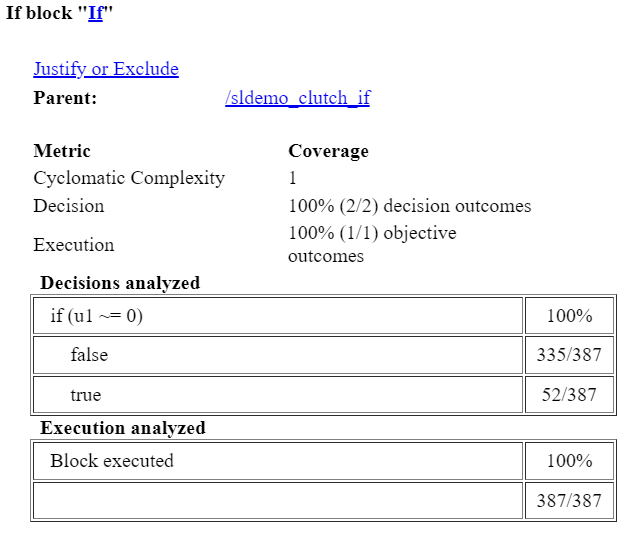
Because the If block compares its input signals, if you select the Relational Boundary coverage metric, the If block receives relational boundary coverage. For more information, see Relational Boundary Coverage (Simulink Coverage).
The coverage report displays the expression that Simulink
Coverage evaluates and reports the number of time steps that the expression is true and
false. For example, consider a case where an If block evaluates whether the
input not equal to zero, the coverage report displays if(u1 ~= 0) as the
decision.
Extended Capabilities
C/C++ Code Generation
Generate C and C++ code using Simulink® Coder™.
HDL Coder™ provides additional configuration options that affect HDL implementation and synthesized logic.
This block has one default HDL architecture.
| ConstrainedOutputPipeline | Number of registers to place at
the outputs by moving existing delays within your design. Distributed
pipelining does not redistribute these registers. The default is
|
| InputPipeline | Number of input pipeline stages
to insert in the generated code. Distributed pipelining and constrained
output pipelining can move these registers. The default is
|
| OutputPipeline | Number of output pipeline stages
to insert in the generated code. Distributed pipelining and constrained
output pipelining can move these registers. The default is
|
| SynthesisAttributes |
Specifies the synthesis attributes for the blocks and block output signals in the model. The generated HDL code contains these attributes. For more information, see SynthesisAttributes (HDL Coder). |
Version History
Introduced before R2006aUse the SynthesisAttributes HDL block property to specify the synthesis attributes for the block and its output signals. HDL Coder includes these attributes in the generated HDL code.
Starting in R2026a, the block allows you to:
Tailor the If block input port label per your modeling requirements. Previously, you could only use the default names such as
u1,u2, and so on for input port label.Use a range of logical expressions that were not previously supported for the if and elseif conditions. For more information about the list of expressions, see the if parameter.
The updated block dialog box allows you to specify the logical expressions in a table. You no longer need to specify the elseif expressions in a comma-separated list. This change makes the overall logic flow easier to visualize and parse. The table also contains new action buttons that allow you to add, delete, and move if-else expressions up and down. These buttons help you to organize the expressions per your modeling requirements. Additionally, the new expression editor box allows you to edit complex expressions.
Generated code contains if-else expressions. This change prevents inclusion of switch-case statements and enhances readability of the generated code.
MATLAB Command
You clicked a link that corresponds to this MATLAB command:
Run the command by entering it in the MATLAB Command Window. Web browsers do not support MATLAB commands.
Select a Web Site
Choose a web site to get translated content where available and see local events and offers. Based on your location, we recommend that you select: .
You can also select a web site from the following list
How to Get Best Site Performance
Select the China site (in Chinese or English) for best site performance. Other MathWorks country sites are not optimized for visits from your location.
Americas
- América Latina (Español)
- Canada (English)
- United States (English)
Europe
- Belgium (English)
- Denmark (English)
- Deutschland (Deutsch)
- España (Español)
- Finland (English)
- France (Français)
- Ireland (English)
- Italia (Italiano)
- Luxembourg (English)
- Netherlands (English)
- Norway (English)
- Österreich (Deutsch)
- Portugal (English)
- Sweden (English)
- Switzerland
- United Kingdom (English)