Rebuild
R2026b(To be removed) Rebuild policy for model reference targets
Model Configuration Pane: Model Referencing
The Rebuild configuration parameter will be removed in a future
release. To prepare for this change, set Rebuild to
If changes in known dependencies detected. For more
information, see Version History.
Description
The Rebuild configuration parameter determines when to rebuild simulation and Simulink® Coder™ targets for referenced models before updating, simulating, or generating code from the model.
Models in a model hierarchy can have different rebuild settings. When you update, simulate, or generate code for a model, the rebuild setting for that model applies to all its referenced models.
Models that execute in normal mode do not generate simulation targets and are unaffected by this configuration parameter.
Settings
If changes in known dependencies
detected (default) | Always | If changes detected | NeverIf changes in known dependencies detectedConditionally rebuild model reference targets when the software detects a change that could affect simulation or code generation results. When the software finds no changes, the software does not compute the structural checksum of the model and does not rebuild the model reference target.
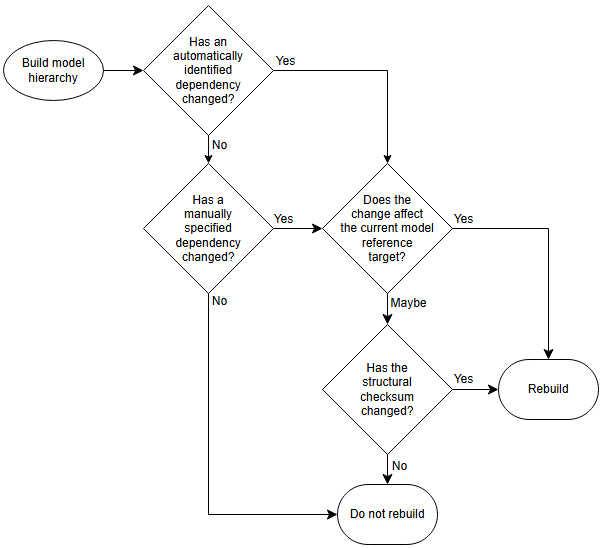
The software rebuilds the model reference targets only when:
A dependency automatically identified by the software has changed, and the change affects the current model.
A dependency manually specified by the Model dependencies configuration parameter has changed, and the change affects the current model.
When needed, the software determines whether the change affects the current model by checking whether the structural checksum has changed.
This flow chart visualizes how the software determines whether to rebuild model reference targets during model compilation, simulation, and code generation.
To prevent invalid simulation and code generation results, use the Model dependencies configuration parameter to specify files that contain code executed by callbacks. For more information, see Model dependencies.
AlwaysUnconditionally rebuild model reference targets. This setting requires the most processing time because this setting can trigger unnecessary builds.
If changes detectedConditionally rebuild model reference targets when the software detects a change that could affect simulation or code generation results. When the software finds no changes, the software computes the structural checksum of the model. If the structural checksum has changed, the software rebuilds the model reference target.
NeverDo not rebuild model reference targets. This setting requires the least processing time. However, if model reference targets are out of date, the simulation or code generation can present invalid results. To manually rebuild model reference targets, use the
slbuildfunction.
Examples
Tips
To improve rebuild detection speed and accuracy, use the Model dependencies configuration parameter to specify custom dependencies. For more information, see Model dependencies.
When available, the software uses Simulink cache files for faster simulations and incremental code generation. For information on using and sharing Simulink cache files, see Share Simulink Cache Files for Faster Simulation and Simulink Cache Files for Incremental Code Generation (Simulink Coder).
Recommended Settings
| Application | Setting |
|---|---|
| Debugging | No impact |
| Traceability | No impact |
| Efficiency | No impact |
| Safety precaution |
When you use the
|
Programmatic Use
Parameter:
UpdateModelReferenceTargets |
Value1
:
"Force" | "IfOutOfDateOrStructuralChange" |
"IfOutOfDate" | "AssumeUpToDate" |
Default:
"IfOutOfDate" (since R2026a) |
Limitations
This configuration parameter does not apply to a Model block when both of these conditions apply:
The block simulates in software-in-the-loop (SIL) or processor-in-the-loop (PIL) mode.
The Code interface block parameter is set to
Top model.
In this case, the code regeneration behavior for the referenced model is what you observe for a standalone model. For more information, see Control Regeneration of Top Model Code (Embedded Coder).
More About
Version History
Introduced before R2006aSee Also
Model Settings
Functions
1 This table maps the programmatic values to the equivalent interactive values of the Rebuild configuration parameter.
UpdateModelReferenceTargets
Value | Equivalent Rebuild Value |
|---|---|
'Force' | Always |
'IfOutOfDateOrStructuralChange' | If changes detected |
'IfOutOfDate' | If changes in known dependencies detected |
'AssumeUpToDate' | Never |

