LCD Screen
R2026bDisplay text and numerical value on specified line of LCD screen
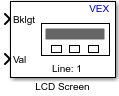
LCD Screen block
To add a block to a model, double-click the canvas and start typing the block name. Then, select the block from the list.
Libraries:
Simulink Coder Support Package for ARM Cortex-based VEX Microcontroller /
LCD
Description
Add-On Required: This feature requires the Simulink Coder Support Package for ARM Cortex-based VEX Microcontroller add-on.
The LCD Screen block displays a static label and a value from the block input on the LCD screen. You can also choose to display only the label and not to display the value.
A maximum of 16 characters are displayed for a label or a combination of label and its value. Any output on the LCD screen more than 16 characters is truncated.
For example, if you select only a label to be displayed, the label can have maximum length of 16 characters. If you select a combination of label and its value, the maximum length of the characters displayed for both is 16.
Using this block, select a line on which you want to display the label and value, and then turn the LCD backlight on or off.
Ports
Input
Parameters
Programmatic Use: Add Block
To add the block programmatically, use the add_block function with one of these library block paths as the source.
"vexarmcortexlib/LCD/LCD Screen"
Example: add_block("vexarmcortexlib/LCD/LCD Screen","myModel/myBlock",MakeNameUnique="on")
Version History
Introduced in R2017a

