slreportgen.report.SystemHierarchy Class
R2026bNamespace: slreportgen.report
Superclasses: slreportgen.report.Reporter
System hierarchy reporter
Description
Creates a system hierarchy reporter that generates a nested list of the subsystems of a Simulink® model or subsystem in a report.
Note
To use a system hierarchy reporter in a report, you must create the report using the
slreportgen.report.Report class or subclass.
The slreportgen.report.SystemHierarchy class is a handle class.
Creation
Description
rptr = slreportgen.report.SystemHierarchy creates
an empty system hierarchy reporter based on a default template. Customize the content and
format of the generated list by using the reporter properties. Before you add the reporter
to a report, you must specify a model or subsystem in the Source
property of the reporter. Adding an empty reporter to a report produces an error.
rptr = slreportgen.report.SystemHierarchy(
creates a system hierarchy reporter for the model or subsystem specified by
source)source. See the Source
property.
rptr = slreportgen.report.SystemHierarchy(>PropertyName=Value)
Properties
Simulink model or subsystem, specified as a character vector or string scalar that contains the path to the model or subsystem, or as a handle to the model or subsystem.
Attributes:
GetAccess | public |
SetAccess | public |
NonCopyable | true |
Maximum number of levels of ancestors of the source subsystem to include in the
generated list, specified as a nonnegative integer scalar. For example, if
MaxAncestorLevel is 2, the list includes the
source and up to two levels of ancestors. If MaxAncestorLevel is
Inf, the default value, the list includes all ancestors. If
MaxAncestorLevel is zero, the list does not include
ancestors.
Attributes:
GetAccess | public |
SetAccess | public |
Data Types: double
Maximum number of levels of descendants of the source model or subsystem to include
in the generated list, specified as a nonnegative integer scalar. For example, if
MaxDescendantLevel is 2, the list includes the
source and up to two levels of descendants. If MaxDescendantLevel is
Inf, the default value, the list includes all descendants. If
MaxDescendantLevel is zero, the list does not include
descendants.
Attributes:
GetAccess | public |
SetAccess | public |
Data Types: double
Whether to include peers of the source subsystem in the generated list, specified as a numeric or logical 1
(true) or 0 (false). When you
specify:
1(true) — Include peers of the source subsystem in the generated list.0(false) — Omit peers of the source subsystem in the generated list.
Attributes:
GetAccess | public |
SetAccess | public |
Data Types: logical
Whether to emphasize the source model or subsystem in the generated list,
specified as a numeric or logical 1
(true) or 0 (false). When you
specify:
1(true) — Format the name of the source model or subsystem according to theTextFormatterproperty.0(false) — Format the name of the source model or subsystem like the other items in the list.
Attributes:
GetAccess | public |
SetAccess | public |
Data Types: logical
List formatter for a referenced dictionary list, specified as an mlreportgen.dom.UnorderedList object or mlreportgen.dom.OrderedList object. The list formatter is used when the
ReferencedDictionaryPolicy property is set to
"List". The UnorderedList or
OrderedList object must not contain list items.
The default value of this property is an UnorderedList object with
the StyleName property set to the
SystemHierarchyList style, which is defined in the default template
of a SystemHierarchy reporter. To customize the appearance of the list,
modify the properties of the default UnorderedList object or replace the
object with your own UnorderedList or OrderedList
object.
Attributes:
GetAccess | public |
SetAccess | public |
List formatter that formats the generated list, specified as an mlreportgen.dom.UnorderedList object or an mlreportgen.dom.OrderedList object. The default value of this property is an
object of mlreportgen.dom.UnorderedList. To
customize the list formatting, modify the list object properties or replace the list
object with a customized list object that does not contain list items.
Attributes:
GetAccess | public |
SetAccess | public |
Text formatter object that formats the name of the source model or subsystem in the
generated list, specified as an mlreportgen.dom.Text object. This property
applies only if the EmphasizeSource property is
true. The initial value of the
SourceTextFormatter property is an mlreportgen.dom.Text object with the Bold and
Italic properties set to true. To customize
the appearance of the name in the generated list, modify the
mlreportgen.dom.Text object properties or replace the object with a
customized mlreportgen.dom.Text object. If you add text to the default or
replacement text object, the text appears in front of the source name in the generated
report.
Attributes:
GetAccess | public |
SetAccess | public |
Whether the generated list of descendants of the source system includes masked
subsystems, specified as a numeric or logical 1
(true) or 0 (false). When you
specify:
1(true) — Include masked subsystems and their descendant subsystems, as long as the number of levels below the source subsystem is less than or equal to the value of theMaxDescendantLevelproperty.To enable the system hierarchy reporter to link masked subsystems to the corresponding diagrams in the report, in the diagram reporter, set the
MaskedSystemLinkPolicyproperty to"system".0(false) — Omit masked subsystems and their descendant subsystems.
Attributes:
GetAccess | public |
SetAccess | public |
Data Types: logical
Whether the generated list of descendants of the source system includes referenced
models, specified as a numeric or logical 1
(true) or 0 (false). When you
specify:
1(true) — Include referenced models and their descendant subsystems, as long as the number of levels below the source subsystem is less than or equal to the value of theMaxDescendantLevelproperty.0(false) — Omit referenced models and their descendant subsystems.
Attributes:
GetAccess | public |
SetAccess | public |
Data Types: logical
Whether the generated list of descendants of the source system includes referenced
subsystems, specified as a numeric or logical 1
(true) or 0 (false). When you
specify:
1(true) — Include referenced subsystems and their descendant subsystems, as long as the number of levels below the source subsystem is less than or equal to the value of theMaxDescendantLevelproperty.0(false) — Omit referenced subsystems and their descendant subsystems.
Attributes:
GetAccess | public |
SetAccess | public |
Data Types: logical
Whether the generated list of descendants of the source system includes subsystems
that link to a Simulink library subsystem, specified as a numeric or logical 1
(true) or 0 (false). When you
specify:
1(true) — Include a linked subsystem or one of its descendant subsystems that link to a Simulink library subsystem, if all of these conditions are true:the value of
IncludeSimulinkLibraryLinksistrue.the subsystem is not masked, or the subsystem is masked and the value of the
IncludeMaskedSubsystemsproperty istrue.the number of levels below the source subsystem is less than or equal to the value of the
MaxDescendantLevelproperty.
0(false) — Omit the generated list of descendants of the source system includes subsystems that link to a Simulink library subsystem.
Data Types: logical
Whether the generated list of descendants of the source system includes subsystems
that link to a user-defined library subsystem, specified as a numeric or logical 1
(true) or 0 (false). When you
specify:
1(true) — Include a linked subsystem or one of its descendant subsystems that link to a user-defined library subsystem, if all of these conditions are true:the value of
IncludeUserLibraryLinksistrue.the subsystem is not masked, or the subsystem is masked and the value of the
IncludeMaskedSubsystemsproperty istrue.the number of levels below the source subsystem is less than or equal to the value of the
MaxDescendantLevelproperty.
0(false) — Omit the generated list of descendants of the source system includes subsystems that link to a user-defined library subsystem.
Attributes:
GetAccess | public |
SetAccess | public |
Data Types: logical
Variants of a variant block to include in the generated list of descendants of the source system, specified as one of these values:
| Value | Description |
|---|---|
"Active" | Active variants |
"All" | All variants |
"ActivePlusCode" | Active variants and code variants |
The list includes the variants only if the number of levels below the source
subsystem is less than or equal to the value of the
MaxDescendantLevel property. When
IncludeVariants is specified as "All", the
report displays inactive variant links using a different
style (since R2026a) than the active variant links. Active variant links display in blue and
inactive variant links display in gray italic.
Note
If you have not compiled the model before generating the report, the report includes all variants regardless of the specified value of this property.
Attributes:
GetAccess | public |
SetAccess | public |
Data Types: char | string
Source of the template for this reporter, specified in one of these ways:
Character vector or string scalar that specifies the path of the file that contains the template for this reporter
Reporter or report whose template this reporter uses or whose template library contains the template for this reporter
Document Object Model (DOM) document or document part whose template this reporter uses or whose template library contains the template for this reporter
The specified template must be the same type as the report to which you
append this reporter. For example, for a Microsoft® Word report, TemplateSrc must be a Word reporter template.
If the TemplateSrc property is empty, this reporter uses the
default reporter template for the output type of the report.
Attributes:
GetAccess | public |
SetAccess | public |
NonCopyable | true |
Dependent | true |
Name of the template for this reporter, specified as a character vector or string scalar.
The template for this reporter must be in the template library of the template specified by
the TemplateSrc property of this reporter.
Attributes:
GetAccess | public |
SetAccess | public |
Data Types: char | string
Hyperlink target for this reporter, specified as a character vector or string scalar
that specifies the link target ID, or an mlreportgen.dom.LinkTarget object. A character vector or string scalar
value converts to a LinkTarget object. The link target immediately
precedes the content of this reporter in the output report.
Attributes:
GetAccess | public |
SetAccess | public |
Methods
| Method | Purpose |
|---|---|
slreportgen.report.SystemHierarchy.createTemplate |
Create reporter template
Input Arguments
Return Values
For more information, see the method
for the |
slreportgen.report.SystemHierarchy.customizeReporter |
Create reporter from
Input Arguments
Return Values
For more information, see the method
for the |
slreportgen.report.SystemHierarchy.getClassFolder |
Get location of folder that contains
Return Values
For more information, see the method
for the |
copy |
Create copy of reporter object and make deep copies of property values
Input Arguments
Return Values
For more information, see the method
for the |
getImpl |
Get implementation of reporter
Note You cannot add content to the reporter after calling this method. Input Arguments
Return Values
For more information, see the method
for the |
Examples
Create a report that includes the system hierarchy of the
slrgex_idle_control model with linked subsystem diagrams.
Import the API packages.
import slreportgen.report.*
import mlreportgen.report.*
import mlreportgen.dom.*
Load the model.
model = "slrgex_idle_control";
openExample(model)
Create a report.
rpt = slreportgen.report.Report("output","pdf");
Create a chapter reporter.
chapter = Chapter("System Hierarchy for the " + model + " Model");
Create a System Hierarchy reporter for the model.
rptr = SystemHierarchy(model);
Add the System Hierarchy reporter to the chapter. Then add the chapter to the report.
add(chapter, rptr);
add(rpt, chapter);
Find the diagrams for the subsystems.
finder = slreportgen.finder.DiagramFinder(model);
while hasNext(finder)
    result = next(finder);
    ch = Chapter(result.Name);
    add(ch, result);
    add(rpt, ch);
end
Close and view the output report.
close(rpt);
close_system(model);
rptview(rpt);
Version History
Introduced in R2019bWhen IncludeVariants is specified as
"All", the report displays inactive variant links using a different
style than the active variant links. Active variant links display in blue and inactive
variant links display in gray italic.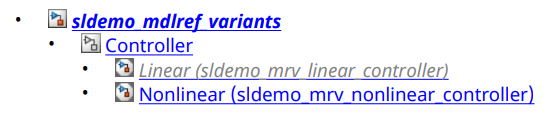
MATLAB Command
You clicked a link that corresponds to this MATLAB command:
Run the command by entering it in the MATLAB Command Window. Web browsers do not support MATLAB commands.


Select a Web Site
Choose a web site to get translated content where available and see local events and offers. Based on your location, we recommend that you select: .
You can also select a web site from the following list
How to Get Best Site Performance
Select the China site (in Chinese or English) for best site performance. Other MathWorks country sites are not optimized for visits from your location.
Americas
- América Latina (Español)
- Canada (English)
- United States (English)
Europe
- Belgium (English)
- Denmark (English)
- Deutschland (Deutsch)
- España (Español)
- Finland (English)
- France (Français)
- Ireland (English)
- Italia (Italiano)
- Luxembourg (English)
- Netherlands (English)
- Norway (English)
- Österreich (Deutsch)
- Portugal (English)
- Sweden (English)
- Switzerland
- United Kingdom (English)