Author Tests
R2026bYou can author C/C++ tests using the Polyspace
Test xUnit API. Tests and assessments are written using macros that begin with
PST_. For instance, use PST_TEST to define a
test in a suite, or PST_VERIFY_EQ_INT to assess that two integer
values are equal.
If you use the Polyspace
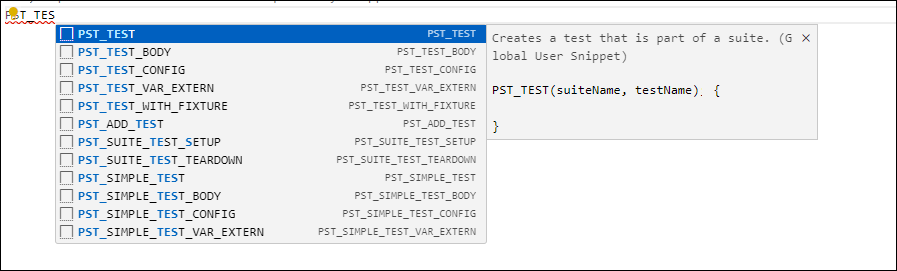
as You Code™ extension in Visual Studio Code, you can start typing PST_ to see autocomplete
suggestions for macros from the C/C++ xUnit API. You can hover on a suggestion to see a
description of the macro, and select a suggestion to enter the macro with placeholders
to be filled in. You can also build and run these tests from Visual Studio Code. All files needed for compiling xUnit tests are available with either a
Polyspace
as You Code or Polyspace
Test installation (in the folder
<polyspaceroot>/polyspace/pstest/pstunit/).
Topics
- Set Up C/C++ Testing and Code Profiling Using Self-Managed Builds (Polyspace Test)
Define environment variables that point to locations of Polyspace Test files required for compiling xUnit tests or code profiling macros.
- Writing Tests Using Polyspace Test xUnit API for C/C++ Code (Polyspace Test)
Look up the various test creation macros that you can use in tests written with the Polyspace Test API.
- Assessment Macros in Polyspace Test API for C/C++ Code (Polyspace Test)
Look up the various assessment macros that you can use in tests written with the Polyspace Test API.

