Process for Calibrating and Filling Feature Tables
R2026bA feature calibration is the process of calibrating lookup tables and their normalizers by comparing a collection of lookup tables to a statistical model. The strategy determines the collection of lookup tables. A feature refers to the object that contains the statistical model and the collection of lookup tables.
This is the process for calibrating, filling, and validating feature lookup tables for a subsystem that estimates engine torque.
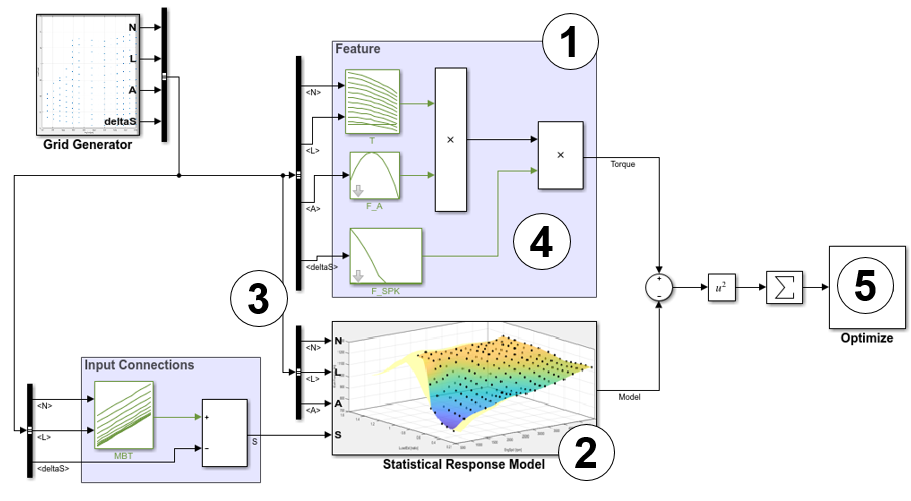
Step | Description | |
|---|---|---|
1 | Add a feature and construct or import a strategy from a Simulink® model file. | |
2 | Import and select a response model that relates to the feature that you are filling. A Model-Based Calibration Toolbox™ response model is a function of a set of variables. Typically, you construct a model using the Model Browser. | |
3 | Set Up Variables and Constants (optional) | Optionally, align the feature inputs to a response model. You can use variables, constants, and aliases to create function models. |
4 | Initialize Feature and Calibration Tables (optional) | Optionally, initialize the feature model lookup table parameters. |
5 | Initialize and optimize your feature model lookup table parameters. | |
6 | Validate the feature fill by comparing the feature model and response model outputs at the same input values. | |
7 | Export feature calibration tables to a file. | |

