subtract
Difference of two polyshape objects
Syntax
Description
[
also returns vertex mapping information from the vertices in
polyout,shapeID,vertexID] = subtract(poly1,poly2)polyout to the vertices in poly1 and
poly2. The subtract function only supports
this syntax when poly1 and poly2 are scalar
polyshape objects.
The shapeID elements identify whether the corresponding vertex
in polyout originated in poly1,
poly2, or was created from the difference.
vertexID maps the vertices of polyout to
the vertices of poly1, poly2, or the
difference.
___ = subtract(___,
specifies options using one or more name-value arguments in addition to any of the
input argument combinations in previous syntaxes. You can use any of the output
argument combinations in previous syntaxes. For example, Name=Value)polyout =
subtract(poly1,poly2,Simplify=false) returns a
polyshape object whose vertices have not been modified
regardless of intersections or improper nesting.
Examples
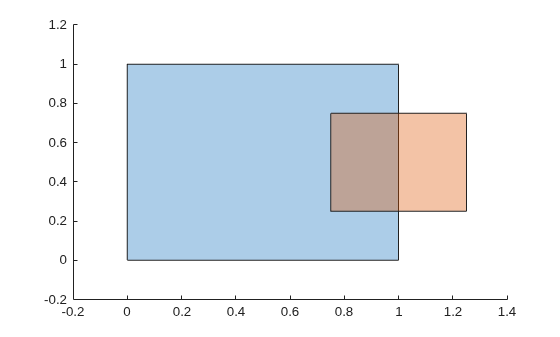
Create and plot two polygons poly1 and poly2 that partially overlap.
poly1 = polyshape([0 0 1 1],[1 0 0 1]);
poly2 = polyshape([0.75 1.25 1.25 0.75],[0.25 0.25 0.75 0.75]);
plot(poly1)
hold on
plot(poly2)
figure
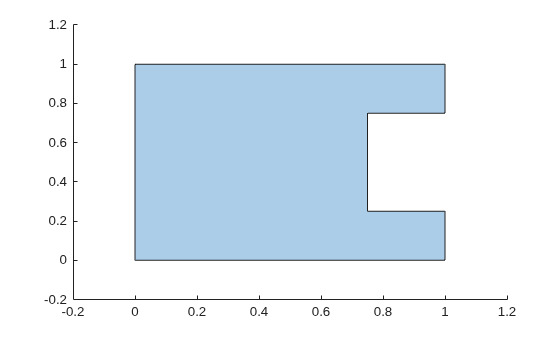
Subtract poly2 from poly1. The resulting polygon is poly1 minus any part of poly2 that overlaps with poly1.
polyout1 = subtract(poly1,poly2)
polyout1 =
polyshape with properties:
Vertices: [8×2 double]
NumRegions: 1
NumHoles: 0
plot(polyout1)
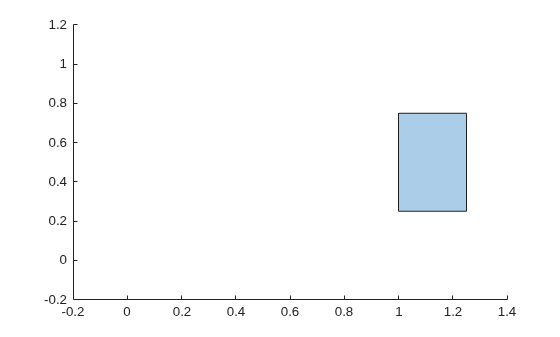
Now subtract the two polygons in the opposite order, that is, subtract poly1 from poly2. The resulting polygon is poly2 minus any part of poly1 that overlaps poly2.
polyout2 = subtract(poly2,poly1)
polyout2 =
polyshape with properties:
Vertices: [4×2 double]
NumRegions: 1
NumHoles: 0
plot(polyout2) xlim([-0.2 1.4]); ylim([-0.2 1.2]);
Create two polygons, and compute and plot their difference. When calling the subtract function, specify three output arguments to return the vertex mapping information.
poly1 = polyshape([0 0 1 1],[1 0 0 1]);
poly2 = translate(poly1,[0.5 0.5]);
[polyout,shapeID,vertexID] = subtract(poly1,poly2);
plot(polyout)
axis equal
Display the vertex coordinates of the difference and the corresponding vertex mapping information.
Vertices = polyout.Vertices; table(Vertices,shapeID,vertexID)
ans=6×3 table
Vertices shapeID vertexID
__________ _______ ________
0 1 1 1
0.5 1 0 0
0.5 0.5 2 4
1 0.5 0 0
1 0 1 3
0 0 1 4
The first, fifth, and sixth values in shapeID are 1, indicating that the corresponding vertices of the difference originated in poly1. The corresponding values in vertexID are 1, 3, and 4, indicating that the vertices are the first, third, and fourth vertices in the property poly1.Vertices. Similarly, the third vertex of the difference originated in poly2, and it is the fourth vertex in the property poly2.Vertices. The second and fourth vertices of the difference were created from the subtraction computation, and the corresponding values of shapeID and vertexID are 0.
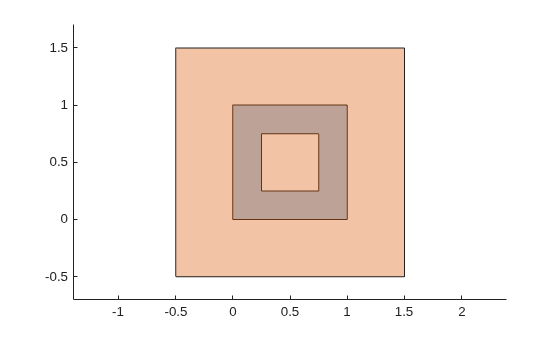
Create and plot two polygons. The first polygon represents a square with a hole at its center, and the second polygon is a square without holes.
poly1 = polyshape([0.25 0.25 0.75 0.75], ... [0.75 0.25 0.25 0.75]); poly2 = polyshape([0 0 1 1],[1 0 0 1]); poly1 = subtract(poly2,poly1); poly2 = translate(scale(poly2,2),[-0.5 -0.5]); plot([poly1 poly2]) axis equal
Subtract the polygon with the hole from the square. Plot the difference.
[polyout,shapeID,vertexID] = subtract(poly2,poly1);
plot(polyout)
axis equal
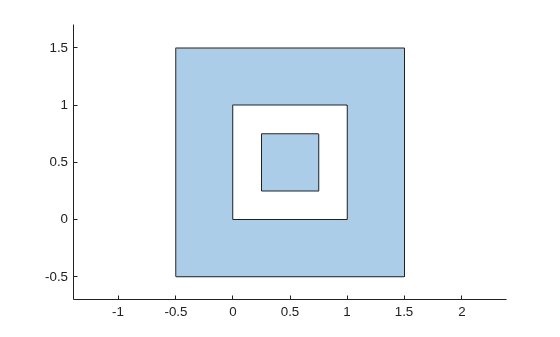
Display the vertex coordinates of the resulting polyshape object and the corresponding vertex mapping information.
Vertices = polyout.Vertices; table(Vertices,shapeID,vertexID)
ans=14×3 table
Vertices shapeID vertexID
____________ _______ ________
-0.5 1.5 1 1
1.5 1.5 1 2
1.5 -0.5 1 3
-0.5 -0.5 1 4
NaN NaN NaN NaN
0 1 2 1
0 0 2 4
1 0 2 3
1 1 2 2
NaN NaN NaN NaN
0.25 0.75 2 6
0.75 0.75 2 9
0.75 0.25 2 8
0.25 0.25 2 7
The resulting difference has three boundaries. In the Vertices property of the output polyshape object, the three sets of boundary coordinates are separated by a row of NaN values. The corresponding values in shapeID and vertexID are also NaN.
Input Arguments
First input polyshape, specified as a scalar, vector,
matrix, or multidimensional array.
Second input polyshape, specified as a scalar, vector,
matrix, or multidimensional array.
Name-Value Arguments
Specify optional pairs of arguments as
Name1=Value1,...,NameN=ValueN, where Name is
the argument name and Value is the corresponding value.
Name-value arguments must appear after other arguments, but the order of the
pairs does not matter.
Example: polyout =
subtract(poly1,poly2,Simplify=false)
Keep collinear points as vertices, specified as one of these numeric or logical values:
1(true) — Keep all collinear points as vertices.0(false) — Remove collinear points so that the outputpolyshapecontains the fewest vertices necessary to define the boundaries.
If you do not specify the KeepCollinearPoints
name-value argument, the function assigns its value according to the
values used during creation of the input polyshape objects.
If each input
polyshapekept collinear points as vertices during creation, then the function setsKeepCollinearPointstotrue.If each input
polyshaperemoved collinear points during creation, then the function setsKeepCollinearPointstofalse.If the collinear points of the input
polyshapeobjects were treated differently, then the function setsKeepCollinearPointstofalse.
Modify polygon vertices to simplify output, specified as one of these numeric or logical values:
1(true) — Modify polygon vertices to produce a well-defined polygon when the output vertices produce intersections or improper nesting.0(false) — Produce a polygon that may contain intersecting edges, improper nesting, duplicate points, or degeneracies. Computing with ill-defined polygons can lead to inaccurate or unexpected results.
Output Arguments
Resulting difference, returned as a polyshape object or
an array of polyshape objects.
The two polyshape input arguments must have compatible
sizes. For example, if two polyshape input vectors have
different lengths M and N, then they
must have different orientations (one must be a row vector and one must be a
column vector). polyout is then
M-by-N or
N-by-M depending on the
orientation of each input vector. For more information on compatible array
sizes, see Compatible Array Sizes for Basic Operations.
If the Vertices property of polyout
contains NaN values, then that shape has multiple regions
or holes and, therefore, has more than one boundary. NaN
values separate the sets of vertices for each boundary.
Shape ID, returned as a column vector whose elements each represent the origin of the vertex in the difference.
The length of
shapeIDis equal to the number of rows in theVerticesproperty of the outputpolyshape.The value of an element in
shapeIDis 1 when the corresponding vertex originated frompoly1, and 2 when it originated frompoly2. An element is 0 when the corresponding vertex of the outputpolyshapewas created by the subtraction.The
subtractfunction supports this output argument only if thepoly1andpoly2input arguments are scalarpolyshapeobjects.NaNvalues inshapeIDindicate thatpolyouthas multiple regions or holes and, therefore, has more than one boundary.NaNvalues separate the sets of vertices for each boundary.
Data Types: double
Vertex ID, returned as a column vector whose elements map the vertices in
the output polyshape to the vertices in the
polyshape of origin.
The length of
vertexIDis equal to the number of rows in theVerticesproperty of the outputpolyshape.The elements of
vertexIDcontain the row numbers of the corresponding vertices in theVerticesproperty of the inputpolyshape. An element is 0 when the corresponding vertex of the outputpolyshapewas created by the difference.The
subtractfunction supports this output argument only ifpoly1andpoly2input arguments are scalarpolyshapeobjects.NaNvalues invertexIDindicate thatpolyouthas multiple regions or holes and, therefore, has more than one boundary.NaNvalues separate the sets of vertices for each boundary.
Data Types: double
Extended Capabilities
Usage notes and limitations:
Dynamic memory allocation must be enabled for code generation.
Name-value pair must be compile time constant.
Refer to the usage notes and limitations in the C/C++ Code Generation section. The same usage notes and limitations apply to GPU code generation.
Version History
Introduced in R2017bSpecify the Simplify name-value argument to control whether
the subtract function simplifies its output. By default,
Simplify is true and
subtract returns a well-defined polygon by resolving
boundary intersections and improper nesting and also by removing duplicate points
and degeneracies.
You can specify Simplify=false to gain performance when
performing a series of exclusive ors or subtractions. In this case, you can simplify
the output once at the end either by specifying Simplify=true in
the final function call or by using the simplify function on the final output polygon.
MATLAB Command
You clicked a link that corresponds to this MATLAB command:
Run the command by entering it in the MATLAB Command Window. Web browsers do not support MATLAB commands.
Select a Web Site
Choose a web site to get translated content where available and see local events and offers. Based on your location, we recommend that you select: .
You can also select a web site from the following list
How to Get Best Site Performance
Select the China site (in Chinese or English) for best site performance. Other MathWorks country sites are not optimized for visits from your location.
Americas
- América Latina (Español)
- Canada (English)
- United States (English)
Europe
- Belgium (English)
- Denmark (English)
- Deutschland (Deutsch)
- España (Español)
- Finland (English)
- France (Français)
- Ireland (English)
- Italia (Italiano)
- Luxembourg (English)
- Netherlands (English)
- Norway (English)
- Österreich (Deutsch)
- Portugal (English)
- Sweden (English)
- Switzerland
- United Kingdom (English)