Main Content

houghlines

Extract line segments based on Hough transform

Description

lines = houghlines(BW,theta,rho,peaks) extracts line segments in the binary image BW associated with particular bins in a Hough transform. theta and rho are the angles and perpendicular offset of lines, respectively, corresponding to each bin of the Hough transform. peaks lists the row and column coordinates of peaks in the Hough transform matrix. The returned value lines contains information about the extracted line segments.

example

lines = houghlines(BW,theta,rho,peaks,Name=Value) uses name-value arguments to control various aspects of the line extraction. For example, specify MinLength=7 to extract lines with a minimum length of 7 pixels.

example

Examples

collapse all

Read an image into the workspace, then rotate the image 33 degrees counterclockwise about the center of the image.

I = imread("circuit.tif");
rotI = imrotate(I,33,"crop");

Find the edges in the image by using the edge function.

BW = edge(rotI,"canny");

Calculate the Hough transform of the rotated binary image.

[H,theta,rho] = hough(BW);

Find up to five peaks in the Hough transform matrix, H, by using the houghpeaks function.

maxpeaks = 5;
thresh = ceil(0.3*max(H(:)));
P = houghpeaks(H,maxpeaks,Threshold=thresh);

Find lines that have a length of at least 7 pixels. Before counting line lengths, fill in gaps that are smaller than 5 pixels.

lines = houghlines(BW,theta,rho,P,FillGap=5,MinLength=7);

Display the original image, then overlay the detected lines in green. Also plot the start of each line in yellow and the end of each line in red.

imshow(rotI)
hold on
for k = 1:length(lines)
   xy = [lines(k).point1; lines(k).point2];
   plot(xy(:,1),xy(:,2),LineWidth=2,Color="green");
   plot(xy(1,1),xy(1,2),"x",LineWidth=2,Color="yellow");
   plot(xy(2,1),xy(2,2),"x",LineWidth=2,Color="red");
end
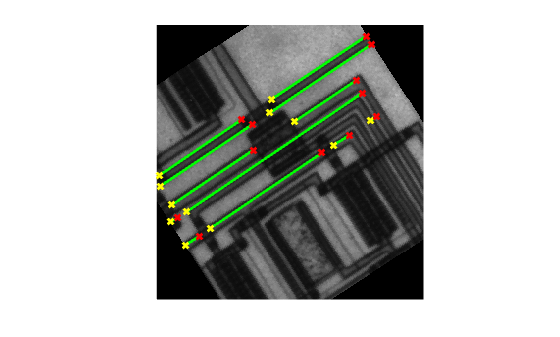
Figure contains an axes object. The hidden axes object contains 37 objects of type image, line. One or more of the lines displays its values using only markers

Input Arguments

collapse all

Binary image, specified as a 2-D logical matrix or 2-D numeric matrix. For numeric input, any nonzero pixels are considered to be 1 (true).

Data Types: single | double | int8 | int16 | int32 | int64 | uint8 | uint16 | uint32 | uint64 | logical

Angles of the perpendicular projections to the lines, in degrees, specified as a numeric vector with elements in the range [-90, 90). The angles are measured in the clockwise direction from the x-axis. Each element of the vector specifies the theta value for the corresponding column of the Hough transform matrix H.

Set this value as the theta output argument from the hough function.

Data Types: double

Perpendicular offsets from the origin to the line, in pixels, specified as a numeric vector. The origin is at the center of the top-left corner pixel of the image. Each element of the vector specifies the rho value for the corresponding row of the Hough transform matrix H.

Set this value as the rho output argument from the hough function.

Data Types: double

Row and column coordinates of peaks in the Hough transform, specified as a numeric vector. Set this value as the peaks output argument from the houghpeaks function.

Data Types: double

Name-Value Arguments

collapse all

Specify optional pairs of arguments as Name1=Value1,...,NameN=ValueN, where Name is the argument name and Value is the corresponding value. Name-value arguments must appear after other arguments, but the order of the pairs does not matter.

Example: lines = houghlines(BW,theta,rho,peaks,MinLength=7) specifies that the minimum line length is 7 pixels.

Before R2021a, use commas to separate each name and value, and enclose Name in quotes.

Example: lines = houghlines(BW,theta,rho,peaks,"MinLength",7);

Distance between two line segments associated with the same Hough transform bin, specified as a positive number. When the distance between the line segments is less than the value specified, the houghlines function merges the line segments into a single line segment.

Data Types: double

Minimum line length, specified as a positive number. The houghlines function discards lines that are shorter than the minimum line length.

Data Types: double

Output Arguments

collapse all

Detected lines, returned as a vector of structures. Each element represents one merged line segment and has these fields:

Field

Description

point1

Two element vector [X Y] specifying the coordinates of the first end-point of the line segment

point2

Two element vector [X Y] specifying the coordinates of the second end-point of the line segment

theta

Angle, in degrees, corresponding to a Hough transform bin

rho

Perpendicular offset from the origin to the line, corresponding to a Hough transform bin

Extended Capabilities

expand all

Version History

Introduced before R2006a