Analyze Multitasking Programs in Polyspace
R2026bWith Polyspace®, you can analyze programs where multiple threads (tasks) run concurrently.
In addition to regular run-time checks, the analysis looks for issues specific to concurrent execution:
Data races, deadlocks, consecutive or missing locks and unlocks (Bug Finder)
Unprotected shared variables (Code Prover)
Configure Analysis
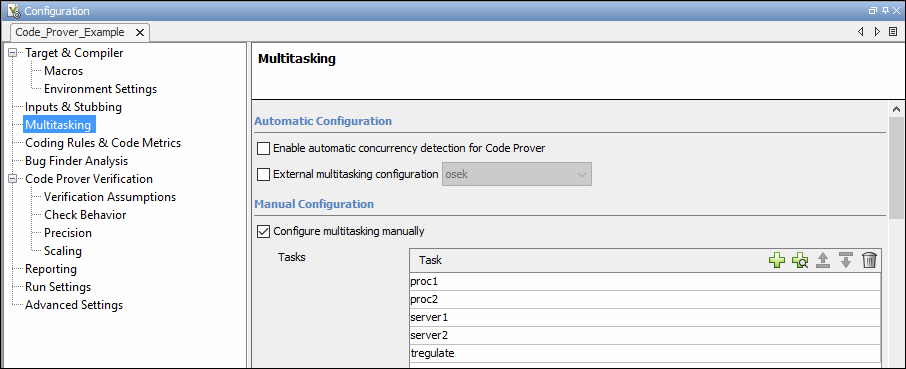
If your code uses multitasking primitives from certain families, for instance, pthread_create for thread creation:
In Bug Finder, the analysis detects them and extracts your multitasking model from the code.
In Code Prover, enable this automatic detection explicitly. See
Enable automatic concurrency detection for Code Prover (-enable-concurrency-detection).
See Auto-Detection of Thread Creation and Critical Section in Polyspace.
Alternatively, define your multitasking model through the analysis options. In the user interface of the Polyspace desktop products, the options are on the Multitasking node in the Configuration pane. Most options are common between Bug Finder and Code Prover. The multitasking analysis in Code Prover is more exhaustive about finding potentially unprotected shared variables and therefore follows a stricter model. Your code must be written in a specific format for Code Prover to successfully complete a multitasking analysis. For instance,
the functions that you specify as entry points must be void(void) functions. However, if your code is not already written in this format, you can work around the restrictions. For details, see Configuring Polyspace Multitasking Analysis Manually.
Review Analysis Results
Bug Finder
A Bug Finder analysis can find many different kinds of concurrency defects including:
Data races, when operations on a variable from different tasks interfere with each other.
Deadlocks or double locks, because of incorrect placement of lock and unlock functions.
For the complete list, see Concurrency Defects. However, the analysis makes certain assumptions to avoid false positives, and might not find all data races. You can perform an initial check for data races with Bug Finder, and make a more exhaustive pass later with Code Prover.
Code Prover

The Code Prover analysis exhaustively checks if shared global variables are protected from concurrent access. The analysis reports variables that are definitely protected in green and variables that might be unprotected in orange. See Global Variables.
Review the results using the message on the Result Details pane. See a visual representation of conflicting operations using the graph icon.

Differences Between Bug Finder and Code Prover
The following table summarizes the differences between the multitasking analysis in Polyspace Bug Finder™ and Polyspace Code Prover™.
Configuration
| Bug Finder | Code Prover | |
|---|---|---|
| Auto-detection of concurrency routines | Supported by default | Supported on option Enable automatic concurrency detection for Code Prover (-enable-concurrency-detection) |
Constraints on main function | None | The For workarounds if there is an intentional infinite loop in |
| Atomic operations | Depending on the target size, certain operations are considered as atomic (non-interruptable). To consider all operations as non-atomic, use the option | All operations are considered as non-atomic. |
Results
| Bug Finder | Code Prover | |
|---|---|---|
| Concurrent unprotected access on shared variables (data races) | Shown using one of these results:
| Shown using the result Code Prover is more exhaustive when keeping track of control and data flows. Therefore, Code Prover might detect probable data races not detected with Bug Finder. |
Issues with concurrency routines besides data race:
| Detected | Not detected |

