How can i find out if two minutiae points in a fingerprint image are on the same ridge line?
You are now following this question
- You will see updates in your followed content feed.
- You may receive emails, depending on your communication preferences.
An Error Occurred
Unable to complete the action because of changes made to the page. Reload the page to see its updated state.
Show older comments
0 votes
Please i need help on how to know if two minutiae points on a fingerprint image are on the same ridge so as to be able to remove fake minutiae points from the fingerprint.

So I have done the extraction of minutiae points in the fingeprint image but how can i know if two of these minutiae points are on the same ridge line i.e. the same white line.
Thanks.
2 Comments
darova
on 24 Mar 2020
What about bwlabel? You can separate each 'white' line and loop through all individually
Check if one has 2 points

Fego Etese
on 24 Mar 2020
Edited: Fego Etese
on 24 Mar 2020
Thanks for your help on this, if i have two white points on the image how can i know with this method you've proposed that they are either on the same line or on different white lines? I mean if you could please just explain to me how the bwlabel can help me do this, I will be very grateful.
Thanks
Accepted Answer
darova
on 24 Mar 2020
Simple example
I0 = imread('image.jpg');
I1 = ~im2bw(I0);
I2 = bwmorph(I1,'thin',inf);
I3 = bwareaopen(I2,30); % remove lines bigger 30 pixels
[L,n] = bwlabel(I3); % label each region
for i = 1:n
Ic = L==i; % find region
Ib = bwmorph(Ic,'branchpoints'); % branch/minutae points
[y,x] = find(Ib); % find coordinates minutae points
II = cat(3,Ic,I3,I3*0);
imshow(II,'initialmagnification','fit')
hold on
plot(x,y,'or')
hold off
pause(1)
end
I used attached image. So how do you want to remove points? And which one?
14 Comments
Fego Etese
on 24 Mar 2020
Please don't be upset but i don't really understand what this code does and why it turns the thinned image green. What i want to do is to be able to confirm if any two minutiae points are on the same ridge, i have been able to extract the minutiae using crossing number algorithm and im trying to remove fake minutia by comparing each minutia with another one and checking if the distance bewteen them are below a value and also if the two minutia are on the same ridge. I can do the distance part but i don;t know how to confirm if they are on the same ridge.
- What i want to do is to be able to confirm if any two minutiae points are on the same ridge
I think you have noticed that the code i posted highlights each ridge line separately
So you can easily check how many minutae points has each ridge line
just put this line inside for loop. It tells how many minutae points has current ridge line
length(x)
Fego Etese
on 24 Mar 2020
Edited: Fego Etese
on 24 Mar 2020
Is the highligting of the ridges what makes the fingeprint turn green? and which of the function does this highlighting is it the bwlabel or the bwareaopen?
Then please i also noticed that it goes through all the ridges in the fingeprint image, but i dont want to go through all the ridges, i have a list of minutiae points that i want to compare each point to another one by one and also know if they are on the same ridge line during the comparision. Sorry if i'm causing a headache but I'm still a bit confused.
From what i uderstand so far, the code scans for minutie points in the for loop and can count how many minuitae points are on a ridge but i really just want to know if two minutiae points are on the same ridge not the number of minutiae points on a ridge.
Thanks
Each color image consist of 3 color (Red,Green and Blue)
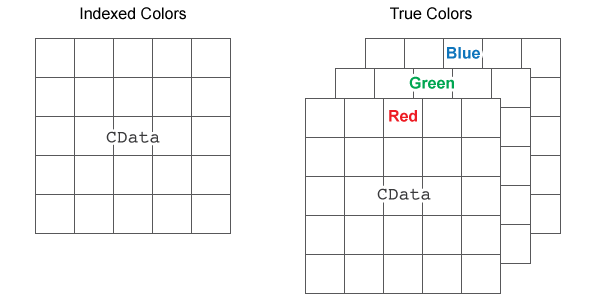
So image is 3D matrix I0 of size 204x293x3
Binary image (only white and black) is 2D matrix

So to highlight current minutae i just concantenated (merged) 3 matrices to create 3D matrix (color)
II = cat(3,Ic,I3,I3*0); % Ic - minutae, I3 - all lines, I3*0 - zeros
imshow(II,'initialmagnification','fit') % show together
darova
on 24 Mar 2020
- i have a list of minutiae points
Can you show the data?
Fego Etese
on 24 Mar 2020

This is what I mean, I have all the coordinates for the minutiae separately, but i am trying to compare each minutiae point with another one, like a ridge ending with another ridge ending, getting the distance and also finding out if the two endings are on the same ridge, the distance part i have done, i just need to know how to determine if the points are on the same ridge.
Fego Etese
on 24 Mar 2020
The minutiae coordinates are stored in a 2 dimensional array
Do you understand this line?
Ib = bwmorph(Ic,'branchpoints'); % branch/minutae points
Fego Etese
on 24 Mar 2020
Edited: Fego Etese
on 24 Mar 2020
I think it finds the branchpoints in the image, that is the minutiae bifurcations. I do not understand it well, so i had to write my own code to find the endings and branchpoints. But please can you explain it to me and also the bwlabel, I have tried reading the docs on bwlabel but i don't understand what it does
Fego Etese
on 24 Mar 2020
I think i understand the bwlabel better now, it groups connected regions together, please correct me if i am wrong, but i am thinking that to know if two minutiae are on the same ridge i can check their coordinates in the label matrix returned from bwlabel and see if the values are the same i.e. they are in the same region on the same ridge.
Do you think this could be the solution?
darova
on 24 Mar 2020
- I think i understand the bwlabel better now, it groups connected regions together
You are correct
Fego Etese
on 24 Mar 2020

Thank you so much for your time and patience. God bless!! ?
Image Analyst
on 24 Mar 2020
Yes, if L(row1, col1) is the same as L(row2, col2) then they are on the same ridgeline, otherwise they are on different ridgelines.
Fego Etese
on 24 Mar 2020
Thanks Image Analyst, I appreciate your help. I will do this.
More Answers (0)
Categories
Find more on Matrix Indexing in Help Center and File Exchange
See Also
Community Treasure Hunt
Find the treasures in MATLAB Central and discover how the community can help you!
Start Hunting!Select a Web Site
Choose a web site to get translated content where available and see local events and offers. Based on your location, we recommend that you select: .
You can also select a web site from the following list
How to Get Best Site Performance
Select the China site (in Chinese or English) for best site performance. Other MathWorks country sites are not optimized for visits from your location.
Americas
- América Latina (Español)
- Canada (English)
- United States (English)
Europe
- Belgium (English)
- Denmark (English)
- Deutschland (Deutsch)
- España (Español)
- Finland (English)
- France (Français)
- Ireland (English)
- Italia (Italiano)
- Luxembourg (English)
- Netherlands (English)
- Norway (English)
- Österreich (Deutsch)
- Portugal (English)
- Sweden (English)
- Switzerland
- United Kingdom (English)