Simulate Mobility of STA in WLAN Network
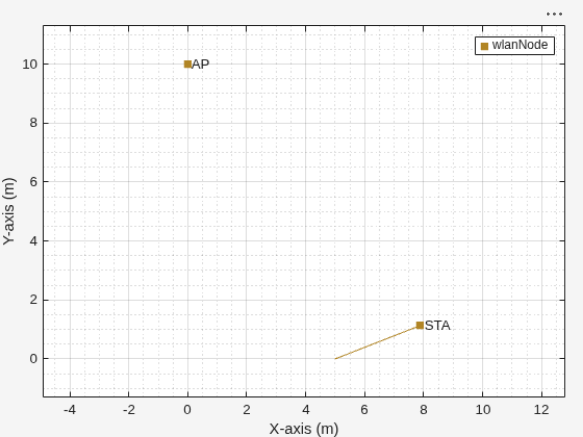
R2026bIncorporate mobility for a station (STA) in a simple wireless local area network scenario. Create an access point (AP) and a STA, then assign a mobility model to the STA. Select random walk, random waypoint, or constant velocity as the mobility model. Then, run the simulation, and obtain the statistics for the AP and STA nodes.
Initialize the wireless network simulator.
networkSimulator = wirelessNetworkSimulator.init;
Create and configure the AP node.
deviceCfg = wlanDeviceConfig(Mode="AP");
apNode = wlanNode(Name="AP",Position=[0 10 0],DeviceConfig=deviceCfg);
Create the STA node with the default device configuration.
staNode = wlanNode(Name="STA",Position=[5 0 0]);Initialize the wireless network viewer.
visualizer = wirelessNetworkViewer;
Add the AP and STA nodes to the wireless network viewer.
addNodes(visualizer,[apNode staNode])
Select the mobility model for the STA node. Create the selected mobility model and assign it to the STA node.
mobilityModelOption ="Random Waypoint"; switch mobilityModelOption case "Random Walk" mobilityModel = nodeMobilityRandomWalk( ... BoundaryShape= "circle", ... Bounds=[0 0 20], ... % Center at (0,0), radius 20 SpeedRange=[1 2], ... % Speed range between 1 and 2 (Units are in meters per second) WalkMode="distance", ... % Change direction after a fixed distance Distance= 0.6, ... % Change direction every 0.6 meters RefreshInterval= 0.1); % Refresh every 0.1 seconds case "Random Waypoint" mobilityModel = nodeMobilityRandomWaypoint( ... BoundaryShape= "circle", ... Bounds=[0 0 20], ... % Center at (0,0), radius 20 SpeedRange=[1 2], ... % Speed range between 1 and 2 RefreshInterval= 0.1); % Refresh every 0.1 seconds; case "Constant Velocity" mobilityModel = nodeMobilityConstantVelocity( ... Velocity=[2 1 0], ... % velocity vector in m/s along x, y, z axes RefreshInterval= 0.1); % Refresh every 0.1 seconds; end addMobility(staNode,MobilityModel=mobilityModel)
Associate the STA node with the AP node.
associateStations(apNode,staNode)
Create On-Off application traffic.
traffic = networkTrafficOnOff(DataRate=10e6, PacketSize=1500);
Add application traffic from the AP to the STA.
addTrafficSource(apNode,traffic,DestinationNode=staNode)
Add the AP and STA nodes to the simulator.
addNodes(networkSimulator,[apNode staNode])
Set the simulation time.
simulationTime = 2;
Run the simulation.
run(networkSimulator,simulationTime)
Obtain the application layer (APP) statistics for the AP and STA nodes.
apStats = statistics(apNode);
apAPPStats=apStats.App
apAPPStats = struct with fields:
    TransmittedPackets: 577
      TransmittedBytes: 865500
       ReceivedPackets: 0
         ReceivedBytes: 0
staStats = statistics(staNode);
staAPPStats=staStats.App
staAPPStats = struct with fields:
    TransmittedPackets: 0
      TransmittedBytes: 0
       ReceivedPackets: 577
         ReceivedBytes: 865500
See Also
Objects
nodeMobilityConstantVelocity(Wireless Network Toolbox) |nodeMobilityRandomWaypoint(Wireless Network Toolbox) |nodeMobilityRandomWalk(Wireless Network Toolbox) |wirelessNetworkViewer(Wireless Network Toolbox)
Classes
wnet.Node(Wireless Network Toolbox) |wnet.Mobility(Wireless Network Toolbox)

