HDL Implementation of AWGN Generator
R2026bThis example shows how to implement an additive white Gaussian noise (AWGN) generator that is optimized for HDL code generation and hardware implementation. The hardware implementation of AWGN accelerates the performance evaluation of wireless communication systems using an AWGN channel. In this example, the Simulink® model accepts signal-to-noise ratio (SNR) values as inputs and generates Gaussian random noise along with valid signal. The example supports SNR input ranges from –20 to 31 dB in steps of 0.1 dB.
Modern wireless communication systems involve multiple simulation parameters such as channel bandwidth, modulation type, and coding rate. Evaluating system performance across these parameters is computationally intensive and often becomes a bottleneck. FPGA-based acceleration helps overcome this challenge by leveraging hardware parallelism, thereby substantially improving simulation efficiency.
Model Architecture
Run this command to open the whdlAWGNGenerator model.
modelname = 'whdlAWGNGenerator';
open_system(modelname);
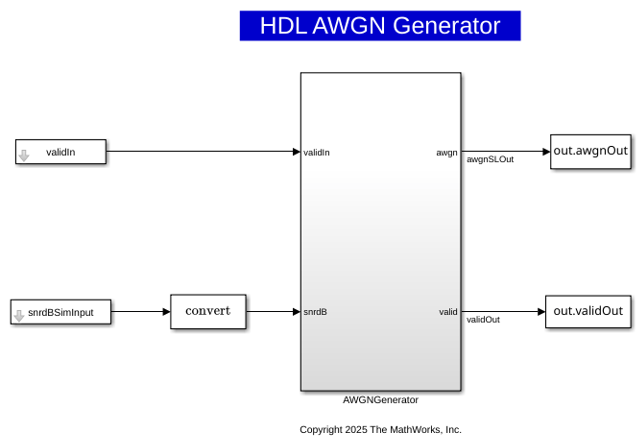
This example uses the Box-Muller method for Gaussian noise generation, which is widely adopted due to its hardware-friendly architecture and constant output rate. The top-level structure of the model comprises these three subsystems:
SNR dB to Linear Scale Converter
Gaussian Noise Generator with Unit Variance
Gaussian Noise Generator with Required Variance
Run this command to open the subsystems inside AWGNGenerator model.
open_system([modelname '/AWGNGenerator']);
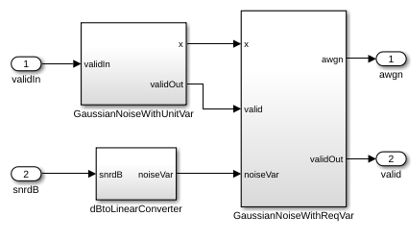
SNR dB to Linear Scale Converter
The dBtoLinearConverter subsystem receives an SNR value in dB as input and converts it to noise variance on a linear scale. The system then uses this noise power to multiply the output of the Gaussian noise with unit variance. Use the lookup table approach to convert the SNR value from dB to a noise power value on a linear scale, assuming a signal power of 1 during the conversion.
Gaussian Noise Generator with Unit Variance
The GaussianNoiseWithUnitVar subsystem uses the WGN Generator block with Noise variance 1. The block uses Box-Muller method to generate two normally distributed random variables through a series of logarithmic, square root, sine, and cosine operations.
Gaussian Noise Generator with Required Variance
The GaussianNoiseWithReqVar subsystem converts Gaussian noise with unit variance to Gaussian noise with required variance. This subsystem takes inputs from dBToLinearConverter and GaussianNoiseWithUnitVar subsystems. The linear noise variance obtained from dBToLinearConverter is multiplied with normally distributed random variables obtained from the GaussianNoiseWithUnitVar subsystem.
Results and Plots
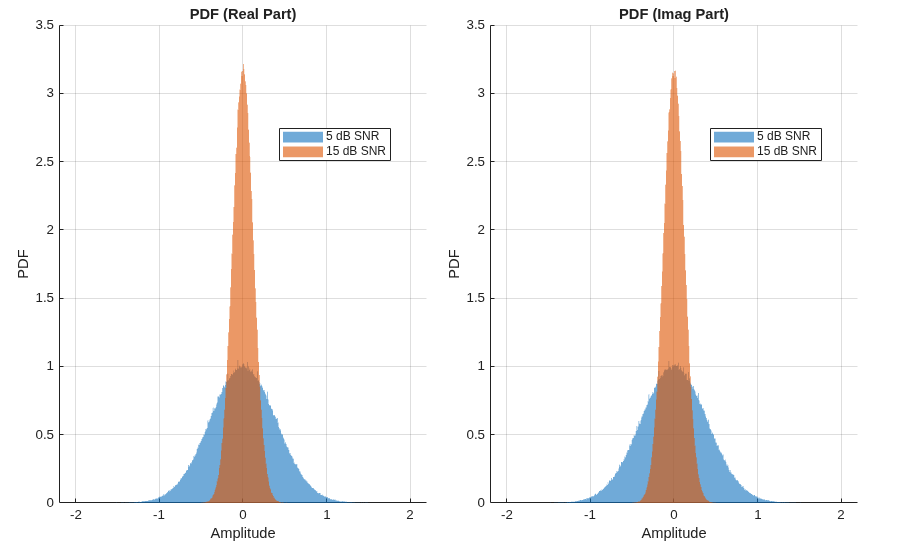
Simulate the whdlAWGNGenerator.slx model to generate 10^6 valid AWGN samples for each SNR of 5 dB and 15 dB. The implementation is pipelined to maximize the synthesis frequency, generating AWGN with an initial latency of 60. Plot the probability density function (PDF) of the AWGN output.
snrdB         = [5, 15];             % SNRs to compare (dB)
numOfSamples  = 1e6;                 % Per-SNR sample count for distribution/PSD
Fs            = 1;                   % Sample rate (Hz)
samplingTime  = 1/Fs;
latency       = 68;                  % Known pipeline latency of model (samples)
rngSeed       = 67;                  % Fixed seed for reproducibility (used by MATLAB HDL function)

% ---- Derived ----
numSNRs           = numel(snrdB);
snrdBSimInput     = repmat(snrdB(:).', numOfSamples, 1);      % replicate rows
snrdBSimInput     = snrdBSimInput(:);                         % column vector [5,...,5,15,...,15]
totalInputSamples = numel(snrdBSimInput);
validIn           = true(1,totalInputSamples);
stopTime          = (totalInputSamples + latency - 1) * samplingTime;

% Simulate the model
fprintf('--- Setup ---\n');
fprintf('SNRs        : %s dB\n', mat2str(snrdB));
fprintf('Samples/SNR : %d\n', numOfSamples);
fprintf('Fs          : %.3f Hz\n', Fs);
fprintf('Latency     : %d samples\n', latency);
fprintf('StopTime    : %.6f s\n\n', stopTime);

set_param(modelname,'SimulationMode','Accel');
fprintf('\nSimulating HDL AWGN Generator (Simulink)...\n');
outSimulink = sim(modelname, 'ReturnWorkspaceOutputs', 'on');
fprintf('Simulation complete.\n');


% Extract valid samples only
awgnSimulink = outSimulink.awgnOut(outSimulink.validOut);
validCount   = numel(awgnSimulink);

% Slice into per-SNR segments
for ii = 1:length(snrdB)
snr_seg(ii,:) = awgnSimulink(1+(ii-1)*numOfSamples:numOfSamples*ii);
end
--- Setup ---
SNRs        : [5 15] dB
Samples/SNR : 1000000
Fs          : 1.000 Hz
Latency     : 68 samples
StopTime    : 2000067.000000 s


Simulating HDL AWGN Generator (Simulink)...
Simulation complete.
% Visualizations PDF (Real and Imag parts)
figure('Name','PDF of AWGN (Real & Imag)','Color','w');
tiledlayout(1,2, 'TileSpacing','compact', 'Padding','compact');

% Real
nexttile;
hold on;
for ii = 1:length(snrdB)
histogram(real(snr_seg(ii,:)), 500, 'Normalization','pdf', 'BinLimits',[-2 2], ...
    'EdgeColor','none', 'DisplayName',sprintf('%d dB SNR',snrdB(ii)));
end

title('PDF (Real Part)');
xlabel('Amplitude'); ylabel('PDF');
legend('Location','best'); grid on;

% Imag
nexttile;
hold on;
for ii = 1:length(snrdB)
histogram(imag(snr_seg(ii,:)), 500, 'Normalization','pdf', 'BinLimits',[-2 2], ...
    'EdgeColor','none', 'DisplayName',sprintf('%d dB SNR',snrdB(ii)));
end
title('PDF (Imag Part)');
xlabel('Amplitude'); ylabel('PDF');
legend('Location','best'); grid on;
Comparison of Simulink and MATLAB HDL AWGN Generator Outputs
Simulate the MATLAB HDL equivalent AWGN generator and compare its output with the Simulink AWGN generator output.
fprintf('\nSimulating MATLAB HDL AWGN Generator for comparison...\n');
% Simulating MATLAB HDL AWGN Generator for comparison
awgnMatlab = hdlwgn(numOfSamples, snrdB(1), rngSeed, 'Complex');
fprintf('Simulation complete.\n');

% Reduce sample count for visualization clarity
numVerify = 1e3;
sim_verify = awgnSimulink(1:numVerify);
sim_matlab = awgnMatlab(1:numVerify);

% Real comparison
figure('Name','MATLAB vs Simulink (Real)','Color','w');
plot(1:numVerify, real(sim_verify), 'LineWidth',1.5, 'DisplayName','Simulink'); hold on;
plot(1:numVerify, real(sim_matlab),     'LineWidth',1.5, 'DisplayName','MATLAB HDL');
xlabel('Sample Index'); ylabel('Real Part');
title('Comparison of MATLAB and Simulink Output (Real Part)');
legend('Location','best'); grid on;

% Imag comparison
figure('Name','MATLAB vs Simulink (Imag)','Color','w');
plot(1:numVerify, imag(sim_verify), 'LineWidth',1.5, 'DisplayName','Simulink'); hold on;
plot(1:numVerify, imag(sim_matlab),       'LineWidth',1.5, 'DisplayName','MATLAB HDL');
xlabel('Sample Index'); ylabel('Imaginary Part');
title('Comparison of MATLAB and Simulink Output (Imaginary Part)');
legend('Location','best'); grid on;
Simulating MATLAB HDL AWGN Generator for comparison...
Simulation complete.
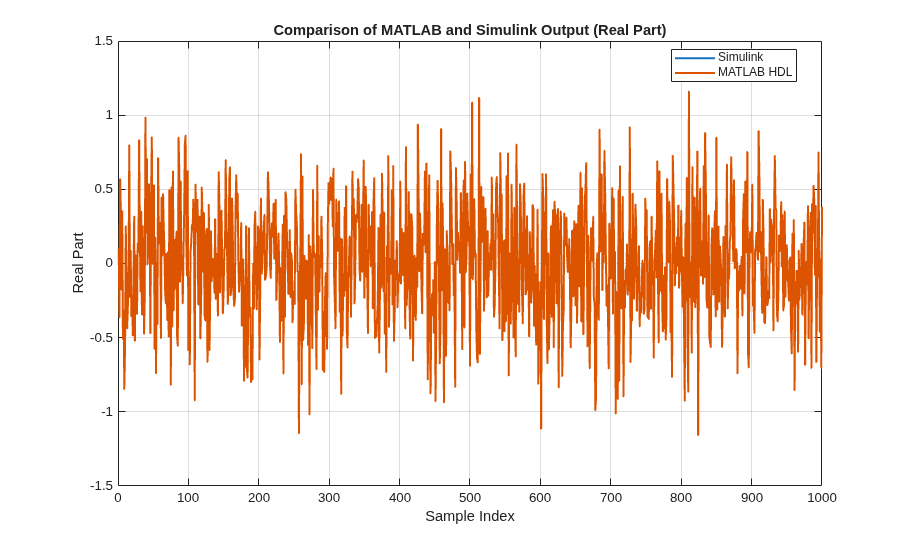
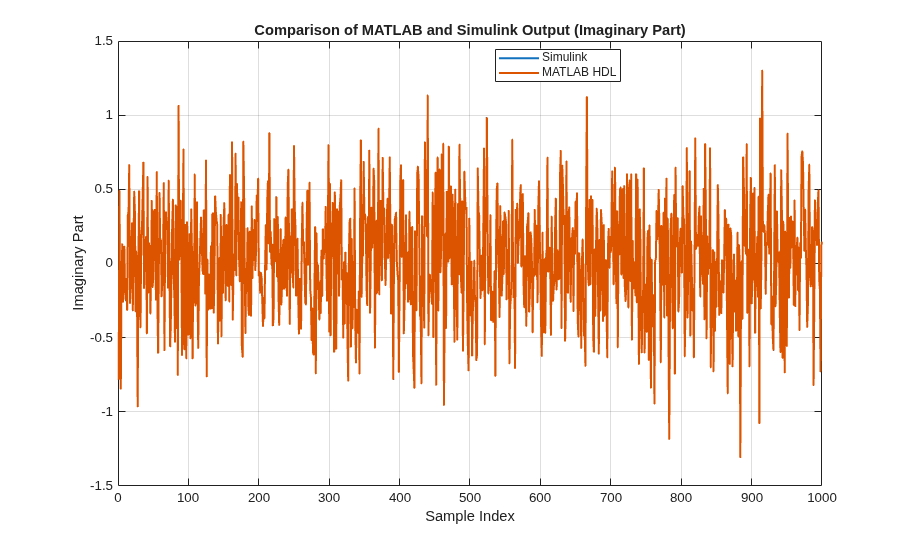
Compute signal-to-quantization-noise ratio (SQNR) by considering the MATLAB output as the reference signal and the difference of Simulink and MATLAB output as the quantization/error noise.
err = awgnSimulink(1:numOfSamples) - awgnMatlab;

psig_real = mean(real(awgnMatlab).^2);
perr_real = mean(real(err).^2);
SQNR_real = 10*log10(psig_real / perr_real);

psig_imag = mean(imag(awgnMatlab).^2);
perr_imag = mean(imag(err).^2);
SQNR_imag = 10*log10(psig_imag / perr_imag);


fprintf('\n--- SQNR (Simulink vs MATLAB reference) ---\n');
fprintf('Real part   SQNR: %.2f dB\n', SQNR_real);
fprintf('Imag part   SQNR: %.2f dB\n', SQNR_imag);
--- SQNR (Simulink vs MATLAB reference) ---
Real part   SQNR: 71.48 dB
Imag part   SQNR: 71.47 dB
HDL Code Generation
To check and generate the HDL code referenced in this example, you must have an HDL Coder™ license.
To generate the HDL code, enter this command at the MATLAB command prompt.
makehdl('whdlAWGNGenerator/AWGNGenerator')
To generate a test bench, enter this command at the MATLAB command prompt.
makehdltb('whdlAWGNGenerator/AWGNGenerator')
In this example, HDL code generated for the AWGNGenerator module is implemented for the AMD® Zynq®-7000 ZC706 board. The implementation results are shown in this table.
F = table(...
    categorical({'Slice Registers'; 'Slice LUT'; 'Block RAMs'; 'DSPs';'Max Frequency (MHz)'}),...
    categorical({'8477'; '4436'; '5';'2';'300'}),...
    'VariableNames',...
    {'Resources','Usage'});

disp(F);
         Resources         Usage
    ___________________    _____

    Slice Registers        8477
    Slice LUT              4436
    Block RAMs             5
    DSPs                   2
    Max Frequency (MHz)    300
References
1. J.D. Lee, J.D. Villasenor, W. Luk, and P.H.W. Leong. “A Hardware Gaussian Noise Generator Using the Box-Muller Method and Its Error Analysis,” 659–71. IEEE, 2006. https://doi.org/10.1109/TC.2006.81.

