Use Mask Parameters with Fast Restart to Switch Variant Choices Without Recompiling for Variant Blocks
R2026bWhen you define a mask parameter as a variant control variable and set the variant activation time to startup, Simulink® compiles the model with all variant choices and resolves the active variant choice at the start of each simulation run. Each instance of a masked subsystem can independently resolve a different variant choice. To switch the active variant choice from the mask dialog box and resimulate without recompiling the model, use fast restart.
For more information, see these examples and topics:
To define a mask parameter as a variant control variable, see Use Mask Parameters for Per-Instance Variant Control in Variant Blocks.
To check supported variant activation times and variant control variable types for the mask workspace, see Verify Variable Type Compatibility with Workspace and Variant Activation Time.
For constraints when defining variant control variables in different workspaces, see Workspace Constraints for Variant Control Variables.
Explore the Model
The slexVariantsWithMaskParametersInStartup model contains two instances of a masked Variant Subsystem block, Controller and Controller1.
Open the slexVariantsWithMaskParametersInStartup model.
model = "slexVariantsWithMaskParametersInStartup";
open_system(model)
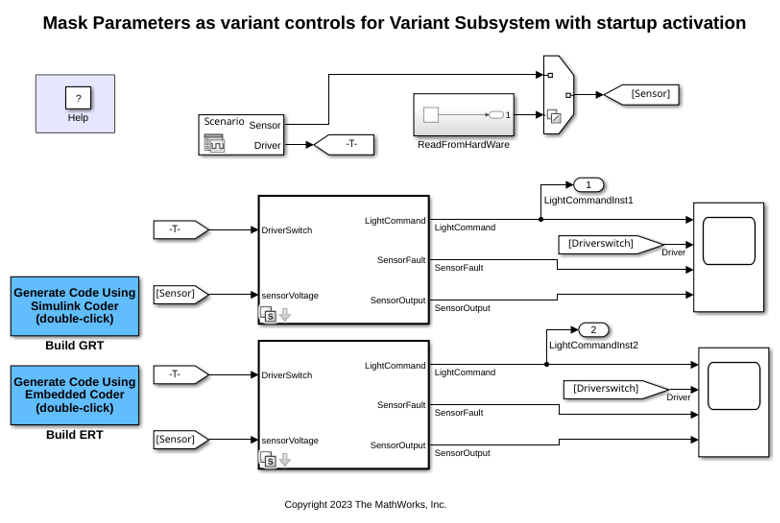
Open the Controller block. The block has two variant choices Driver Switch and Sensors Connected.
Open the Block Parameters dialog box of the Controller block.
The Variant activation time parameter is set to
startup.
The variant control expressions are
CTRL_MODE == InputType.DriverandCTRL_MODE == InputType.Sensorfor variant choicesDriver SwitchandSensors Connected.
CTRL_MODEis a mask parameter. To view the variable definition, right-click theControllersubsystem and select Edit Mask. On the Parameters & Dialog tab, Name is specified asCTRL_MODE.
Because the activation time is startup, Simulink compiles the model with all variant choices. The active variant choice is resolved at the start of each simulation run based on the value of CTRL_MODE in the mask dialog box.
Simulate in Driver Switch Mode
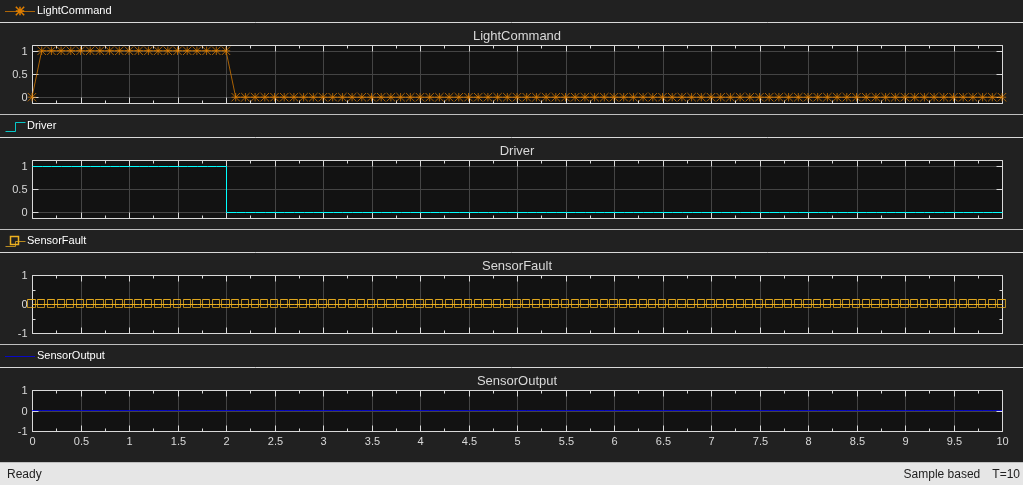
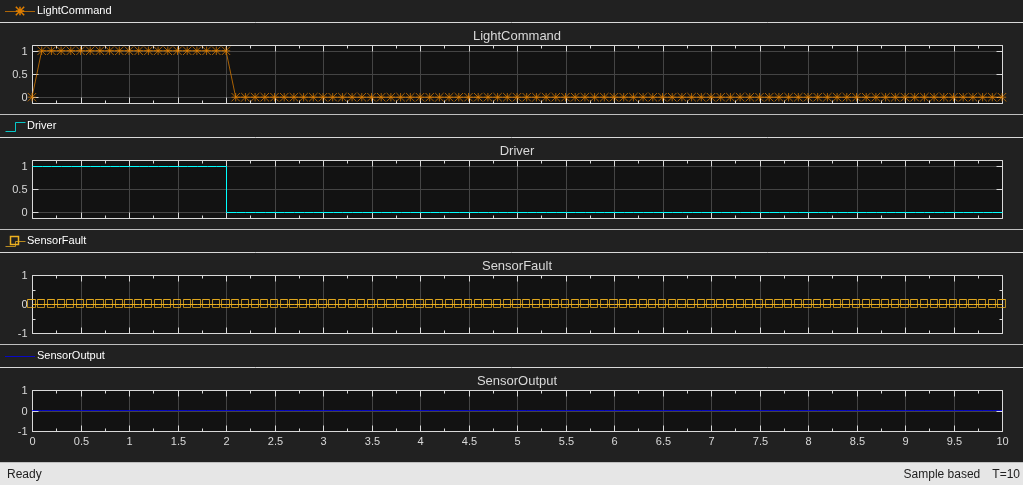
The default value of CTRL_MODE on the Controller block is InputType.Driver. Simulate the model. At the start of the simulation run, the variant condition CTRL_MODE == InputType.Driver evaluates to true. The Driver Switch variant choice becomes active.
In this mode, the LightCommand output is a delayed version of the DriverSwitch signal. The Scope block shows that when DriverSwitch transitions from high to low, LightCommand follows after a short delay.
sim(model);
open_system(model + "/Scope")
Switch the Active Variant Choice and Resimulate Without Recompiling
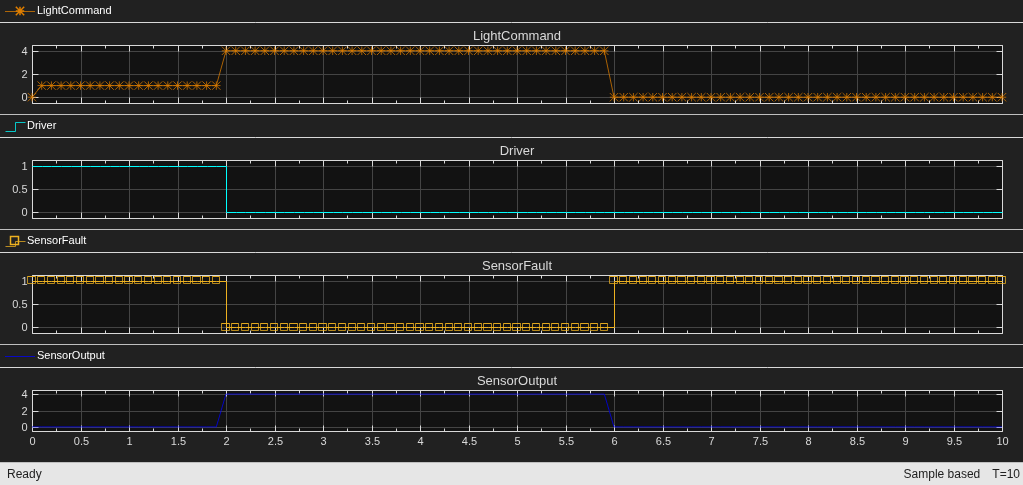
Change the value of CTRL_MODE on the Controller block to InputType.Sensor from the mask dialog box. On the Simulation tab, select Fast Restart and simulate the model again. Simulink resolves the new active choice at the start of the simulation run without recompiling the model.
The Scope block shows the output for the Sensors Connected mode. In this mode, the LightCommand output remains high as long as the SensorOutput signal is high. The DriverSwitch signal has no effect on the output, confirming that the active variant choice has switched from Driver Switch to Sensors Connected.
set_param(model,"FastRestart","on")
set_param(model + "/Controller","CTRL_MODE","InputType.Sensor")
sim(model);
Resolve Different Variant Choices on Each Instance at Simulation Start
Each instance of the masked subsystem has its own mask dialog box. Set CTRL_MODE to InputType.Sensor on the Controller block and InputType.Driver on the Controller1 block. During simulation, each instance independently resolves its active variant choice.
set_param(model + "/Controller","CTRL_MODE","InputType.Sensor")
set_param(model + "/Controller1","CTRL_MODE","InputType.Driver")
The Scope block shows the Controller output in Sensors Connected mode.
sim(model);
open_system(model + "/Scope")
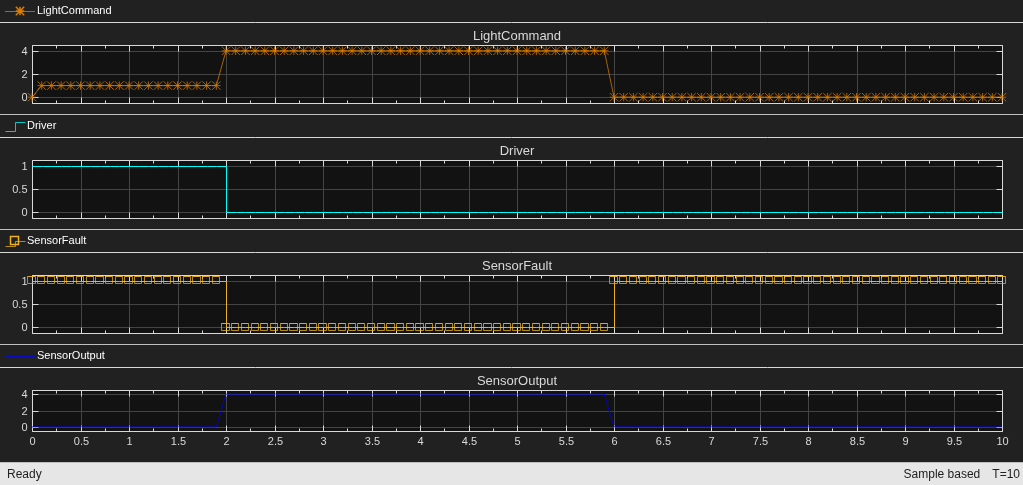
The Scope1 block shows the Controller1 output in Driver Switch mode.
open_system(model + "/Scope1")
Note: The mask parameter value takes precedence over variables with the same name in the model workspace, data dictionary, or base workspace. Verify that you do not have unintended variables with the same name in multiple workspaces.

