Power Analysis of Spring-Mass-Damper System
R2026bThis example shows how to analyze the mechanical power and energy of a spring-mass-damper system using Powertrain Blockset™ functions. This example uses the autoblks.pwr.PlantInfo (Powertrain Blockset) object to analyze the energy of the system and the Power Accounting Bus Creator (Powertrain Blockset) block to report on system power and energy usage. Additionally, this example illustrates the power flow through the spring-mass-damper system and subsystems using the createSankeyPlot (Powertrain Blockset) function.
You can leverage insights from a power analysis to optimize performance, improve efficiency, and ensure reliability of a system.
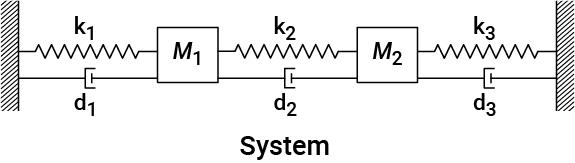
Spring-Mass-Damper System Decomposition
The spring-mass-damper system contains these subsystems, each of which models a separate set of components:
Spring-Damper1Mass1Spring-Damper2Mass2Spring-Damper3
Power Accounting Overview
The system-level power and energy accounting satisfies the conservation of energy.
Spring-Damper Power Flow
This diagram illustrates the direction of the forces for the spring and damper components.
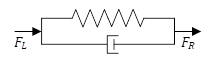
The forces are calculated using these equations:
Power Accounting Bus Creator Power Signals
This table shows the signals in the power information bus created by the Power Accounting Bus Creator block for the spring-damper components.
Signal | Description | Definition |
|---|---|---|
| Power transferred at left connection | |
| Power transferred at right connection | |
| Damper power loss | |
| Power stored by spring |
Mass Power Flow
This diagram illustrates the direction of the forces for the mass components.
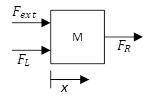
The mass velocity and position are governed by this equation:
Power Accounting Bus Creator Power Signals
This table shows the signals in the power information bus created by the Power Accounting Bus Creator block for the mass components.
Signal | Description | Definition |
|---|---|---|
| Power transferred at left connection | |
| Power transferred at right connection | |
| Power from external force | |
| Power stored as kinetic energy |
For more information, see Power Signals (Powertrain Blockset).
Run Simulation
Click Run to create an autoblks.pwr.PlantInfo object. Use the PwrUnits and EnrgyUnits properties to set the units.
SysName = 'powerAnalysis';
open(SysName);
SysPwrAnalysis = autoblks.pwr.PlantInfo(SysName);
SysPwrAnalysis.PwrUnits = 'kW';
SysPwrAnalysis.EnrgyUnits = 'kJ';
Use the run method to turn on logging, run the simulation, and add logged data to the object.
SysPwrAnalysis.run;
Summary of Energy Values
Display the final energy values for each subsystem.
SysPwrAnalysis.dispSysSummary
    System Name      Efficiency    Energy Loss (kJ)    Energy Input (kJ)    Energy Output (kJ)    Energy Stored (kJ)
----------------------------------------------------------------------------------------------------------------------
powerAnalysis             0.144               -18.8                   22                     0                  3.17
  Mass1                   0.755               -5.05                 20.7                 -15.6                     0
  Mass2                   0.594               -10.6                 26.1                 -15.5                     0
  Spring-Damper1          0.957               -0.48                 11.2                 -9.46                  1.26
  Spring-Damper2          0.993             -0.0718                  9.8                 -9.33                   0.4
  Spring-Damper3          0.741               -2.61                 10.1                 -5.97                   1.5
Write the summary to a spreadsheet.
SysPwrAnalysis.xlsSysSummary(fullfile(fileparts( ...
    which('PowerAnalysisOfSystemExample.mlx')), 'EnergySummary.xlsx'));
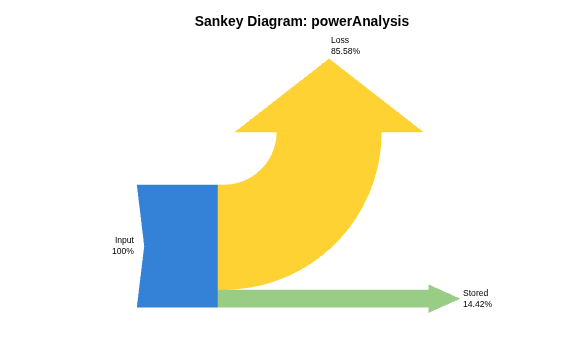
Generate a Sankey plot to visualize the power flow of the system using the createSankeyPlot function by entering "createSankeyPlot(SysPwrAnalysis)" in the command window.
createSankeyPlot(SysPwrAnalysis);
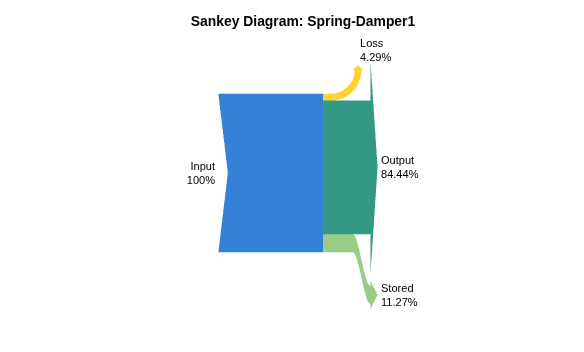
Spring-Damper1 Subsystem Summary
Display the energy of the Spring-Damper1 subsystem for the autoblks.pwr.PlantInfo object using the dispSignalSummary method.
SpringDamper1Name = 'powerAnalysis/Spring-Damper1';
SpringDamper1PwrAnalysis = SysPwrAnalysis.findChildSys(SpringDamper1Name);
SpringDamper1PwrAnalysis.dispSignalSummary;
powerAnalysis/Spring-Damper1
Average Efficiency = 0.957

       Signal         Energy (kJ)
-----------------------------------
Inputs                       11.2
  Transferred                11.2
    Left force                  0
    Right force              11.2
  Not transferred               0
    Damping loss                0
Outputs                     -9.46
  Left force                    0
  Right force               -9.46
Losses                      -0.48
  Damping loss              -0.48
Stored                       1.26
  Spring                     1.26
Generate a Sankey plot to visualize the power flow of the Spring-Damper1 subsystem using the createSankeyPlot (Powertrain Blockset) function by entering "SpringDamper1PwrAnalysis.createSankeyPlot()" in the command window.
SpringDamper1PwrAnalysis.createSankeyPlot();
Mass Subsystem Summary
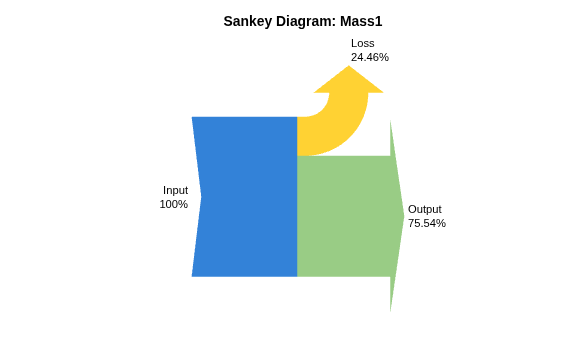
Display the energy of the Mass subsystem for the autoblks.pwr.PlantInfo object using the dispSignalSummary method.
Mass1Name = 'powerAnalysis/Mass1';
Mass1PwrAnalysis = SysPwrAnalysis.findChildSys(Mass1Name);
Mass1PwrAnalysis.dispSignalSummary;
powerAnalysis/Mass1
Average Efficiency = 0.755

            Signal              Energy (kJ)
---------------------------------------------
Inputs                                 20.7
  Transferred                          14.2
    Left force                         9.46
    Right force                        4.72
  Not transferred                      6.47
    Externally applied force           6.47
Outputs                               -15.6
  Left force                          -11.2
  Right force                          -4.4
Losses                                -5.05
  Externally applied force            -5.05
Stored                                    0
  Kinetic                                 0
Generate a Sankey plot to visualize the power flow of the Mass2 subsystem using the createSankeyPlot function by entering "Mass1PwrAnalysis.createSankeyPlot()" in the command window.
Mass1PwrAnalysis.createSankeyPlot();
Spring-Damper2 Subsystem Summary
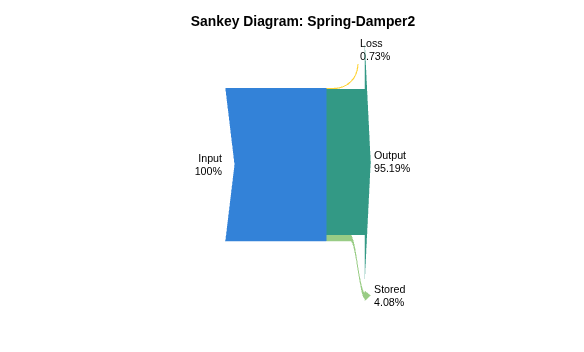
Display the energy of the Spring-Damper2 subsystem for the autoblks.pwr.PlantInfo object using the dispSignalSummary method.
SpringDamper2Name = 'powerAnalysis/Spring-Damper2';
SpringDamper2PwrAnalysis = SysPwrAnalysis.findChildSys(SpringDamper2Name);
SpringDamper2PwrAnalysis.dispSignalSummary;
powerAnalysis/Spring-Damper2
Average Efficiency = 0.993

       Signal         Energy (kJ)
-----------------------------------
Inputs                        9.8
  Transferred                 9.8
    Left force                4.4
    Right force              5.39
  Not transferred               0
    Damping loss                0
Outputs                     -9.33
  Left force                -4.72
  Right force                -4.6
Losses                    -0.0718
  Damping loss            -0.0718
Stored                        0.4
  Spring                      0.4
Generate a Sankey plot to visualize the power flow of the Spring-Damper2 subsystem using the createSankeyPlot (Powertrain Blockset) function by entering "SpringDamper2PwrAnalysis.createSankeyPlot()" in the command window. |
SpringDamper2PwrAnalysis.createSankeyPlot();
Mass2 Subsystem Summary
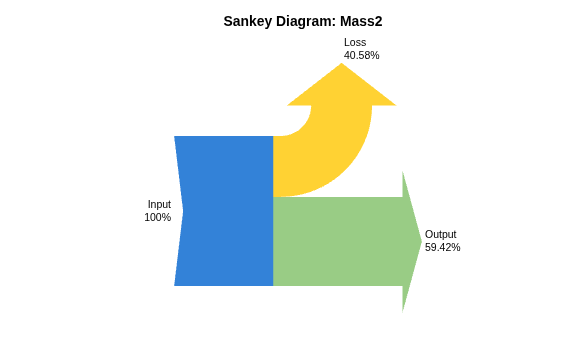
Display the energy of the Mass2 subsystem for the autoblks.pwr.PlantInfo object using the dispSignalSummary method.
Mass2Name = 'powerAnalysis/Mass2';
Mass2PwrAnalysis = SysPwrAnalysis.findChildSys(Mass2Name);
Mass2PwrAnalysis.dispSignalSummary;
powerAnalysis/Mass2
Average Efficiency = 0.594

            Signal              Energy (kJ)
---------------------------------------------
Inputs                                 26.1
  Transferred                          10.6
    Left force                          4.6
    Right force                        5.97
  Not transferred                      15.5
    Externally applied force           15.5
Outputs                               -15.5
  Left force                          -5.39
  Right force                         -10.1
Losses                                -10.6
  Externally applied force            -10.6
Stored                                    0
  Kinetic                                 0
Generate a Sankey plot to visualize the power flow of the Mass2 subsystem using the createSankeyPlot function by entering "Mass2PwrAnalysis.createSankeyPlot()" in the command window.
Mass2PwrAnalysis.createSankeyPlot();
Spring-Damper3 Subsystem Summary
Display the energy of the Spring-Damper3 subsystem for the autoblks.pwr.PlantInfo object using the dispSignalSummary method.
SpringDamper3Name = 'powerAnalysis/Spring-Damper3';
SpringDamper3PwrAnalysis = SysPwrAnalysis.findChildSys(SpringDamper3Name);
SpringDamper3PwrAnalysis.dispSignalSummary;
powerAnalysis/Spring-Damper3
Average Efficiency = 0.741

       Signal         Energy (kJ)
-----------------------------------
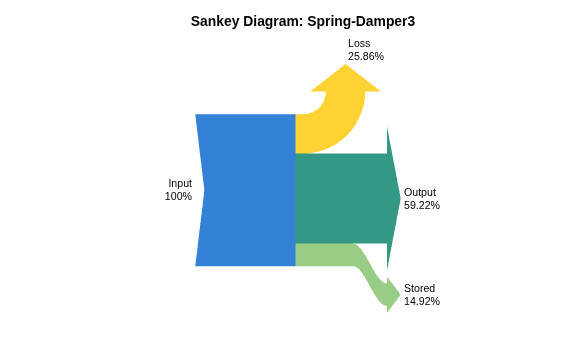
Inputs                       10.1
  Transferred                10.1
    Left force               10.1
    Right force                 0
  Not transferred               0
    Damping loss                0
Outputs                     -5.97
  Left force                -5.97
  Right force                   0
Losses                      -2.61
  Damping loss              -2.61
Stored                        1.5
  Spring                      1.5
Generate a Sankey plot to visualize the power flow of the Spring-Damper3 subsystem using the createSankeyPlot (Powertrain Blockset) function by entering "SpringDamper3PwrAnalysis.createSankeyPlot()" in the command window.
SpringDamper3PwrAnalysis.createSankeyPlot();
Results Plots
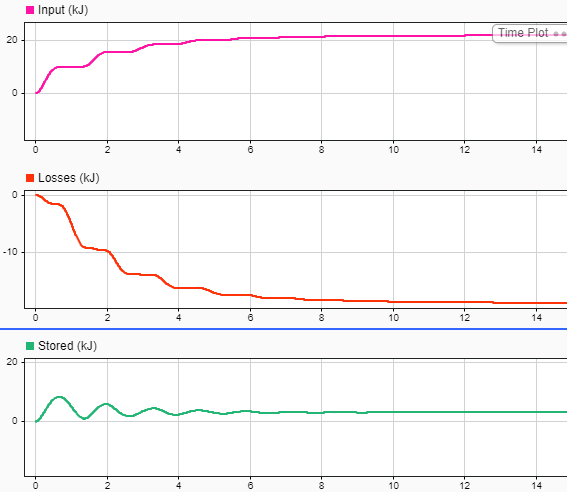
Plot the powertrain energy and power analysis results for the autoblks.pwr.PlantInfo object using the sdiSummary function.
SysPwrAnalysis.sdiSummary({SpringDamper1Name, Mass1Name, ...
    SpringDamper2Name, Mass2Name, ...
    SpringDamper3Name});
For example, plot the input energy, the energy losses, and the stored energy for the system.
Copyright2025 The MathWorks, Inc.
See Also
autoblks.pwr.PlantInfo (Powertrain Blockset) | Power Accounting Bus Creator (Powertrain Blockset)
Topics
- Analyze Power and Energy (Powertrain Blockset)

