Programmatically Manage Simscape Block Parameter Data
R2026bYou can programmatically author, share, and install new Simscape block parameter data and metadata as a part that belongs to a collection. To author a part collection:
Parameterize a Simscape block.
Store the parameters in a new or existing
partrepo.simscape.BlockDataSetobject.Update the properties of the
partrepo.simscape.Metadataobject.Validate the
BlockDataSetobject.Export the
BlockDataSetobject to a JSON part file.Create a collection directory.
Add the JSON part file to a new or existing collection.
Build the collection.
A partrepo.simscape.BlockDataSet object consists of a block parameterization
and an associated set of metadata. When you are ready to share the collection, locate
the MLDATX file in the Build folder of the collection directory. To
install a part collection, double-click the MLDATX file for the collection. Installing a
collection allows you to access the parts in that collection for a given Simscape block
in the Block
Parameterization Manager tool.
Create Block Data Sets
To create a partrepo.simscape.BlockDataSet object:
Parameterize a Simscape block according to your requirements.
Use the
partrepo.simscape.dataSetFromBlockfunction to create a block data set that contains the parameter data and metadata for the block.
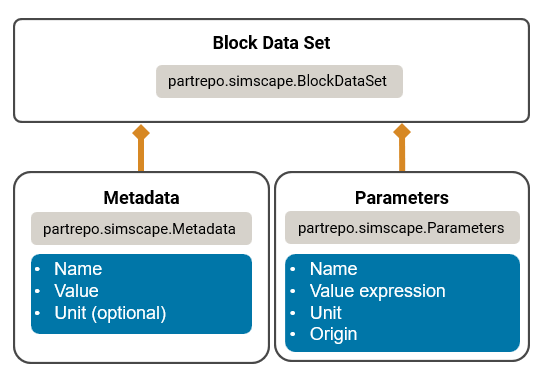
In the BlockDataSet object, the Metadata and
Parameters properties contain information about the
metadata and parameter values, respectively.
Edit Block Data Sets
To edit block parameter data in the BlockDataSet object:
Apply the parameters from the object to a Simscape block by using the
applyParamsfunction.Edit the block parameters, as needed.
Verify that the block behaves as expected with the new parameter settings.
Use the
partrepo.simscape.paramsFromBlockfunction to write the new block parameters to theBlockDataSetobject.
To edit the block metadata, edit the properties of the
partrepo.simscape.Metadata object. To remove a field, use the
removeField function.
When you are finished editing the BlockDataSet object, use the
validate function to validate the data set.
Import and Export Block Data as a Part
You can store your block data set as a part by exporting the block data set to a
JSON file. To export a block data set to JSON, use the partrepo.exportDataSetsToJSON function. To import part data from a
JSON file, use the partrepo.importDataSetsFromJSON function.
Share and Manage Collections of Parts
A part collection contains one or more parts that you can use to parameterize a
given block. Use partrepo.collection.new to create a collection. Creating a
collection generates a directory where you can add part files. To share parts, add
the JSON file associated with each part to the collection. Use partrepo.collection.build to build the collection and create a
shareable MLDATX file in the Build folder of the collection
directory. To edit parts in a collection, you must create a new JSON part file from
the block, replace the original JSON part file in the collection with the new part
file, and re-build the collection.
To install or uninstall built collections, use partrepo.collection.install or partrepo.collection.uninstall, respectively. When you install a
collection, the parts that belong to that collection appear in the options of the
Block Parameterization Manager tool for the associated block.

