show
R2026bDescription
show(
shows cadnetobj,ColorByIndividual='Cadnet')cadnet objects with individual colors by cadnet.
Examples
Use the show function to display the cadnet of a pcb.
Read-in a pcb file
Use the pcbFileRead object to read in a file. Accepted file formats are:
ODB++
Allegro
Native
Here we are using a native format file.
pfile = pcbFileRead('native_ExampleBoard_Allegro')pfile =
pcbFileRead with properties:
FileName: 'native_ExampleBoard_Allegro'
NumLayers: 5
MetalLayer: [1 3 5]
DielectricLayer: [2 4]
LayerHeight: [0.0184 0.0104 0.0092 0.0012 0]
NumCadnets: 7
NumPadStacks: 6
NumComponents: 8
NumParts: 5
Get cadnet list
Use the cadnetList function.
cadnetList(pfile)
ans = 7×4 table
    CadnetIdx        CadnetName         NumPins    Length
    _________    ___________________    _______    ______

        1        {'Unconnected_Net'}       3           0
        2        {'NET_OUTV'       }       2       0.615
        3        {'NET_GND'        }       1        0.46
        4        {'NET_IN22'       }       2       0.645
        5        {'NET_IN11'       }       4       0.488
        6        {'NET_INNEG'      }       2       0.515
        7        {'NET_INPOS'      }       2       0.676
Create a cadnet object
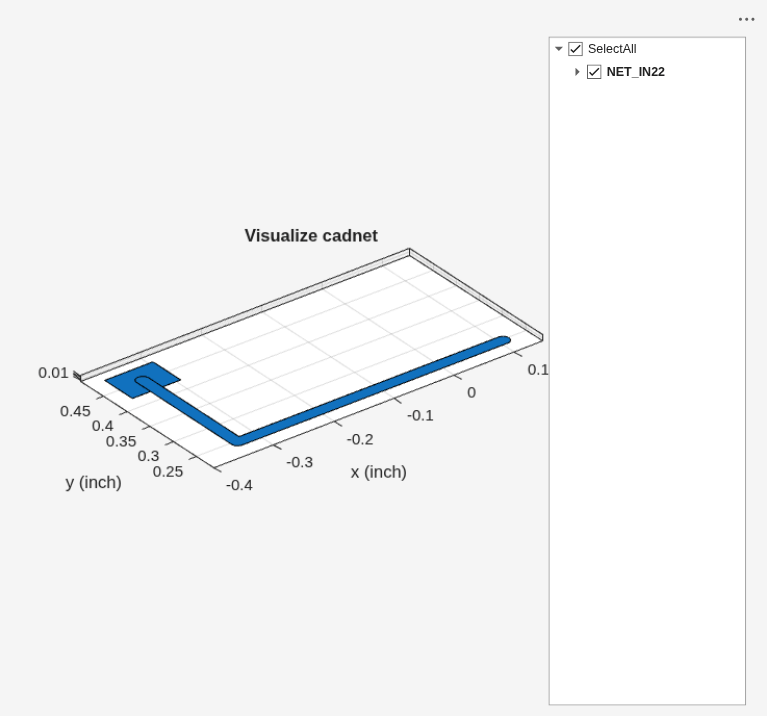
Create a cadnet object of 'NET_IN22'.
cnet = cadnet(pfile,"NET_IN22");Show the cadnet object
Use the show function to display 'NET_22'.
show(cnet)
Input Arguments
Version History
Introduced in R2025a

