Generate GPU Kernels for Reduction Operations
R2026bA reduction is a common pattern in MATLAB® code that uses a loop to accumulate a value that depends on
all the iterations together, but which is independent of
the iteration order. You can implement reductions by using the gpucoder.reduce
function or for-loops.
What Is a Reduction?
In MATLAB, a reduction is a code pattern that uses a variable on both sides of an
assignment statement to accumulate a value. For example, this pseudocode shows a reduction
for the variable
acc:
acc = ...; % initialize acc to a value
for i=1:n
  ...
  acc = f(acc,b);
end
acc by using the binary
function f with the value of acc from the previous
iteration. Because each loop iteration depends on the previous iteration, this
implementation is usually not suitable for parallel execution. However, you can calculate
the reduction in parallel on the GPU if function f:
Is associative. For inputs
a,b, andc,f(a,f(b,c))is equal tof(f(a,b),c).For example, the
plusfunction or+operator is associative with integer inputs because addition of integers is associative. However, theminusfunction or-operator is not associative because switching the order of subtraction can change the result.Is commutative. For inputs
aandb,f(a,b)is equal tof(b,a).For example, the
maxfunction with two inputs is commutative. However, a functiong(a,b)that returnsmax(a,2*b)is not necessarily commutative. For instance,g(1,0)returns1, butg(0,1)returns2.
This code uses plus as a reduction operator to calculate the sum of
the matrix X:
X = [3,1,7,0,4,1,6,3]
out = 0;
for i=1:numel(X)
  out = out+X(i);
end
Because adding integers is associative and commutative, the result of summing the elements is the same regardless of the pairs and the order in which you add them. You can calculate the sum by using a binary tree.
In this example, the tree represents the process of summing the array elements that
contain the values [3,1,7,0,4,1,6,3] from top to bottom. Each level of
the tree is the result of adding a pair of values from the level above it. The last level
contains the sum of the array, 25. The code generated by GPU Coder™ calculates reductions in parallel by using this binary tree-based approach in
which multiple GPU threads apply the reduction operator to pairs of values.
Note
Mathematical addition of real numbers is associative and commutative. However, addition of floating-point numbers is only approximately associative. Reducing large arrays of floating-point numbers in parallel might introduce numeric errors.
Choose an Approach for Writing Reductions
You can write parallel reductions by using the gpucoder.reduce function or by using for-loops.
You can use gpucoder.reduce to express common reduction patterns,
like reducing an array along one dimension or preprocessing before a reduction. GPU Coder maps calls to gpucoder.reduce to kernels in generated GPU
code.
To use gpucoder.reduce, you use the binary function that reduces
the array as an argument. For example, consider this pseudocode that calculates a reduction
by using a loop:
acc = ...; % initialize acc to a value
for i=1:n
  ...
  acc = f(acc,b);
end
If the function f is commutative and associative, you can replace the
loop with a call to gpucoder.reduce. This pseudocode shows how to
reduce the array by using gpucoder.reduce:
acc = ...; % initialize acc to a value
if ~isempty(X)
  acc = gpucoder.reduce(X,@f);
end
GPU Coder can also generate kernels for for-loops that implement
reductions. However, if GPU Coder cannot prove that the result of the loop is independent of the iteration
order, it generates a CPU loop.
Generate Kernels for for-Loop Reductions
GPU Coder generates kernels for for-loops when it can determine the
result is independent of the loop iteration order. For example, this function,
sumArray, computes the sum of an input array
X.
function y = sumArray(X) %#codegen
y = zeros(1,"like",X);
for i=1:numel(X)
    y = y+X(i);
end
end
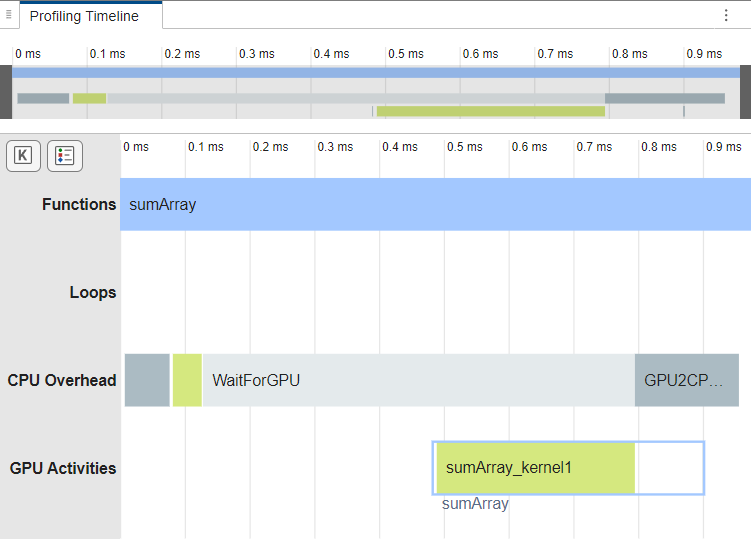
To check if the generated code contains a GPU kernel, generate code for and profile
sumArray by using the gpuPerformanceAnalyzer function. The GPU
Performance Analyzer opens. In the
Profiling Timeline pane, the analyzer shows the function uses one
kernel, sumArray_kernel1, to calculate the sum.
X = gpuArray(randi(100,512));
cfg = coder.gpuConfig("mex");
gpuPerformanceAnalyzer("sumArray.m",{X},Config=cfg);
Generating GPU Kernels by Using gpucoder.reduce
When you use gpucoder.reduce to implement a reduction, GPU Coder maps the call to a GPU kernel in the generated code. You can use
gpucoder.reduce to reduce arrays to scalars or to reduce arrays along
one dimension.
Reduce Array to Scalar
To reduce an array to a scalar, first determine the binary function you want to use as
a reduction operator. For example, consider the numberOdd function. The
function returns the number of odd elements in an array.
function y = numberOdd(X) %#codegen
y = 0;
for i=1:numel(X)
    y = y + mod(X(i),2);
end
end
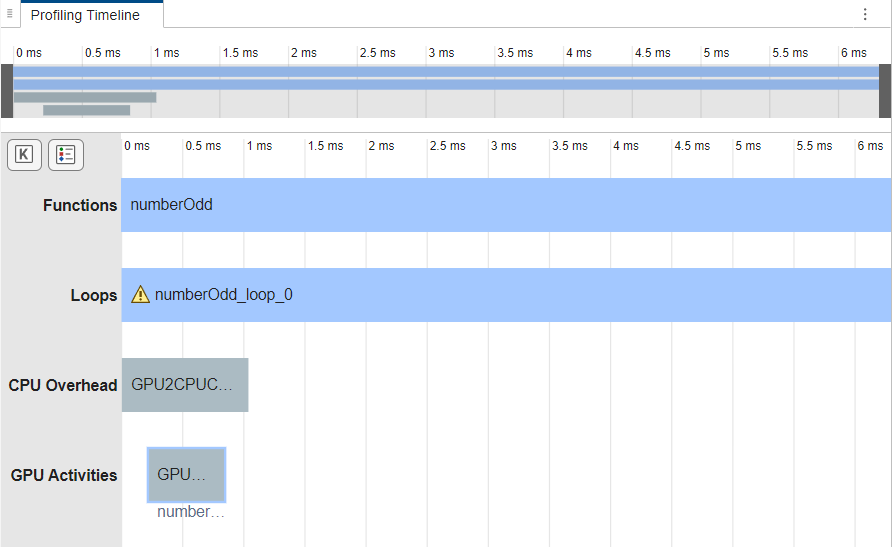
Generate code for and profile numberOdd. In the GPU
Performance Analyzer, the GPU
Activities row does not contain kernel activities. A loop
numberOdd_loop_0 executes for most of the run time.
X = randi(32,1024,"gpuArray");
cfg = coder.gpuConfig("mex");
gpuPerformanceAnalyzer("numberOdd.m",{X},Config=cfg);
In this example, the loop uses mod to preprocess the input array
X and plus to add to the output variable
y. To generate a GPU kernel that returns the same result, replace the
loop with a call to gpucoder.reduce that uses
mod as the preprocessing function and plus as
the reduction operator. Name the new function numberOddReduce.
function y = numberOddReduce(X) %#codegen
y = 0;
if ~isempty(X)
    y = gpucoder.reduce(X,@plus,preprocess=@(x) mod(x,2));
end
Generate code for and profile numberOddReduce. The code generator
maps the call to gpucoder.reduce to a GPU kernel in the generated
code.
gpuPerformanceAnalyzer("numberOddReduce.m",{X},Config=cfg);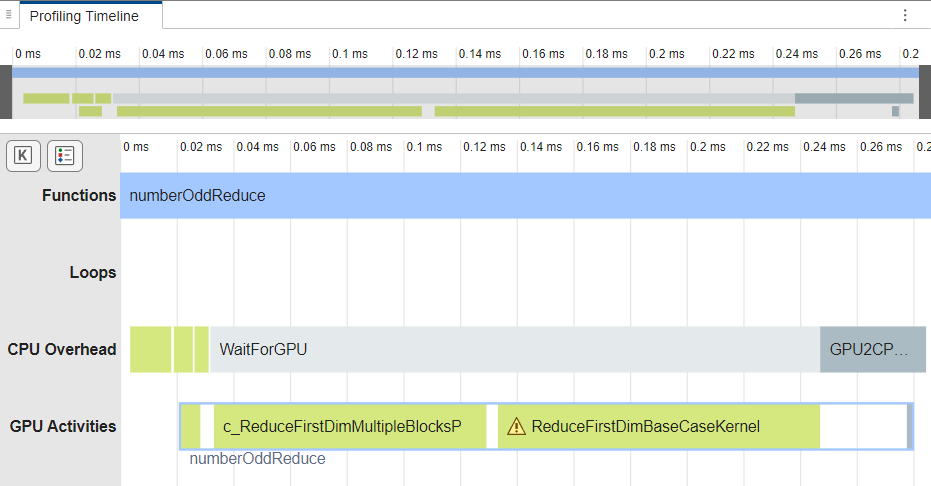
Reduce Array Along One Dimension
You can also use gpucoder.reduce to reduce along one dimension of
an array. For example, consider this function, colNorm, which
calculates the norm of each column of a three-dimensional array.
function Y = colNorm(X) %#codegen
% X: 3d matrix, MxNxK
% Y: 2d matrix, NxK, each element is a norm of a column of input
[~,n,k] = size(X);
Y = coder.nullcopy(zeros(n,k,"like",X));
for i = 1:n
    for j = 1:k
        Y(i,j) = norm(X(:,i,j));
    end
end
end
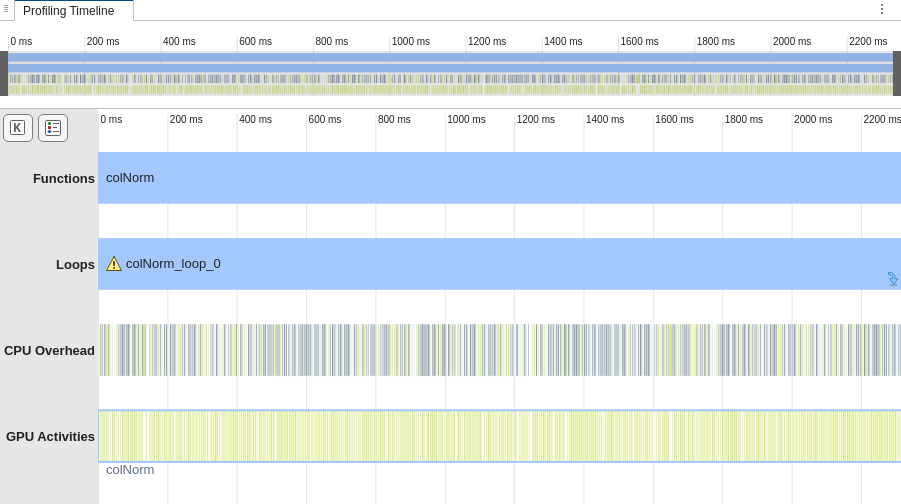
Generate code for and profile colNorm. In the GPU
Performance Analyzer, in the
Profiling Timeline pane, the Loops row shows
that the loop colNorm_loop_0 executes for most of the execution time,
and the GPU Activities row contains many kernel launches.
X = rand(512,256,128,"gpuArray");
gpuPerformanceAnalyzer("colNorm",{X},Config=cfg);
Because the norm calculation is the square root of a sum, you can write it as a
reduction by using gpucoder.reduce. To calculate the norm of the
columns of the array:
Preprocess the array by squaring the elements.
Calculate the sum of each column of the array by using
gpucoder.reducewithplusas the reduction operator. To sum the columns, specify the dimension to reduce along as1.Take the square root of the array that
gpucoder.reducereturns.
This code shows a function, colNormReduce, that calculates the norm
of each column by using gpucoder.reduce. The function uses the
coder.ceval function to synchronize the GPU before the program
terminates.
function Y = colNormReduce(X) %#codegen
% input: 3d matrix, MxNxK
% output: 2d matrix, NxK, each element is a norm of a column of input
[~,n,k] = size(X);
Y = coder.nullcopy(zeros(n,k,"like",X));
if ~isempty(X)
    fh = @(x)x^2;
    Y = squeeze(gpucoder.reduce(X,@plus,dim=1,preprocess=fh));
    Y = sqrt(Y);
    if coder.target("GPU")
        coder.ceval("cudaDeviceSynchronize");
    end
end
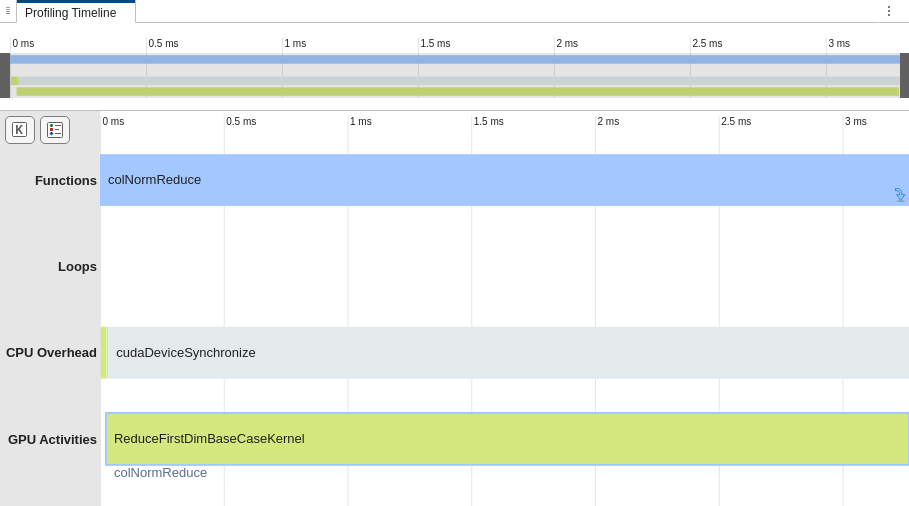
Generate code for and profile colNormReduce. In the analyzer, in
the Profiling Timeline pane, the GPU Activities
row shows that the generated code uses a GPU kernel to calculate the norm.
gpuPerformanceAnalyzer("colNormReduce",{X},Config=cfg);