Scaling, Range, and Precision of Fixed-Point Data Types
The range of representable values for fixed-point data is less than floating-point data with an equivalent word length. When mapping real-world values to fixed-point values with limited range and precision, apply scaling to avoid overflow and quantization errors. You can scale fixed-point data using Fixed-Point Designer™ and how to analyze the range and precision of fixed-point data based on its scaling. The key concepts described in this topic are:
Scaling – Conversion of stored integers into meaningful real-world numbers.
Range – The span of representable values for a fixed-point data type.
Precision – The smallest difference between two representable values in a fixed-point system.
Scaling
Scaling is the conversion of raw binary data into meaningful real-world numbers. Scaling allows you to fit real-world values into the limited range and precision given by fixed point numbers. If you do not apply scaling to fixed-point data, you are limited to using integer values. For example, the 8-bit binary word 01110110 is interpreted as the integer value 118 if no scaling is applied. To change the interpreted value of a binary word you can scale it either by moving the binary point, or by multiplying the integer value by a slope and adding a bias.
Binary-Point Scaling
Binary-point scaling, also known as power-of-two scaling, scales by moving the radix point within a binary word. The radix point is also referred to as the binary point.
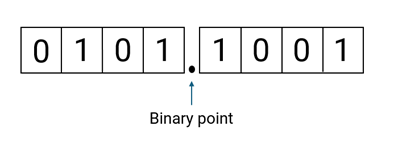
This scaling method minimizes the number of arithmetic operations the processor must perform. The real-world value of a binary-point only scaled number can be represented by:
or
Where the integer value, or stored integer, is the interpreted binary number, in which the binary point is assumed to be at the far right of the word. In binary-point scaling, you move the binary point from the far right of the word by multiplying the stored integer by a power of two. This table shows an example of how binary point scaling can change the interpretation of a binary word.
| Binary Word | Stored Integer | Scaling | Interpreted Value |
|---|---|---|---|
| 01110110 | 118 | No scaling | 20× 118 = 118 or 01110110. (binary) = 182 |
| Binary-point scaled with fraction length 3 | 2⁻³ ×118 = 14.75 or 10110.110 (binary) = 14.75 |
It is common to use a real-world value as a basis for creating fixed-point data, and choose word length, fraction length and other scaling factors according to hardware requirements.
To create this binary-point scaled fixed-point number in MATLAB®, specify a signed fi object with the value 14.75, a word length of 8,
and a fraction length of 3.
a = fi(14.75,1,8,3)
a =

   14.7500

          DataTypeMode: Fixed-point: binary point scaling
            Signedness: Signed
            WordLength: 8
        FractionLength: 3
>> a.bin
ans =

    '01110110'
Slope-Bias Scaling
A slope and bias can be introduced for additional scaling of a fixed point value. Slope-bias scaling is useful when you need non-power of two scaling, when your hardware uses a custom format, or when your real-world data does not start at zero. The real-world value of a slope-bias scaled number can be represented by:
where the slope can be expressed as
Slope-bias scaling is the same as binary-point scaling with the addition of a slope adjustment factor and a bias. The slope adjustment factor is a number greater than or equal to 1 and less than 2. It adjusts the slope so that you can scale your values by non-power of two numbers. The bias can be any number and allows you to center your data around it as a starting value. Binary-point scaling is special case of slope-bias scaling where the bias is 0 and the slope adjustment factor is 1.
This table shows how slope-bias scaling changes the interpretation of the binary word.
| Binary Word | Stored Integer | Scaling | Interpreted Value |
|---|---|---|---|
| 01110110 | 118 | No scaling | 20× 118 = 118 |
| Slope-bias scaling with slope adjustment factor 1.2, fixed exponent –3, and bias –10 | 1.2 × 2–3 ×118 + (–10) = 7.7 |
To create this slope-bias scaled fixed-point number in MATLAB, specify a signed fi object with the value 7.7, word length
8, slope adjustment factor 1.2, fixed exponent –3, and bias –10.
b = fi(7.7,1,8,1.2,-3,-10)
b =

   7.7000

          DataTypeMode: Fixed-point: slope and bias scaling
            Signedness: Signed
            WordLength: 8
                 Slope: 0.15
                  Bias: -10
b.bin
ans =

    '01110110'
Unspecified Scaling
You can create a fixed-point data type object with no scaling. No scaling means the interpreted value is the stored integer value. Use unspecified scaling to store raw binary values or perform bitwise operations.
Range
Range is the span of numbers that a fixed-point data type can represent. The range of representable numbers for a signed fixed-point number of word length wl, slope S, and bias B is shown below.

For both signed and unsigned fixed-point data types, the total number of different bit patterns is 2wl. For signed data types, the representation includes negative values and zero. The number of positive and negative values is not equal. The maximum value is 2wl–1 – 1. If a data type is unsigned, it can represent values from zero to S× (2wl – 1).
For example, the range of an 8 bit fixed-point data type is shown in the table below:
| Signed | Minimum Value | Maximum Value |
|---|---|---|
| Signed | –27=–128 | 27–1 = 127 |
| Unsigned | 0 | 28–1 = 255 |
Overflow
Because a fixed-point data type represents numbers within a finite range, overflow can occur when the result of an operation exceeds that range. You can handle overflows using saturation or wrapping. Saturation is the default overflow handling method. Saturation represents positive overflows as the largest positive number in the range being used, and negative overflows as the largest negative number in the range being used. Wrapping uses modulo arithmetic to cast an overflow back into the representable range of the data type.
For example, try specifying a fixed-point number with the value 6 using a 3-bit signed data type.
c = fi(6, 1, 3, 0)
c =

     3

          DataTypeMode: Fixed-point: binary point scaling
            Signedness: Signed
            WordLength: 3
        FractionLength: 0
The largest representable value for this data type is 3. Because 6 exceeds this value,
a positive overflow occurs and the result saturates to 3. Repeat the same operation and
set the OverflowAction parameter to Wrap.
c = fi(6, 1, 3, 0, 'OverflowAction', 'Wrap')
c =

    -2

          DataTypeMode: Fixed-point: binary point scaling
            Signedness: Signed
            WordLength: 3
        FractionLength: 0

        RoundingMethod: Nearest
        OverflowAction: Wrap
           ProductMode: FullPrecision
               SumMode: FullPrecision
The value is wrapped using modulo arithmetic. For more information, see Modulo Arithmetic.
Precision
Precision is the smallest difference between two values that a fixed-point number can represent. Higher precision means that the fixed-point number can represent smaller increments between numbers, reducing quantization error.
Precision is equal to the value of the least significant bit of a fixed-point number. The value of the least significant bit is determined by the number of fractional bits in the data type. For example, a fixed-point data type with a fraction length of four has a precision of 2–4 or 0.0625.
A fixed-point value can be represented to within half the precision of its data type and scaling. Any number within the range of this data type and scaling can be represented to within (2–4)/2 or 0.03125, which is half the precision.
Rounding
When you represent numbers with finite precision, not every number in the available range can be represented exactly. If a number cannot be represented exactly by the specified data type and scaling, a rounding method casts the value to a representable number.
For example, try specifying the value 22.6 using an unsigned binary-point scaled fixed-point type with word length 8 and fraction length 3.
d = fi(22.6,0,8,3)
d =

   22.6250

          DataTypeMode: Fixed-point: binary point scaling
            Signedness: Unsigned
            WordLength: 8
FractionLength: 3fimath
RoundingMethod property in the fi constructor for
more precise control over rounding.d = fi(22.6, type, "RoundingMethod","Floor")
d =

   22.5000

          DataTypeMode: Fixed-point: binary point scaling
            Signedness: Unsigned
            WordLength: 8
        FractionLength: 3

        RoundingMethod: Floor
        OverflowAction: Saturate
           ProductMode: FullPrecision
               SumMode: FullPrecision
For more information on available rounding methods, see Rounding Modes.
See Also
fi | numerictype | fimath

