Logarithm HDL Optimized
R2026bLogarithm HDL Optimized block
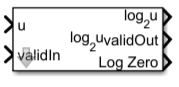
To add a block to a model, double-click the canvas and start typing the block name. Then, select the block from the list.
Libraries:
Fixed-Point Designer HDL Support /
Math Operations
Description
The Logarithm HDL Optimized block computes the arbitrary-base logarithm of an input. This block is optimized for efficient HDL code generation with HDL Coder™.
Ports
Input
Value to compute logarithm of, specified as a real-valued scalar, vector, or matrix. Fixed-point inputs must use binary-point scaling.
Data Types: single | double | int8 | int16 | int32 | int64 | uint8 | uint16 | uint32 | uint64 | fixed point
Whether input is valid, specified as a Boolean scalar. This control signal
indicates when the data from the u input port is valid. When this value
is 1 (true), the block captures the value at the
u input port. When this value is 0
(false), the block ignores the input samples.
Data Types: Boolean
Output
Arbitrary-base logarithm of input, returned as a scalar, vector, or matrix the same size as the input u. For fixed-point inputs, the block returns a signed fixed-point data type. For floating-point inputs, the output data type is the same as the input data type.
Dependencies
To set the base of the logarithm, use the Base parameter.
Data Types: single | double | int8 | int16 | int32 | int64 | uint8 | uint16 | uint32 | uint64 | fixed point
Whether output data is valid, returned as a Boolean scalar. When the value of this
control signal is 1 (true), the block has
successfully computed the output. When this value is 0
(false), the output data is not valid.
Data Types: Boolean
Whether value at output port is result of
logBase(0), returned as a Boolean scalar,
vector, or matrix. When the value of this port is 1
(true), the block has processed an input value of
0. When the value of this port is 0
(false), the block has processed a nonzero input value.
Tips
When the value at the logZero port is 1
(true), the output saturates to the maximum that the output
data type allows.
Dependencies
To enable this port, select the Signal Log Zero parameter.
Data Types: Boolean
Parameters
To edit block parameters interactively, use the Property Inspector. From the Simulink® Toolstrip, on the Simulation tab, in the Prepare gallery, select Property Inspector.
Base for logarithm, specified as a real, finite, scalar value greater than
1.
Programmatic Use
To set the block parameter value programmatically, use
the set_param function.
To get the block parameter value
programmatically, use the get_param function.
| Parameter: | Base |
| Values: | 2 (default) | real, finite, scalar value greater than 1 |
| Data Types: | single | double | int8 | int16 | int32 | int64 | uint8 | uint16 | uint32 | uint64 | fi |
Example: set_param(gcb,Base = 2)
Whether the block shows the LogZero port.
Programmatic Use
To set the block parameter value programmatically, use
the set_param function.
To get the block parameter value
programmatically, use the get_param function.
| Parameter: | SignalLogZero |
| Values: | 1or true (default) | 0 or false |
| Data Types: | logical |
Example: set_param(gcb,SignalLogZero = 0)
Algorithms
The latency of the Log10 HDL Optimized block depends on the data type of the input. The latency is:
9for unsigned integer and fixed-point data types11for signed integer, signed fixed-point, and floating-point data types
Extended Capabilities
HDL Code Generation
Generate VHDL, Verilog and SystemVerilog code for FPGA and ASIC designs using HDL Coder™.
Version History
Introduced in R2026b
MATLAB Command
You clicked a link that corresponds to this MATLAB command:
Run the command by entering it in the MATLAB Command Window. Web browsers do not support MATLAB commands.
Select a Web Site
Choose a web site to get translated content where available and see local events and offers. Based on your location, we recommend that you select: .
You can also select a web site from the following list
How to Get Best Site Performance
Select the China site (in Chinese or English) for best site performance. Other MathWorks country sites are not optimized for visits from your location.
Americas
- América Latina (Español)
- Canada (English)
- United States (English)
Europe
- Belgium (English)
- Denmark (English)
- Deutschland (Deutsch)
- España (Español)
- Finland (English)
- France (Français)
- Ireland (English)
- Italia (Italiano)
- Luxembourg (English)
- Netherlands (English)
- Norway (English)
- Österreich (Deutsch)
- Portugal (English)
- Sweden (English)
- Switzerland
- United Kingdom (English)