SPI
R2026bSPI block
To add a block to a model, double-click the canvas and start typing the block name. Then, select the block from the list.
Libraries:
Embedded Coder Support Package for Renesas RA
Microcontrollers /
Renesas RA6 Based
Description
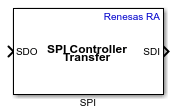
The SPI block writes data to and reads data from an SPI peripheral device connected to a Renesas RA microcontroller. The block uses the SPI driver to perform full-duplex, transmit-only, or receive-only SPI communication.
The block uses the SPI stack instance configured in the RA Smart Configurator (RASC) project. Click Get Stack Info to retrieve available SPI stack instances defined in the project.
The block provides the following capabilities:
Full-duplex SPI communication (simultaneous transmit and receive).
Transmit-only or receive-only modes for one-directional data transfer.
Software-controlled chip select using GPIO pins with configurable active logic.
Configurable data width (number of bits per transfer).
Use this block with Byte Pack and Byte Unpack blocks to support heterogeneous data transfers.
Note
This block supports only SPI Controller mode. SPI Peripheral mode is not supported.
Ports
Input
The input accepts a one-dimensional array of the configured data type. The number of elements in the array determines the number of SPI transfer frames.
Dependencies
To enable this port, set the Transfer mode parameter to
Transmit or Transmit and Receive.
Data Types: int8 | uint8 | int16 | uint16 | int32 | uint32 | int64 | uint64 | single | double
Output
The output is a one-dimensional array of the same size and data type as the transmitted data.
Dependencies
To enable this port, set the Transfer mode parameter to
Receive or Transmit and
Receive.
Data Types: int8 | uint8 | int16 | uint16 | int32 | uint32 | int64 | uint64 | single | double
Outputs the status of the SPI transfer operation as an int32
value.
0— Transmission completed successfully..1— Transmission failed.
Dependencies
To enable this port, select the Enable output status parameter.
Data Types: int32
Parameters
Specify the name of the SPI stack instance as configured in the RA Smart Configurator (RASC) project. Click Get Stack Info to retrieve available SPI stack instances defined in the project.
Programmatic Use
To set the block parameter value programmatically, use
the set_param function.
To get the block parameter value
programmatically, use the get_param function.
| Parameter: | SPIModule |
| Values: | character vector |
| Data Types: | char |
Select the direction of SPI data transfer for the block.
Transmit and Receive— Performs full-duplex SPI communication. An input port accepts transmit data and an output port emits received data.Transmit— Transmits data to the SPI peripheral. Only the input port is enabled.Receive— Receives data from the SPI peripheral. Only the output port is enabled.
Programmatic Use
To set the block parameter value programmatically, use
the set_param function.
To get the block parameter value
programmatically, use the get_param function.
| Parameter: | TransferMode |
| Values: | character vector |
| Data Types: | char |
Select how the block handles data reading in receive mode.
Write and read— Writes data to initiate a clock and reads received data simultaneously.Output last read— Outputs the data from the previous read operation.Trigger to read— Triggers a read operation and outputs the received data.
Dependencies
To enable this parameter, set the Transfer mode
parameter to Receive.
Programmatic Use
To set the block parameter value programmatically, use
the set_param function.
To get the block parameter value
programmatically, use the get_param function.
| Parameter: | ReadDataMode |
| Values: | character vector |
| Data Types: | char |
Select the data type for the received SPI data output.
Dependencies
To enable this parameter, set the Transfer mode
parameter to Receive.
Programmatic Use
To set the block parameter value programmatically, use
the set_param function.
To get the block parameter value
programmatically, use the get_param function.
| Parameter: | OutputDataType |
| Values: | character vector |
| Data Types: | char |
Specify the number of data elements to receive in the SPI transfer. The block output is a one-dimensional array of the specified length and data type.
Dependencies
To enable this parameter, set the Transfer mode
parameter to Receive.
Programmatic Use
To set the block parameter value programmatically, use
the set_param function.
To get the block parameter value
programmatically, use the get_param function.
| Parameter: | OutputDataLength |
| Values: | character vector |
| Data Types: | char |
Specify the number of bits per SPI transfer frame. This value determines the data width for each element in the transmit and receive arrays.
Programmatic Use
To set the block parameter value programmatically, use
the set_param function.
To get the block parameter value
programmatically, use the get_param function.
| Parameter: | NumberOfBitsToTransfer |
| Values: | character vector |
| Data Types: | char |
Select how the chip select (CS) signal is controlled during SPI communication.
Provided by the SPI Peripheral— The SPI peripheral hardware manages the chip select signal automatically.Explicit GPIO calls— The block drives the chip select pin using GPIO read/write operations.
Programmatic Use
To set the block parameter value programmatically, use
the set_param function.
To get the block parameter value
programmatically, use the get_param function.
| Parameter: | ChipSelectMethod |
| Values: | character vector |
| Data Types: | char |
Specify the GPIO port name used for the chip select signal. This port is driven high or low to select or deselect the SPI peripheral device.
Dependencies
To enable this parameter, set the Chip select calling method
parameter to Explicit GPIO calls.
Programmatic Use
To set the block parameter value programmatically, use
the set_param function.
To get the block parameter value
programmatically, use the get_param function.
| Parameter: | ChipSelectPortName |
| Values: | character vector |
| Data Types: | char |
Specify the GPIO pin number used for the chip select signal on the selected port.
Dependencies
To enable this parameter, set the Chip select calling method
parameter to Explicit GPIO calls.
Programmatic Use
To set the block parameter value programmatically, use
the set_param function.
To get the block parameter value
programmatically, use the get_param function.
| Parameter: | ChipSelectPinNumber |
| Values: | character vector |
| Data Types: | char |
Select the chip select pin behavior during the SPI transfer.
Select and deselect— Drive the chip select pin to its active level at the start of the transfer and return it to its inactive level after the transfer completes.Select only— Drive the chip select pin to its active level during the transfer.Deselect only— Drive the chip select pin to its inactive level during the transfer.None— Do not drive the chip select pin.
Dependencies
To enable this parameter, set the Chip select calling
method parameter to Explicit GPIO
calls.
Programmatic Use
To set the block parameter value programmatically, use
the set_param function.
To get the block parameter value
programmatically, use the get_param function.
| Parameter: | ChipSelectAction |
| Values: | character vector |
| Data Types: | char |
Select the active logic level of the chip select signal.
Active low— Drive low to select the SPI peripheral and high to deselect it.Active high— Drive high to select the SPI peripheral and low to deselect it.
Dependencies
To enable this parameter, set the Chip select calling method
parameter to Explicit GPIO calls.
Programmatic Use
To set the block parameter value programmatically, use
the set_param function.
To get the block parameter value
programmatically, use the get_param function.
| Parameter: | ChipSelectActiveLogic |
| Values: | character vector |
| Data Types: | char |
Select this parameter to make the block wait for the SPI transfer to complete before proceeding to the next time step. Clear this parameter to initiate the transfer and continue execution without waiting.
Dependencies
This parameter is configurable only in the following cases:
Transfer mode is
Transmitand Drive chip select pin isSelect onlyorNone.Transfer mode is
Receive, Drive chip select pin isSelect onlyorNone, and Read data mode isWrite and readorTrigger to read.
In all other configurations, blocking mode is enabled by default and cannot be changed.
Programmatic Use
To set the block parameter value programmatically, use
the set_param function.
To get the block parameter value
programmatically, use the get_param function.
| Parameter: | BlockingMode |
| Values: | character vector |
| Data Types: | char |
Specify how often (in seconds) the block executes the SPI transfer. Enter a
value greater than zero. When you specify this parameter as -1,
Simulink® determines the best sample time for the block based on the block
context within the model.
Programmatic Use
To set the block parameter value programmatically, use
the set_param function.
To get the block parameter value
programmatically, use the get_param function.
| Parameter: | SampleTime |
| Values: | -1 (default) | positive scalar |
| Data Types: | double |
Version History
Introduced in R2026b
See Also
MATLAB Command
You clicked a link that corresponds to this MATLAB command:
Run the command by entering it in the MATLAB Command Window. Web browsers do not support MATLAB commands.


Select a Web Site
Choose a web site to get translated content where available and see local events and offers. Based on your location, we recommend that you select: .
You can also select a web site from the following list
How to Get Best Site Performance
Select the China site (in Chinese or English) for best site performance. Other MathWorks country sites are not optimized for visits from your location.
Americas
- América Latina (Español)
- Canada (English)
- United States (English)
Europe
- Belgium (English)
- Denmark (English)
- Deutschland (Deutsch)
- España (Español)
- Finland (English)
- France (Français)
- Ireland (English)
- Italia (Italiano)
- Luxembourg (English)
- Netherlands (English)
- Norway (English)
- Österreich (Deutsch)
- Portugal (English)
- Sweden (English)
- Switzerland
- United Kingdom (English)