Resolve Common Issues
R2026bResolve unexpected issues in Embedded Coder® Support Package for Qualcomm® Hexagon® Processors.
Variable alignment with DSP blocks (Discrete FIR, FFT, IFFT)
Issue
When DSP blocks(Discrete FIR, FFT, IFFT) are used in conjunction with Matrix Concatenation, SubMatrix, etc dimension reshaping blocks, code-generation may fail and no code is generated.
Error: You could encounter with any one of the following errors:
Submatrix of the variable Out1 cannot be aligned at the 8-byte boundary.
Signal rtb_VariableSelector is not aligned on an 8-byte boundary.
Solution
If the error points to the corresponding port or the block, then add a Subsystem block, set the Treat as atomic unit block parameter, and connect to the inputs of the Matrix operation block.
For example: During the CRL code generation for the below model, the error will point out that the submatrix of the variable concat is not able to align.
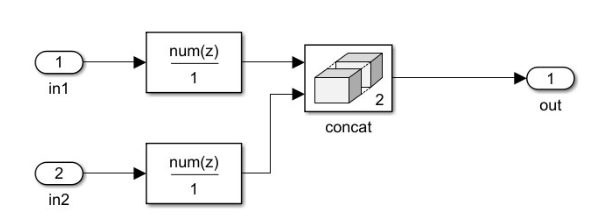
Error: Submatrix of variable concat cannot be aligned at 8-byte boundary.
Now adding the Buffer block to the input ports other than the first input port of this concat block will resolve this issue.
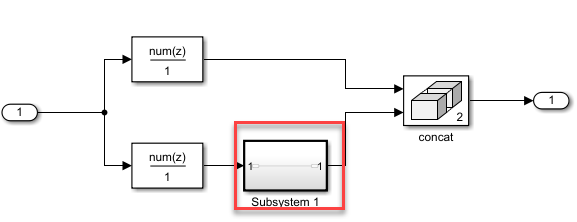
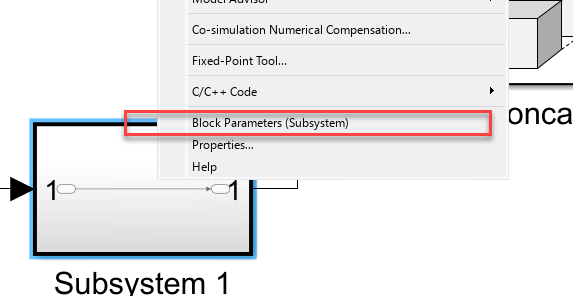
To set the block parameter, right-click on this block and click on Block Parameters(Subsystem) then enable the Treat as atomic unit.
If the error is too generic (like pointing to a signal, then disable the below optimization, so that the error may get resolved (or) will point to the actual block so that the above workaround can be applied.
For example:
Error: Signal rtb_VariableSelector is not aligned on an 8-byte boundary.
Disable the Enable local block output under CodeGeneration > Optimization > Specify custom optimizations.
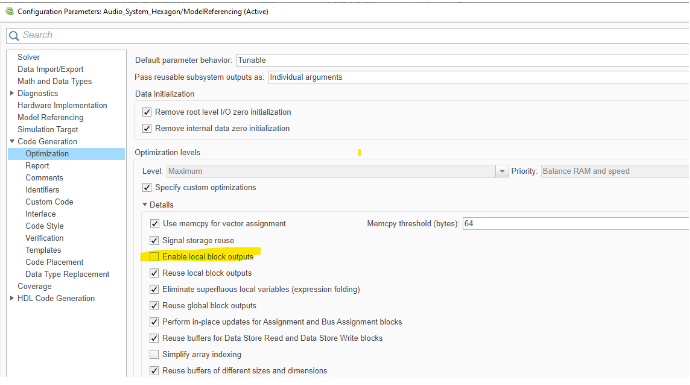
The above should either solve the issue (or) it may point to the actual source block (like the one below), with which we can use one of the workarounds mentioned for the first issue.
No CRL replacement in generated code
Issue
When DSP blocks(Discrete FIR, FFT, IFFT) are used in conjunction with Matrix Concatenation, SubMatrix, etc dimension reshaping blocks, sometimes there won't be any CRL replacement in the code generation and plain-c will be generated.
Error: No error will be prompted, but the Trace Information in the TflContol > makeQHLCRLTable of crviewer (Code Replacement Viewer) under the Code Replacements Report, for the corresponding block entry will have Cannot align input/output as the reason.
Solution
This happens only on the first time codegen/PIL verification after opening the model. And regenerating the code/redoing PIL verification even with clearing the previously generated artifacts, will have CRL replacement hits for those blocks.
PIL simulation failure: Co-Simulation
Issue
The PIL simulation may fail when the model is opened for the first time and PIL simulation is run from SIL/PIL manager.
Error: Unrecoverable PIL target error: Command error (number) occurred during cosimulation
Solution
Run the PIL simulation again and it would complete successfully.
PIL timeout
Issue
When running a computationally intensive model, the simulator may take more time processing it. This may result in the default timeout of 100sec being exceeded.
Error: Timeout occurred while execution of the step function. This might be due to model being compute-intensive. Increase the execution timeout and try again.
Solution
Navigate to Configuration Parameters -> Hardware Implementation -> Execution timeout and increase the execution timeout.
PIL simulation failure: Run‑time error on target due to preprocessing or resize logic
Issue
PIL simulation fails on the Qualcomm Android® board and MATLAB® reports an rtiostream timeout. The MATLAB command window shows a message indicating that MATLAB does not receive data from the target within the expected time. This behavior occurs when the generated code encounters a run‑time failure on the board, such as out‑of‑bounds array indexing in the preprocessing or resize function.
The timeout of 30 seconds for receiving data from the rtiostream interface has been
exceeded. There might be multiple reasons for this communications failure.
You should:

 (a) Check that the target hardware configuration is correct, for example, check that the
     byte ordering is correct.
 (b) Confirm that the target application is running on the target hardware.
 (c) Consider the possibility of application run-time failures (e.g. divide by zero
     exceptions, incorrect custom code integration, etc.).

If you cannot find a solution, consider using rtw.connectivity.RtIOStreamHostCommunicator
to increase the timeout value.
Solution
Enable run‑time error checks so the generated code reports the actual error from the target. In the configuration settings, select Generate run‑time error checks. From the command prompt, enable this option using the following command:
cfg.RuntimeChecks = true;
Rebuild and run PIL simulation again. MATLAB displays the error logs in the command window, which allows you to view the exact error that occurs on the target hardware.

