Store Credentials for Data Service Connections
R2026bWhen connecting to a data server that requires your username and password, you can gain access by including them in your code. However, this mode of connection exposes your credentials to a security risk. Instead, protect your credentials by storing them in the MATLAB® vault, which provides a secure way to store sensitive information, such as passwords, API keys, tokens, and credentials.
To store your username and password, create your secret prompt by using the setSecret
function for each of these
secrets.
setSecret("username");
setSecret("password");
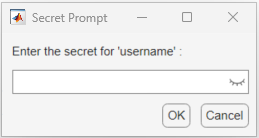
When the dialog box appears for each secret, enter your credentials and click OK.
Before you connect, retrieve your credentials by using the getSecret
function.
username = getSecret("username");
password = getSecret("password");
ice connection
object.conn = ice(username,password)
conn =

  ice with properties:

    TimeOut: 200
   UserName: "username"
ice connection object by retrieving your
username and password from the MATLAB vault, keeps your user credentials secret.

