LiteRT
R2026bLiteRT block

To add a block to a model, double-click the canvas and start typing the block name. Then, select the block from the list.
Libraries:
MATLAB Coder Support Package for PyTorch & LiteRT Models
Description
Add-On Required: This feature requires the MATLAB Coder Support Package for PyTorch and LiteRT Models add-on.
The LiteRT block loads a LiteRT model. The block uses the LiteRT model to run inference on the input data to compute the outputs. The block can generate deployable code.
To load a LiteRT model, use the LiteRT model file parameter. By default, the block has one input and output port, in1 and out1. When you load the LiteRT file, the block replaces these ports with the input and output ports specified in the file.
Examples
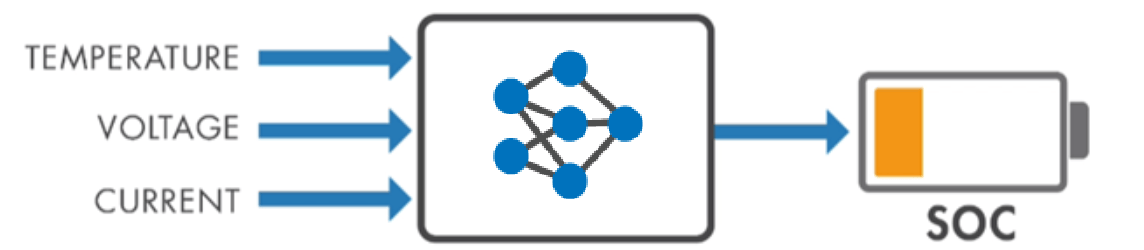
Predict Battery State of Charge Using LiteRT Block in Simulink
Generate code for a LiteRT model that predicts the state of charge for the battery in Simulink.
- Since R2026a
- Open Live Script
Ports
Input
Input data, specified as a numeric array. You can rearrange the dimensions of the input data that the block passes to the LiteRT model by specifying a permutation vector on the Inputs tab of the Block Parameters dialog box.
Data Types: single | double | half | int8 | int16 | int32 | int64 | uint8 | uint16 | uint32 | uint64 | Boolean
Output
Computed outputs, returned as a numeric array. You can rearrange the dimensions of the output data returned by the LiteRT model by specifying a permutation vector on the Outputs tab of the Block Parameters dialog box.
Data Types: single | double | half | int8 | int16 | int32 | int64 | uint8 | uint16 | uint32 | uint64 | Boolean
Parameters
To edit block parameters interactively, use the Property Inspector. From the Simulink® Toolstrip, on the Simulation tab, in the Prepare gallery, select Property Inspector.
Model
Specify the name or path of a LiteRT model file. Alternatively, you can select a file by clicking the Browse button.
Programmatic Use
To set the block parameter value programmatically, use
the set_param (Simulink) function.
To get the block parameter value
programmatically, use the get_param (Simulink) function.
Block Parameter:
ModelFilePath |
| Type: string scalar | character vector |
Name of function to use to compute output. You can specify entry-point function in the model for which to use for a LiteRT model with multiple entry-point functions.
Programmatic Use
Block Parameter:
FcnName |
| Type: string scalar | character vector |
Specify the discrete interval between sample time hits or specify another type of
sample time, such as continuous (0) or inherited
(–1). For more options, see Types of Sample Time (Simulink).
By default, the LiteRT block inherits sample time based on the context of the block within the model.
Programmatic Use
Block Parameter:
SampleTime |
| Type: string scalar or character vector |
| Values: scalar |
Default:
"–1" |
Inputs
Properties to apply to the input data. Each row of the table corresponds to an individual input port of the LiteRT block.
Double-click a table cell entry to edit its value. If you specify multiple input ports, their order must correspond to the input order in the LiteRT model.
The table has these columns:
Port — Block input port label. This column is read-only.
Inferred type — Data type the LiteRT model accepts, returned as a character vector. This column is read-only.
Inferred size — Size of the input data the LiteRT model accepts. The dimension is a vector of nonnegative integer or
Inf.Infindicates a dimension is variable-size. This column is read-only.Permutation to apply — New dimension arrangement for the input data, specified as a numeric vector with unique positive integer elements that represent the dimensions of the input data (see
permute). For example, if the input data is a 2D matrix, you can specify[2 1]to switch the row and column dimensions. The LiteRT block passes the rearranged array to the LiteRT model.
Programmatic Use
Block Parameter: InputsTable |
| Type: cell array |
Outputs
Select this parameter to enable variable-size output signals from the block. By default, variable-size outputs are unbounded and the generated code uses dynamic memory allocation. To produce bounded variable-size outputs and avoid dynamic allocation, specify maximum output sizes in the Maximum size column of the Outputs table. You must specify maximum output sizes for GPU code generation, GPU acceleration, Accelerator mode simulation, and Rapid Accelerator mode simulation.
If this parameter is cleared, the block uses shape refinement to resolve dynamic model dimensions to fixed sizes at code generation time by propagating the shapes of the input data through the model. If the block cannot resolve an output to a fixed size, an error directs you to select this parameter.
To use variable-size output signals, you must also enable the Support variable-size signals and Dynamic memory allocation in MATLAB functions model configuration parameters.
Programmatic Use
Block Parameter:
SupportVariableSizeOutputs |
| Type: character vector |
Values:
'off' (default) | 'on' |
Properties to apply to the output data. Each row of the table corresponds to an individual output port of the LiteRT block.
Double-click a table cell entry to edit its value.
The table has these columns:
Port — Block output port label. This column is read-only.
Inferred type — Data type returned by the LiteRT model. This column is read-only.
Inferred size — Size of the output data returned by the LiteRT model. The dimension is a vector of nonnegative integer or
Inf.Infindicates a dimension is variable-size. This column is read-only.Maximum size — Maximum size of the block output along each dimension, specified as a vector of positive integers. The default value is same as the Inferred size. If the output is variable-size, the generated code uses dynamic memory allocation, which may slow execution. Specify a maximum size for each variable-size dimension to avoid dynamic allocation. If the Inferred size has a variable-size dimension, you cannot set Maximum size to a scalar or vector with only singleton dimensions.
Permutation to apply — New dimension ordering for the array that the LiteRT block passes to the output port, specified as a numeric vector with unique positive integer elements (see
permute).
Programmatic Use
Block Parameter:
OutputsTable
|
| Type: cell array |
Alternative Functionality
You can use a MATLAB Function block, along with the invoke object
function of a LiteRTModel object,
to compute output and generate code.
Extended Capabilities
C/C++ Code Generation
Generate C and C++ code using Simulink® Coder™.
GPU Code Generation
Generate CUDA® code for NVIDIA® GPUs using GPU Coder™.
Version History
Introduced in R2026a
See Also
Blocks
Functions
Objects
MATLAB Command
You clicked a link that corresponds to this MATLAB command:
Run the command by entering it in the MATLAB Command Window. Web browsers do not support MATLAB commands.
Select a Web Site
Choose a web site to get translated content where available and see local events and offers. Based on your location, we recommend that you select: .
You can also select a web site from the following list
How to Get Best Site Performance
Select the China site (in Chinese or English) for best site performance. Other MathWorks country sites are not optimized for visits from your location.
Americas
- América Latina (Español)
- Canada (English)
- United States (English)
Europe
- Belgium (English)
- Denmark (English)
- Deutschland (Deutsch)
- España (Español)
- Finland (English)
- France (Français)
- Ireland (English)
- Italia (Italiano)
- Luxembourg (English)
- Netherlands (English)
- Norway (English)
- Österreich (Deutsch)
- Portugal (English)
- Sweden (English)
- Switzerland
- United Kingdom (English)
